
Very pleased for you with the result !He knows his stuff for sure.Top marks

Very pleased for you with the result !He knows his stuff for sure.Top marks
This is awesome! And his resulting wiki is very good stuff.Update to my Megatech issues.Very interesting watch.Looks like it's finally fixed


Luke has done a top job on your repair no doubt and well worth the wait. Pleased for you mate.So.The repaired board has been running for many hours now and it is working great.I couldn't be happier with the service I got from Luke.When I opened up the box there was even a nice gesture in there as well as a working board you could eat your dinner off.
Now the cosmetic refurb begins lolView attachment 18520
Yeah I agree. I'll likely go over my MegaTech and see which games I'd like. Definitely Sonic 2, Rocket Knight Adventures, Gunstar Heroes and Comix Zone. Possibly Ristar and Aladdin. I just want some quirky fun games to switch about.Really enjoying this thread , certainly reinvigorated my love for my Megatech and system overall and with the new game possibilities and open source made by @mourix I am excited to create some carts in the future.
I am sure the thread has also created new interest and audience for the system.


Did the screws come out ok ? The torx head on screw looks a bit worn. Normal finish of screw is a satin black.Swapped the marquee bulbs (thanks to Maurix for the size) and now want to remove the operator stickers and sort out the screws.
View attachment 18589
How do I remove this from the wood without damaging the finish?
View attachment 18590
And this from the plastic?
Finally the screws?
View attachment 18591
They seem to have what I think is oxidisation?How do I clean them?I thought soaking in vinegar?
And what colour should they be?
Really enjoying this thread , certainly reinvigorated my love for my Megatech and system overall and with the new game possibilities and open source made by @mourix I am excited to create some carts in the future.
I am sure the thread has also created new interest and audience for the system.
Awesome, guys. This makes me happy. I put a list of all available games and their respective home console review scores here.The choice is wide open now and will be nice to be able to play the elusive titles which didn‘t surface when I was collecting the system.
Gunstar heroes will be a great addition 👌
Putting more of this stuff out there is always better. Could you try to scan at the highest DPI your flatbed goes? Either 600 or 1200DPI. Thanks!@mourix do you have an original game box to make a scan of ? May have one if needed.
Good work!Swapped the marquee bulbs (thanks to Maurix for the size) and now want to remove the operator stickers and sort out the screws.
View attachment 18589
How do I remove this from the wood without damaging the finish?
View attachment 18590
And this from the plastic?
Finally the screws?
View attachment 18591
They seem to have what I think is oxidisation?How do I clean them?I thought soaking in vinegar?
And what colour should they be?
I only got the Sonic Classics cart but I'll let it run and report back.Thank you for the info Mr Flyback.
On a slightly different note,Luke @ Retrosix wanted me to ask a question.He WILL join up but he's too busy fixing Megatech boards at the mo lol
He asks.......
I've just fixed another one, but on testing I'm not sure its fully fixed. When I play Sonic 2, and just let it start and run, after the 1 Player / 2 Player home screen it starts the demo usually after that, on this one it just fades to black, audio of the demo continues to play, but it remains black until it comes back to the menu then the second time it starts the demo its normal.
Tried with 2 copies of Sonic 2 so it isn't the ROM. Wondering if thats a known Mega Tech glitch?
Anyone???
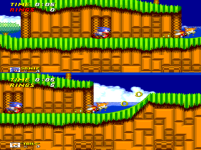
Sonic 2's 2 player mode uses the Megadrive's Interlace Mode 2, which allows the system to output a 320x448 image by alternating between even and odd lines every frame. This allows the game to display two full screens' worth of graphics, at the cost of effectively halving the frame rate to 30.I tried it. After pressing the start and waiting, it goes to this demo:
View attachment 18614
However, this demo uses some weird video mode that makes my arcade monitor really unhappy. Like it's blurry/flickery/interlaced. At first I thought it was my CRT taking a dump.. but it goes away with the next demo. You can even see a bit of the glitchy video in MAME. I think Sega is using some wild scanline interrupt trickery to allow for the dual race screen. With Luke using an LCD, it wouldn't surprise me if it just can't sync to it and shows black instead.
life is manic here so apologises for not keeping in contact over the last 2 weeks!

