
You are using an out of date browser. It may not display this or other websites correctly.
You should upgrade or use an alternative browser.
You should upgrade or use an alternative browser.
Sega rally 2
- Thread starter Teddy
- Start date
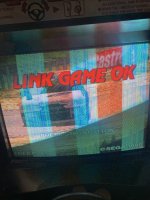

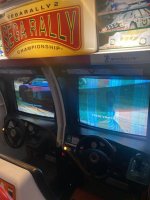

Like the other poster said first port of call is to check the voltages, and then make sure the model 3 stack is seated well, so take apart the stack and re-seat it...
Run the video test in the service menu, that will usually tell you if there is faulty ram modules on the board...
If it fails the service menu test it is highly possible that it is a glitchy video board, which is a common fault on Model 3 stacks,........its worth swapping the videoboard from the working side into the glithcy side and visa-versa to see if that fixes the one side whilst visa-versa it turns the other side bad, if thats the case then its very likely the video board is faulty and glitching out....
There is someone on here who I have heard can fix them, I think his user name was "redleader" but that was a few years ago I saw that but it is worth seeking him out or alternatively you will need to buy a replacement videoboard if its faulty......
Run the video test in the service menu, that will usually tell you if there is faulty ram modules on the board...
If it fails the service menu test it is highly possible that it is a glitchy video board, which is a common fault on Model 3 stacks,........its worth swapping the videoboard from the working side into the glithcy side and visa-versa to see if that fixes the one side whilst visa-versa it turns the other side bad, if thats the case then its very likely the video board is faulty and glitching out....
There is someone on here who I have heard can fix them, I think his user name was "redleader" but that was a few years ago I saw that but it is worth seeking him out or alternatively you will need to buy a replacement videoboard if its faulty......
Thanks for that .Hi,
Did you check your 5v close to the stack ? It has to be slightly above 5. Like 5~5.1v
Did you try a memory test in the service menu ?
Really appreciate that . I’ll try and take a look this weekend.Just looked him up, he uses the user name redleader1 now...worth speaking with him, I have a number of model3 step 2 glitchy video boards I keep meaning to talk to him about myself too, I just gotta get round to it lol, ....
I’m a total novice on this not a clue what’s what . .
But I’ll give it a go . 👍🏻
Thanks again
If you know how to desolder/solder SMDs, and if you manage to find appropriate chips, there is a very useful guide here :

 www.aussiearcade.com
Sega Model 3 Step 2.0 Repair Guide
The work on my Sega Rally 2 has extended out a bit to more of a general Sega Model 3 Step 2.0/2.1 repair exercise. I've had to reverse engineer quite a bit of stuff to work out what was going on and couldn't find that information anywhere on the internet. So I thought I'd put together a bit of a ...
www.aussiearcade.com