SF2: Champion edition (world 920513) Repair advice

Croccy22

Newbie
Credits
10CR
Hi all,

A while ago I was given a couple of arcade boards which have made it to the top of my repair pile. I usually fix up 8-bit/16bit era computers and consoles, so arcade PCBs are a new one for me.

The first board is a CPS1 board with Street Fighter 2 on it. I've connected it all up and thr board powers up, displays the RAM tests which all pass, but then after work RAM OK it just stays on that screen and doesn't go any further.

So far, all I've done is checked the address and data bus lines which all look healthy.

Before I go any further, is there any obvious thing I should look for next? I assume after the RAM tests it would then try to boot the ROM code so I could be looking at bad connections on ROM chips, dead ROMs or bad chip select logic?

I did try reading one of the mask Roms with my EPROM programmer but had no luck, so think the pinout is different to the 27C4096 that I had selected.

Any initial troubleshooting steps would be appreciated. I did find a diagnostic ROM, so am waiting for some blanks to give that a go and see if it gives es any further information.

Thanks all :)

Matt
www.northdevonretroarchive.co.uk
 

ExZX

Active member
Feedback
24 (100%)
Credits
1,245CR
Hi Matt,
horrible hardware to work on lol!
Have you first tried disconnecting and re-seating the A (motherboard), B (rom board) and C board?
Check for broken / bent pins on the connectors.
Also do you own another A board to swap out as this can help diagnose whether it's an A or B/C problem.
Posting a pic up of the board may help as there are some eagle eyed folk on here that may be able to spot something amiss.
 

Croccy22

Newbie
Credits
10CR
Hi,

Yeah I've checked the connector tions between the boards briefly, but not spent any proper time on it yet so will be going over everything in detail soon.

I don't have any other CPS1 boards so swapping bits over isn't currently an option. But I enjoy repairing stuff like this, and the more challenging it is the better. It means I'm not spending money buying other broken stuff to fix 😀

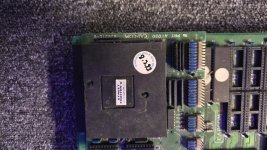
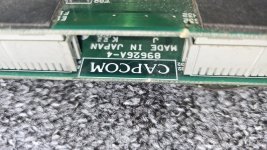
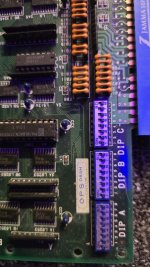
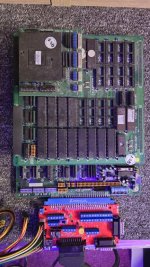
I've attached a few photos, the boards are in "ok" condition, but will definitely need a good clean up as they have been living in a storage container.

Hopefully my blank EPROMS shiyld arrive today so I'll give the diag rom a try and see if that does anything different.

All good fun 😀
 

Attachments

  • 20260127_185958.jpg
    20260127_185958.jpg
    127.3 KB · Views: 18
  • 20260127_190008.jpg
    20260127_190008.jpg
    155 KB · Views: 10
  • 20260127_190003.jpg
    20260127_190003.jpg
    166.5 KB · Views: 9
  • 20260127_190019.jpg
    20260127_190019.jpg
    93.1 KB · Views: 18

TheDaddy

Senior Member
vacBacker
Feedback
14 (93%)
Credits
6,991CR
As ExZx says these are a mare to work on, And defo agree this could be A , B or C board so testing with another A would be (And always is) my first approach ! I build a rig so I could test the A board properly by moving it to the top (If that makes sense !).

Dave.
 

Croccy22

Newbie
Credits
10CR
A not overly exciting update on my backwards progress :)

As a starting point, I have removed all of the socketed ICs. Tested all of the ROMs, cleaned the sockets, sanded the IC legs and put some de-oxit in the sockets.
And here was my first rookie mistake, which I can't believe I did. I put one of the PALs the wrong way around as I followed the writing on it rather than the notch.

Today however, the new GALs arrived, I've written a replacement chip and i'm back to where I started at least!

Whilst I was waiting for the parts to arrive I did have an idea though. On my board, the RAM tests pass and then it locks up. So I ran the ROM in MAME with the debugger enabled and stepped through the code. When this game boots, after the ROM test pass, the text dims for a split second, then the screen goes black and then some street fighter text appears.

My board never gets as far as dimming the text. So, looking through the code with the debugger, once the RAM tests have passed, it looks like it then copies a bunch of stuff from the graphics ROMs into RAM. I'm going to spend a bit more time now looking through this and work out exactly what data it is transferring from place A to place B. Hopefully that should point it towards what is actually failing.

Have other people tried diagnosing a board in this way? It seems like a good idea to me. I'm just hoping that the memory map I found for this board is correct, otherwise I could be chasing completely the wrong thing lol.

Wish me luck :)
 
Last edited:

Lurch666

Active member
Feedback
21 (100%)
Credits
4,190CR
I have heard about using mame in this way to help with fixing but it's not something I have figured out yet. Another thing on my to do list. Is it difficult to do?
 

TheDaddy

Senior Member
vacBacker
Feedback
14 (93%)
Credits
6,991CR
I have heard about using mame in this way to help with fixing but it's not something I have figured out yet. Another thing on my to do list. Is it difficult to do?

Me neither ! Its on my list of ' Top Do's ' Never got around to trying it. Need to get back to repairing first mind.

Dave.
 

PfefferT

Newbie
Credits
17CR
A not overly exciting update on my backwards progress :)

As a starting point, I have removed all of the socketed ICs. Tested all of the ROMs, cleaned the sockets, sanded the IC legs and put some de-oxit in the sockets.
And here was my first rookie mistake, which I can't believe I did. I put one of the PALs the wrong way around as I followed the writing on it rather than the notch.

Today however, the new GALs arrived, I've written a replacement chip and i'm back to where I started at least!

Whilst I was waiting for the parts to arrive I did have an idea though. On my board, the RAM tests pass and then it locks up. So I ran the ROM in MAME with the debugger enabled and stepped through the code. When this game boots, after the ROM test pass, the text dims for a split second, then the screen goes black and then some street fighter text appears.

My board never gets as far as dimming the text. So, looking through the code with the debugger, once the RAM tests have passed, it looks like it then copies a bunch of stuff from the graphics ROMs into RAM. I'm going to spend a bit more time now looking through this and work out exactly what data it is transferring from please A to place B. Hopefully that should point it towards what is actually failing.

Have other people tried diagnosing a board in this way? It seems like a good idea to me. I'm just hoping that the memory map I found for this board is correct, otherwise I could be chasing completely the wrong thing lol.

Wish me luck :)

I also found a very useful website for game lovers. It offers a wide selection of entertainment, and everything works great on your phone, which is perfect for passing the time while traveling or waiting for someone or something.
Using the MAME debugger is a great shout! If you have a donor or a known working board, it’s definitely worth probing the signals side-by-side to see which line is hanging. It’s usually those tiny logic errors that keep the board from booting. Also, keep an eye on your clock signals and chip selects - even a bit of jitter can cause those kinds of freezes. And don't forget to double-check your socket tension after cleaning; a loose contact can easily mimic a major hardware failure.
 

Croccy22

Newbie
Credits
10CR
Using the MAME debugger is a great shout! If you have a donor or a known working board, it’s definitely worth probing the signals side-by-side to see which line is hanging. It’s usually those tiny logic errors that keep the board from booting. Also, keep an eye on your clock signals and chip selects - even a bit of jitter can cause those kinds of freezes. And don't forget to double-check your socket tension after cleaning; a loose contact can easily mimic a major hardware failure.
It seems a bit too constant to be a dodgy connection. Ive got a scope and checked every data/address line (I think).

Using the debugger, I am now at the exact point within 24 instructions of where the hang occurs. I had to pop out for a bit then so I desperate to get back and conclude my test.

I will be doing a write up of what I have done so will detail all the steps.

Basically what I am doing currently is running the emulator and finding chunks of code that do things like copying areas of rom into memory etc. After a big chunk, I then insert a jump instruction to jump to address 0 which resets the game.

I burn this to a ROM chip and run it on my board. If it goes into a reset loop then I know my code is running that far. I kept doing this until my game went back to hanging and then kept narrowing it down.

Soon I will have the exact instruction where it dies and hopefully from that I can try and work out why.

Either that or this would have all been a huge waste of time lol
 

Croccy22

Newbie
Credits
10CR
Ok, an update, and it's a good one! Or at least mostly good :)

I continued down my troubleshooting route of inserting a jump instruction at various parts of the code to get the board to reboot. Then writing the new rom to an EPROM and testing it on my board to observe the behaviour.

This worked fine most of the time, but one small issue I had was the jump instruction was 3 words long and sometimes I couldn't fit the instruction in without corrupting the code. So for once AI was actually useful and gave me the suggestion of using the opcode "illegal" or 4aFC in hex. This should cause the CPU to throw an illegal exception and run whatever routine handles that. I did a test of this and the routine it runs actually resets the board which was exactly what I was after.

So now I was back to inserting instructions but could replace any instruction I wanted without breaking it.

Using this, I got to a section of code where the board would hang instead of reset, which meant this was where my issue was. So I investigated the last instruction that would have run, which was:

move #$2000,SR

Again, AI did help with this one (It's pretty good at translating 68k assembly language). Basically, this command puts the CPU into supervisor mode and sets a bunch of flags, including enabling interrupts! (I started to form a theory here!)

The working mame ROM jumps to address 5C6 at this point, but there was no jump instruction to tell it to do so. So my guess was an interrupt was actually being triggered here. A bit more digging confirmed this, and when the interrupt vector was triggered, it jumped to an address which is held at location 6A. The address held here was 5C6 as expected, so this all made sense so far.

Looking at the pinout for the 68K there are 3 interrupt pins, and on the CPS1 schematics, I found it showed one of those was tied to 5v anyway, so that rules that pin out.

I probed the other 2 pins with my scope, and they were both permanently high. The interrupt pins on the 68K are active low, so this would never trigger in this state, and that is the reason why my board was hanging after the "WORK RAM OK" message :)

My next step was to trace these interrupt pins and found they go to a 74LS74 IC. Checking the input on this chip confirmed that the VBLANK signal was acting as the clock signal for this IC. That signal was there on the input, but not having any effect on the output. Looking at the datasheet and the truth table, this chip should definitely be toggling the output pin. So this is almost certainly where my fault lies. I have ordered some replacements, so I will have to wait for them to turn up now.

But I couldn't stop there! The interrupt pin was expecting an active low clock signal to progress. So let's give it one and see what happens. I grabbed a wire and connected it to ground, and then repeatedly tapped it on the interrupt pin with the other end. And to my amazement, the game starts executing, we get the street fighter 2 text, then it starts printing the other message on the screen character by character.

Now the bad news, in the background of the text, is visible graphics corruption rather than a nice black screen. So I do have another issue going on here, I am very much hoping it is a faulty RAM chip (I know the ROMs are good). But I have read that the GPU chip can go bad on these, and in that case i'm not sure there is any fix.

But the fact that I have got this far by using the MAME Debugger to troubleshoot my hardware is pretty impressive, I think. I've really enjoyed doing it and have learnt many new things along the way.

Today was a good day :)
 

Attachments

  • Screenshot_20260213_222228_Gallery.jpg
    Screenshot_20260213_222228_Gallery.jpg
    94.8 KB · Views: 12
Last edited:
Top