
You are using an out of date browser. It may not display this or other websites correctly.
You should upgrade or use an alternative browser.
You should upgrade or use an alternative browser.
Undoing an LCD monitor upgrade back to CRT
- Thread starter Mr Matt
- Start date


Update to this thread (and I need some more tech help!).
Looks so much better with a curved CRT to a flatscreen, but something isn't right....

I got a 20" Goodmans CRT which had an Orion tube. I purchased a RetroElectronik JAMMA to SCART adapter to use with the 60in1 board and set it to output 15kHz. Tested it using a SCART cable with the new TV still in it's case and it was perfect. Looked fantastic.
I installed the CRT into the cab and fitted the chassis to the back of the cab, but when all connected back together again the picture keeps getting brighter and has diagonal lines across it until the chassis shuts down, I then need to power cycle the chassis before it will turn on again.


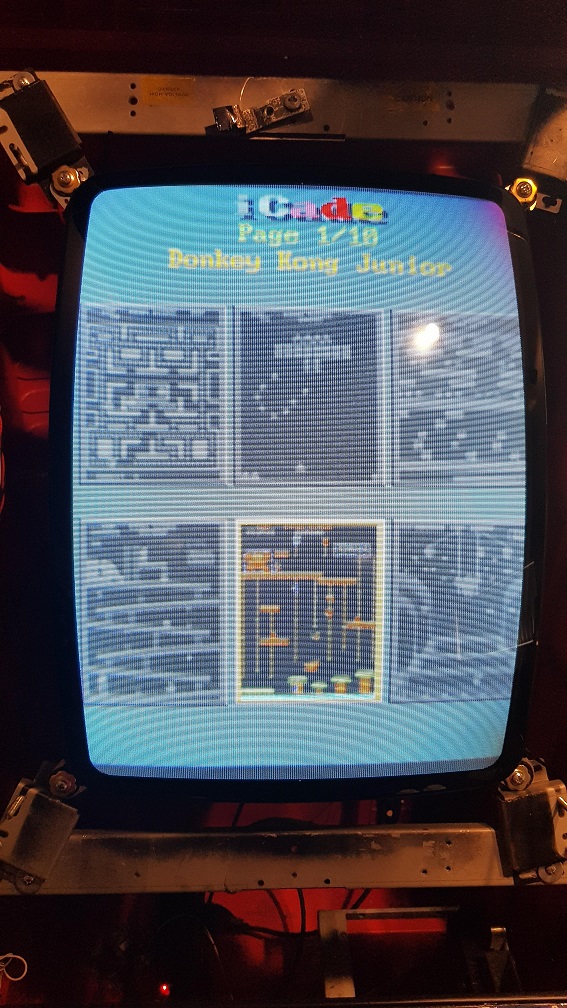
A few times testing the picture warms up and looks almost normal except for the black level still looks too bright, but if I power cycle the chassis then the same issue as above can happen.
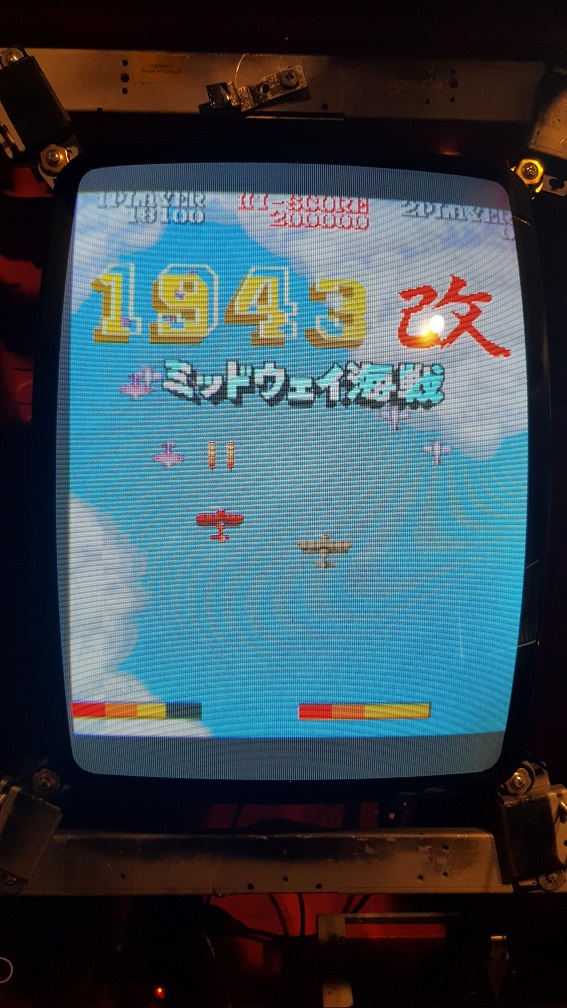
So what did I do wrong?? It was fine until I de-cased it.

There is one black ground wire from the neckboard that I'm not 100% sure of where it was, it comes out of the CR24 white socket. I thought it was connected to the braid that goes around the CRT so I clipped it back onto that but it might have come from somewhere else. Good chance this might be the problem!

Thanks for any suggestions.
Mr Matt2020-11-26 13:32:53
Looks so much better with a curved CRT to a flatscreen, but something isn't right....
I got a 20" Goodmans CRT which had an Orion tube. I purchased a RetroElectronik JAMMA to SCART adapter to use with the 60in1 board and set it to output 15kHz. Tested it using a SCART cable with the new TV still in it's case and it was perfect. Looked fantastic.
I installed the CRT into the cab and fitted the chassis to the back of the cab, but when all connected back together again the picture keeps getting brighter and has diagonal lines across it until the chassis shuts down, I then need to power cycle the chassis before it will turn on again.
A few times testing the picture warms up and looks almost normal except for the black level still looks too bright, but if I power cycle the chassis then the same issue as above can happen.
So what did I do wrong?? It was fine until I de-cased it.
There is one black ground wire from the neckboard that I'm not 100% sure of where it was, it comes out of the CR24 white socket. I thought it was connected to the braid that goes around the CRT so I clipped it back onto that but it might have come from somewhere else. Good chance this might be the problem!
Thanks for any suggestions.
Mr Matt2020-11-26 13:32:53

Kev A said:Looks to me like the flyback is set too high, perhaps it was knocked while you were installing it, there should be 2 knobs one screen and one focus try turning the screen one down a bit.
Due to the design/layout of this chassis the two flyback controls are quite difficult to accidentally move or knock but I'll try to mess around with it and see if it helps. Would that cause those diagonal lines? Watching it in real time, it looks like some voltage or capacitor is increasing/running away until the chassis shuts down. I did get it one time to settle down and look pretty much perfect for a few minutes and then this happened again when I restarted the chassis.
I plugged the 60in1 SCART into another TV and it's fine so the issue is with my chassis. I opened another CRT TV with a CR24 neckboard and it looks like that ground wire is connected to the Tube's braid.
Cheers

The lines are flyback lines which always show like that when the screen volts are too high, causing the screen to become too bright. As mentioned above, try dialing down the screen pot on the flyback, although if this is an intermittent problem, the cause could be elsewhere.
Yeah the ground wire is normally connected to the braid, although I guess it wouldn't hurt to find another spot on the braid to connect it to, the lines look to me like retrace lines that you normally get when the flyback is set too high, monitors do tend to get a little bit brighter as they warm, but not normally to an extreme.
Thanks gents, perfect now after adjusting the flyback Screen and Focus. I really thought it was a much more serious issue than that! Baffled how it changed so much during the de-casing.
One last issue in that the chassis doesn't auto turn on when powered, it goes into standby mode and has to be activated with a button or remote. Hopefully once I get the remote control codes on my universal control there is something in the menu to start in powered mode.
Thank you for the help.
One last issue in that the chassis doesn't auto turn on when powered, it goes into standby mode and has to be activated with a button or remote. Hopefully once I get the remote control codes on my universal control there is something in the menu to start in powered mode.
Thank you for the help.


jinq-sea said:The flyback isn't fouling against the cab casign when you reassmble, is it?
No, the chassis is on those little white motherboard mounting feet/stands which are screwed into a piece of plexi.
This is a plastic cab so no ground or Earth anywhere tho.
It could be that or the JAMMA to SCART adapter mixed with a TV chassis. I tried turning down the RGB lines on the adapter.
The brightness stepping has all but gone away in game but in the iCade main menu there is quite a bit of flickering and brightness stepping, like the chassis doesnt like the input signal from it.
I have a SCART Dreamcast I can try to test on this chassis and tube to see how that looks and if there is any flyback issues.
Kev A said:How are you powering the TV is it still connected via a different cable than the main cab, or have you wired it in somehow?
It's still powered with the mains cable it came with, connected to the chassis. Plan is to change the plug to an IEC connector which will plug into a Y-cable with 2 IEC sockets, the other one is currently powering the Happ JAMMA PSU. The 60in1 gets power through JAMMA.
Things I'll try later tonight;
- Different SCART cable.
- Testing the JAMMA PSU levels.
- Trying the 60in1 in a JAMMA cab with a CRT to see if there's any flickering on the iCade menu or in game.
- Trying a different SCART source with this chassis/CRT.
- Earthing something/everything. I assume that braid around the tube should be earthed?
I have another 20" TV chassis, but there's no way to test without completely swapping it out with the current chassis, so that's a last resort. But if there's no way to auto power on this current chassis then I may end up doing that any way!
Mr Matt2020-11-26 16:50:45
I'm sure you will get there in the end, just to check when you say earth the braid, is that just the cable going to the neck board you mean, you haven't earthed it to anything else? As I have never seen that bit earthed before and no idea what effect it could have.Kev A2020-11-26 17:01:06
Kev A said:I'm sure you will get there in the end, just to check when you say earth the braid, is that just the cable going to the neck board, you haven't earthed it to anything else?
It's just currently connected to the black wire from the neckboard. I cannot find where it was connected before but I cut the cable right at the connection. Now it's just clipped somewhere onto the braid.
Should that braid be earthed though? In a normal arcade cab are the 4 mounting points the CRT bolts onto earthed? The braid is touching those mounting points.
I'm not sure, I have never seen the braid specifically earthed before, is the frame earthed at all? just thinking it wouldn't be earthed when in the tv, and was working ok before, so logically it must be something different from how it was.
Kev A said:I'm not sure, I have never seen the braid specifically earthed before, is the frame earthed at all? just thinking it wouldn't be earthed when in the tv, and was working ok before, so logically it must be something different from how it was.
No, nothing is earthed except the JAMMA PSU. Probably. Another thing to check later!
I've been testing this for a few days and it's still a mess. It's like the Flyback Screen and the Focus just won't hold and keep running away.
When I turn the monitor on it usually slowly turns the Screen brightness down until it is completely black and I cannot even see the TV's overlay. If I up the Screen pot until it looks good but then it will slowly up the brightness and I have to keep turning down the Screen/Focus until it looks good again about every minute, but then the brightness is too high and it has to be adjusted down again. I messed with the TV's brightness and contrast settings in the menu but if it's set to max or min then this issue is still the same.
Another thing I noticed is that when the Brightness is ok the pixels are still really fuzzy and snowy, like a COAX signal. When I use another TV the pixels are really crisp and exactly how I expect a CGA CRT to look.
I connected a Dreamcast with a SCART cable and the screen is perfect, it seems. I think this is using thre Dreamcast's 15kHz output over SCART.
I connected the 60in1 via the JAMMA 2 SCART to another SCART TV and the picture is perfect, no snowy pixels, not brightness issue.
I have no other 15kHz sources to test this with as the 2x Pandora's I have don't have an acceptable CGA output that this TV accepts. They both output 15kHz but this chassis doesn't like it.
I found where the neckboard was connected to the braid before and it's now back in the same place, but it didn't change anything.
Also, for some reason this CRT holds a charge like I've never seen. I have a ground strap that I short the Anode cap with to the Earth in a mains plug, and I can get a loud snap 4 or five times when shorting the Flyback anode connector and then it can still give me shock to the outside of the tube several times, and then when I connect the anode cap back in later the tube is still sparking and discharging.
So I'm stumped. Before I de-cased this I'm sure the TV didn't have the snowy pixels I'm seeing now.
I really don't want to have to replace the chassis and it will be difficult to find another one that fits in the space that I have like this low profile chassis does.
TIA.
Mr Matt2020-11-30 20:22:41
When I turn the monitor on it usually slowly turns the Screen brightness down until it is completely black and I cannot even see the TV's overlay. If I up the Screen pot until it looks good but then it will slowly up the brightness and I have to keep turning down the Screen/Focus until it looks good again about every minute, but then the brightness is too high and it has to be adjusted down again. I messed with the TV's brightness and contrast settings in the menu but if it's set to max or min then this issue is still the same.
Another thing I noticed is that when the Brightness is ok the pixels are still really fuzzy and snowy, like a COAX signal. When I use another TV the pixels are really crisp and exactly how I expect a CGA CRT to look.
I connected a Dreamcast with a SCART cable and the screen is perfect, it seems. I think this is using thre Dreamcast's 15kHz output over SCART.
I connected the 60in1 via the JAMMA 2 SCART to another SCART TV and the picture is perfect, no snowy pixels, not brightness issue.
I have no other 15kHz sources to test this with as the 2x Pandora's I have don't have an acceptable CGA output that this TV accepts. They both output 15kHz but this chassis doesn't like it.
I found where the neckboard was connected to the braid before and it's now back in the same place, but it didn't change anything.
Also, for some reason this CRT holds a charge like I've never seen. I have a ground strap that I short the Anode cap with to the Earth in a mains plug, and I can get a loud snap 4 or five times when shorting the Flyback anode connector and then it can still give me shock to the outside of the tube several times, and then when I connect the anode cap back in later the tube is still sparking and discharging.
So I'm stumped. Before I de-cased this I'm sure the TV didn't have the snowy pixels I'm seeing now.
I really don't want to have to replace the chassis and it will be difficult to find another one that fits in the space that I have like this low profile chassis does.
TIA.
Mr Matt2020-11-30 20:22:41

dremmel or bosh multi tool or equivilant. cut the whole belzel out up to the inside edge
and get a 25" polo hanterex or any 25/26"
with bezel..
if you where local to me i would help
and get a 25" polo hanterex or any 25/26"
with bezel..
if you where local to me i would help