
Anyone know how to hook this up? recently picked up a panel and having problems getting it to work, plug in the cable for the buttons as normal but when i plug in the usb from the trackball into the i/o boards other usb it disables the i/o board in the naomi and nothing works, i cant enter the test settings or anything..mozie2021-03-26 20:06:03

You are using an out of date browser. It may not display this or other websites correctly.
You should upgrade or use an alternative browser.
You should upgrade or use an alternative browser.
virtua golf panel hookup
- Thread starter mozie
- Start date

Thanks mate, basically i have the main button loom hooked up as normal, this powers the trackball i/o, i have a red light on it so its receiving power, then the usb cable from the trackball going to the naomi i/o (in the spare usb slot beside the D type main one) this disables the main one
Fantazia2 said:No I meant the test and service buttons directly on the Naomi itself, not the ones in the cabinet connected to the JVS I/O.
I havent tried those ill give it a go now
The panel usb cable from the track ball io board connects to the standard jvs io board. Then the usb cable from jvs io board connects to the naomi.
The panel also has a standard 12 pin connector going to to player 1 inputs for the buttons.
The game wont boot if both io boards are not detected.
If you are having trouble you can verify:
1. Does the jvs board work with a normal joystick game.
2. Try connect the trackball io directly to the naomi bypassing the jvs io. When boots it will hopefully tell you if your io board is attached. I cant recall the io board code but if you see the io board model number on screen then you know the board is good.
3. Now try the trackball io daisy chained to the jvs io. If only the jvs io is detected, sorry to say the pass through on your jvs io is not working. I had that same problem last year and fixed it with a new jvs io.
.
yoganuggy2021-03-26 23:04:13
OK so the results are
1. Yes the jvs i/o is working fine for other games
2. When I plug the trackball i/o directly into the naomi it's recognised on node 0 as displays the no etc
3. When I connect the trackball i/o to the jvs i/o is disables the first one completely I've tried different USB cable and it's the same, does it require a different i/o type? Iam using a rev one i/o I have a spare type 3 I'll try and see
Tried another jvs i/o and same results very confused as to why the trackball i/o disables the jvs one when connected, maybe the trackball i/o is busted but then it shouldnt be showing up when connected directly to the naomi mb
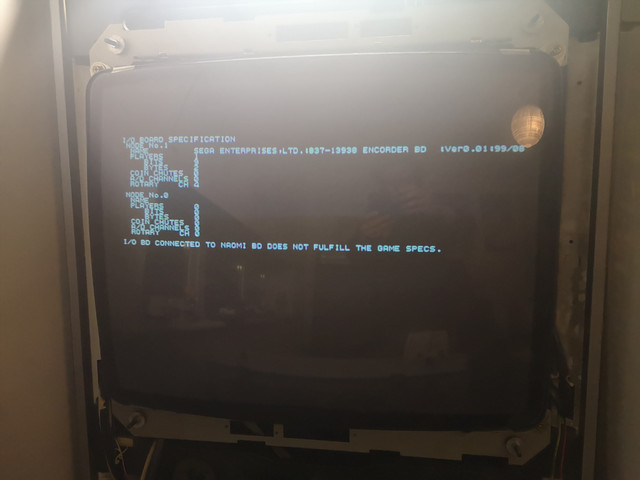
mozie2021-03-27 15:59:06
mozie2021-03-27 15:59:06


mozie said:Thanks very much for the pics, looks the same but mine is wired to type 1 jvs i/o, hows yours getting power, mine is getting power from the digital connector and there's a red led on it so I presume that's all should be on it
The White and Yellow wires going to the track ball PCB are connected to the 1 Player connector header on my Blast City which has a +5V and GND terminal in them.
Yeah same here think iam going to pull it out and try rewire it outside of the cab cause I can't get any good from it at all, no idea why it's stopping the main i/o from working when connected, thanks for all the help was really looking forward to playing this one so iam determined to get it going