Linux Lindbergh issues

Retroman839

Senior Member
vacBacker
Feedback
13 (100%)
Credits
7,477CR
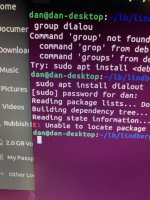
Hi I’m hitting an error where E: is highlitrd in red amd
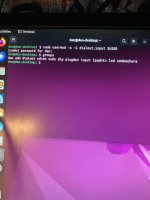
Getting errors IMG_4996.jpeg

E: isn’t reachable ..
I noticed this red E: in the scripted of the install …. So do I now have files unreachable because the program can’t find E:?
 

Retroman839

Senior Member
vacBacker
Feedback
13 (100%)
Credits
7,477CR
It’s not a sega software isssue ..
It’s Linux and the loader software.
Andy still reachable through his email.
Bought some bits of him recently 👍😊
 

DanP

Administrator
Staff member
vacBacker
Feedback
5 (100%)
Credits
2,193CR
I don't think the the "E:" in this case isn't referring to a drive like it would in DOS or Windows - it just means "Error". Is the PC connected to the internet? It's trying to download a package called "dialout" which isn't available locally. Is that really what you mean? I thought "dialout" was reserved for serial interface access. Perhaps a bit more info on what you're trying to do would help? Are you following a guide? Are you trying to add your userid to the "dialout" group perhaps?
 

Retroman839

Senior Member
vacBacker
Feedback
13 (100%)
Credits
7,477CR
I don't think the the "E:" in this case isn't referring to a drive like it would in DOS or Windows - it just means "Error". Is the PC connected to the internet? It's trying to download a package called "dialout" which isn't available locally. Is that really what you mean? I thought "dialout" was reserved for serial interface access. Perhaps a bit more info on what you're trying to do would help? Are you following a guide? Are you trying to add your userid to the "dialout" group perhaps?
Thanks Danp
Yes it’s connected to internet

Yes the dialout is for serial interface
Force feed back information form the pc to the ffb drive pcb that then

Controls the steering Motors for force feedback in the steering wheels .

I have to add dialout to my user
Then run the emulator as user ..
With a second user which is dialout
That how I understand it .

Basically I’m trying to run any game I can using Bobbydillys Lindbergh emulator …
Each game I try I have been unable to run.

 

DanP

Administrator
Staff member
vacBacker
Feedback
5 (100%)
Credits
2,193CR
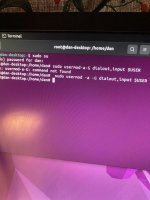
Looking at the documentation, there's a step to run this command to add your userid to the dialout group


sudo usermod -a -G dialout,input $USER


Have you run that command? To explain, $USER is the current userid you are logged in as, from the screenshot that looks like it will resolve to 'dan'. That command adds this user to the 'dialout' group and then gives you access to anything that group has access to - which in this case is probably the serial port devices.
 

Retroman839

Senior Member
vacBacker
Feedback
13 (100%)
Credits
7,477CR
Looking at the documentation, there's a step to run this command to add your userid to the dialout group


sudo usermod -a -G dialout,input $USER


Have you run that command? To explain, $USER is the current userid you are logged in as, from the screenshot that looks like it will resolve to 'dan'. That command adds this user to the 'dialout' group and then gives you access to anything that group has access to - which in this case is probably the serial port devices.
Thank you ..
I was trying this command ..
2 nights ago..

I will try again .
And then update here this evening 👍
Thanks for help really appreciate it..
I’m going to persevere as I have a twin cab .. R tuned amd own out run sp
But so far can’t run them as no workinglimdbergh
 

DanP

Administrator
Staff member
vacBacker
Feedback
5 (100%)
Credits
2,193CR
Argh ok. I was thinking that.. so

Where it says $USER I need to add dan
So like this. $dan
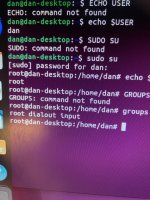
No, $USER is an environment variables which should already be set to 'dan'. You can just run that command as it is. If you want to check what $USER is run command 'echo $USER' and it will print out what it's set to. N.B anything in Linux shell prefixed with a $ is a variable.
 

DanP

Administrator
Staff member
vacBacker
Feedback
5 (100%)
Credits
2,193CR
OK, to check if it's worked - type command 'groups'. You should see a list of groups that user 'dan' is in, hopefully dialout will be one of them.
 

Retroman839

Senior Member
vacBacker
Feedback
13 (100%)
Credits
7,477CR
The creator of the loader says don’t run
The loader in root
Run it as groups
Can you please tell me how I would run it in groups ?
Thanks


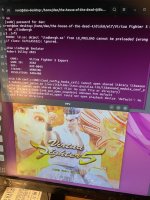
Vf5 crashes after intro
IMG_5006.jpeg
 

DanP

Administrator
Staff member
vacBacker
Feedback
5 (100%)
Credits
2,193CR
"
Run it as groups
Can you please tell me how I would run it in groups ?
"

Sorry but this doesn't make sense, there's no such thing as 'run it in groups'. I think what's happened is you've run 'sudo su' then the 'usermod' command. What this means in plain english is;

1) Switch user to root (sudo su)
2) Modify user root and add it to group 'dialout' (sudo usermod blah blah).
3) Tried to start the emulator either as the root userid (not allowed) or as 'dan' but without adding that user to the dialout group. This is why I think it's failing.

What you want to do is this;

1) Modify user 'dan' and add it to group 'dialout'

To do this, start a new terminal window. You should see dan@dan-desktop in the command prompt (not root@dan-desktop).

1) Run the command 'sudo usermod -a -G dialout,input $USER' - enter it exactly like this. Linux commands are case sensative. If something is shown lower case - then type it lower case.

2) Run command 'groups' - you should see 'dialout' in the groups list.

3) Try running the emulator again as user 'dan'

If you still get errors we'll look at what it says then. If you are following a guide it would be helpful if you could share the exact link to it?
 
Top