Raspberry pi loaded memory card

Chihiro

I do this shit for a living yo!
vacBacker
Feedback
4 (100%)
Credits
778CR
Your PC is prob either Windows or Mac the image for Pi is Linux & therefore needs to be converted to that its really simple you unpack the zip files & use image file it creates with the Pi imager or Win32 to make the image for your SD or what ever storage you are using.
 

Chihiro

I do this shit for a living yo!
vacBacker
Feedback
4 (100%)
Credits
778CR
Then just write the "image file" then you said you had zip flies some posts back so I suggested you unzip them.

I also use this image no probs only thing is its nearly 26K roms so lots of crap.
 

Chihiro

I do this shit for a living yo!
vacBacker
Feedback
4 (100%)
Credits
778CR
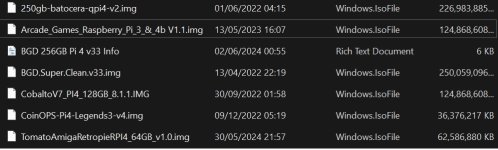
The best overall image I've found is the Bored game dad Super Clean Pi4 image as it only has what you need but its requires a 256gb.

I run all of my Pi4 images on my Namco Noir with LG Ultragear for reference.
 

Chihiro

I do this shit for a living yo!
vacBacker
Feedback
4 (100%)
Credits
778CR
This image runs a bit rubbish on Pi3 too, iirc I had rgb issuers.

I just unpacked the zip files to my laptop & then created the image to the sd card.

Maybe this isn't for you but I'm sure if you look on eBay ect there will be some pre done cards for $$$.

There are some smaller images like Arcade Legends which is 64gb.
 

Chihiro

I do this shit for a living yo!
vacBacker
Feedback
4 (100%)
Credits
778CR
It should unzip to one image file put it in its own folder.

I have a selection.
 

Attachments

  • images.jpg
    images.jpg
    99.4 KB · Views: 2
Top