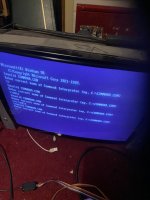
Dos mame , sound blaster issue

Retroman839

Senior Member
vacBacker
Feedback
12 (100%)
Credits
7,369CR
Been bloody years, but autoexec.bat needs to in the root directory doesn't it? Screenshot seems to show it buried in some sub dir.
I have it in root
These are in a sb16 sub folder.

My interest now is towards why when I edit my autoexec.bat it don’t change when I next boot up ?

To edit my autoexec.bat
I am removing my ssd connecting it up to another pc to edit it .

I also want to run
Sb16 diagnosis but I don’t know how to get to a command line to run
C:/sb16/diagnoses. \s

?
 
Last edited:

Hexen

Active member
Feedback
2 (100%)
Credits
487CR
I wanted to ask about parallel
Ports ..
Só I disable
And serial ports ?

I’m pretty sure I have everything ..
I have sb16 file with all related drivers and utilities
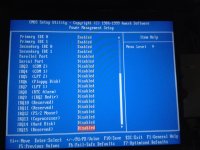
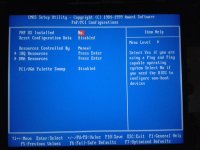
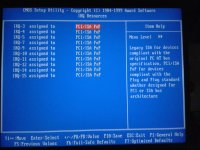
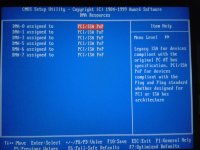
Sometimes the parallel port can be set to I5 or 7 and conflict. Serial less so, but if you're not using them best disabled.

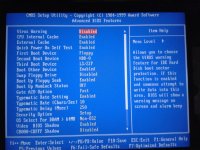
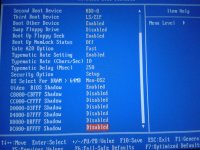
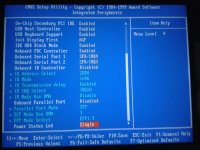
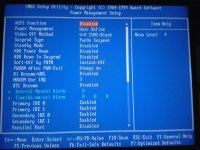
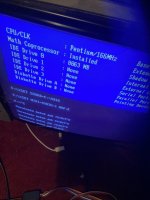
Have a look at these pics with attention to the IRQ settings. It's an old BIOS, but you should have similar settings.
 

Attachments

  • 2019-09-19 13.26.25.jpg
    2019-09-19 13.26.25.jpg
    167.4 KB · Views: 7
  • 2019-09-19 13.26.42.jpg
    2019-09-19 13.26.42.jpg
    163.5 KB · Views: 5
  • 2019-09-19 13.26.54.jpg
    2019-09-19 13.26.54.jpg
    134.5 KB · Views: 4
  • 2019-09-19 13.27.05.jpg
    2019-09-19 13.27.05.jpg
    149.6 KB · Views: 5
  • 2019-09-19 13.27.15.jpg
    2019-09-19 13.27.15.jpg
    140.3 KB · Views: 5
  • 2019-09-19 13.27.25.jpg
    2019-09-19 13.27.25.jpg
    150.6 KB · Views: 5
  • 2019-09-19 13.27.37.jpg
    2019-09-19 13.27.37.jpg
    133.4 KB · Views: 7
  • 2019-09-19 13.27.48.jpg
    2019-09-19 13.27.48.jpg
    119.2 KB · Views: 6
  • 2019-09-19 13.27.59.jpg
    2019-09-19 13.27.59.jpg
    140.2 KB · Views: 6
  • 2019-09-19 13.28.08.jpg
    2019-09-19 13.28.08.jpg
    138.8 KB · Views: 6

Retroman839

Senior Member
vacBacker
Feedback
12 (100%)
Credits
7,369CR
Sometimes the parallel port can be set to I5 or 7 and conflict. Serial less so, but if you're not using them best disabled.

Have a look at these pics with attention to the IRQ settings. It's an old BIOS, but you should have similar settings.
Thanks man ..Will check this out tomorrow 👍
 

Retroman839

Senior Member
vacBacker
Feedback
12 (100%)
Credits
7,369CR
I just need a dos prompt I think
Só I can run the sound card diagnostic

And re install drivers if I need too.

Danp
Vídeo explains it .

Pnp cards in dos require an extra driver

Ct mm or something like that
I have found these in my ssd image .

I need to run them I think ?

I do get 5 glorious seconds of sound before games crash / lock up / freeze.

If I get only 5 seconds could my card actually be configured
And something els is conflicting ?

I really could do with running something els like test suit just incase it’s something els .

What makes me think it is sound card is because if I remove it and ignore request / change sound setting in arcade os my roms run
 
Last edited:

Retroman839

Senior Member
vacBacker
Feedback
12 (100%)
Credits
7,369CR
I just read this from AI

Setting Up Sound
The primary challenge in this legacy setup was configuring the Sound Blaster card to work correctly within MS-DOS and link with ArcadeOS/MAME.

Is it the link with arcadeos/mame part Thats causing conflict ?
 

DanP

Administrator
Staff member
vacBacker
Feedback
5 (100%)
Credits
2,191CR
You seem to be looking at a copy of autoexec.bat on the E: drive? You need to edit the one on the boot drive c:/. If what you’re seeing during boot doesn’t match what’s in the file then you are editing the wrong file. Personally I would just use DOS here, don’t bother with Windoze. Just use DOS commands to get to c:/ and edit autoexec.bat using DOS edit.
 

Retroman839

Senior Member
vacBacker
Feedback
12 (100%)
Credits
7,369CR
You seem to be looking at a copy of autoexec.bat on the E: drive? You need to edit the one on the boot drive c:/. If what you’re seeing during boot doesn’t match what’s in the file then you are editing the wrong file. Personally I would just use DOS here, don’t bother with Windoze. Just use DOS commands to get to c:/ and edit autoexec.bat using DOS edit.
How I do that man ..

Your absolutly right.
Yeh my drive is now E
Because I edit/created it on another pc.
So of course it isn’t seeing any locations now .


Not sure if I can rename this drive to c on a pc with a c drive already ?


Is it possible to rename this boot drive in dos
On this 486 ?

I do not know how to get to dos prompt .
How do I get to dos prompt to use command ?
Thanks danp👍
 
Last edited:

DanP

Administrator
Staff member
vacBacker
Feedback
5 (100%)
Credits
2,191CR
This is really difficult to diagnose remotely. From the picture on the 1st post of this thread, it's running DOS then, is that right? So is that the PC you put in the cab? Then you're trying to edit config files using another PC - is that right? How are you doing that? Are you using some sort of adapter to allow Windows to see the disk as a removable disk? If so, boot the Cab PC and try to edit files there (you might need to plug a keyboard in?). You get to the DOS prompt from either ArcadeOS by exiting it OR by quitting the autoexec.bat script before it runs ArcadeOS - you have to be very quick to do this, I think you press CTRL-C during the boot to do that. If you do you should see a black screen with a prompt for C:\ which you can then type in commands to. The command to edit files is just called 'edit'. Is not super easy to use, I think the main pain is that you have to use the cursor keys to move around the file, and then press the ALT key to get the menu drop-downs to appear then use the cursor keys to select save followed by exit. If you've never used it before it's difficult to use - just be warned.

If you get stuck you can just reboot and try again using (ctrl-alt-del).
 

Hexen

Active member
Feedback
2 (100%)
Credits
487CR
How I do that man ..

Your absolutly right.
Yeh my drive is now E
Because I edit/created it on another pc.
So of course it isn’t seeing any locations now .


Not sure if I can rename this drive to c on a pc with a c drive already ?


Is it possible to rename this boot drive in dos
On this 486 ?

I do not know how to get to dos prompt .
How do I get to dos prompt to use command ?
Thanks danp👍
If it's win95 0r 98 then you should be able to press shift-F3 (I think) to bypass everything on boot, or just exit from windows into DOS and start from there.

Find a copy of Xtree Gold to use as an easy file manager and editor in DOS.

You can't rename a drive to C:, maybe reassign a partition, but C: is C: - the boot drive.

I would be tempted to find any 'WIN.EXE' in the C:\ root directory autoexec and REM it. Alternatively, delete windows and use Xtree to manage everything. You're setting up a DOS SB environment and then letting windows set up its own, it seems.

As someone mentioned, it's a nightmare to do this remotely but would be a 20 minute job with the machine to hand.
 

Hexen

Active member
Feedback
2 (100%)
Credits
487CR
Ah, and it looks as though you have two HDDs in there - the reason why your C: partition is now an E: partition is because your C: drive is the slave...

It's all becoming clear.
 

Retroman839

Senior Member
vacBacker
Feedback
12 (100%)
Credits
7,369CR
This is really difficult to diagnose remotely. From the picture on the 1st post of this thread, it's running DOS then, is that right? So is that the PC you put in the cab? Then you're trying to edit config files using another PC - is that right? How are you doing that? Are you using some sort of adapter to allow Windows to see the disk as a removable disk? If so, boot the Cab PC and try to edit files there (you might need to plug a keyboard in?). You get to the DOS prompt from either ArcadeOS by exiting it OR by quitting the autoexec.bat script before it runs ArcadeOS - you have to be very quick to do this, I think you press CTRL-C during the boot to do that. If you do you should see a black screen with a prompt for C:\ which you can then type in commands to. The command to edit files is just called 'edit'. Is not super easy to use, I think the main pain is that you have to use the cursor keys to move around the file, and then press the ALT key to get the menu drop-downs to appear then use the cursor keys to select save followed by exit. If you've never used it before it's difficult to use - just be warned.

If you get stuck you can just reboot and try again using (ctrl-alt-del).
Cool ..
Thanks for that gold info !

To answer your question .
I’m just taking the ssd from a dos pc in my cab ..

And then plugging it into a pc running win 10.

I used macrium to restore an image from original ide drive .

Original ide drive though has same issue , And Thats maybe because I plugged it into my pc as a slave Só win 10 has also assigned it a drive letter E too hence its doing same sound blaster issue .

I need to just get these drives to be C drives ..

Or at lease they all need to be seen as in a C drive ?

Any other way I can do this ?

 

Retroman839

Senior Member
vacBacker
Feedback
12 (100%)
Credits
7,369CR
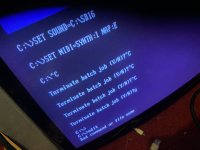
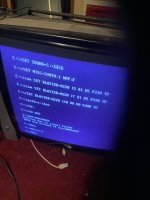
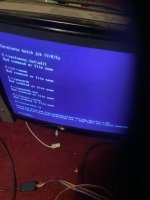
Now I can get here with
Ctrl C
IMG_4637.jpeg

Terminate batch jobIMG_4638.jpeg

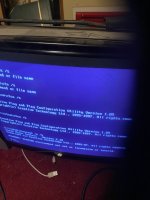
Ok I got something

IMG_4639.jpeg
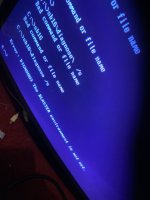
Sound blaste enviromemt not set
( which I think means I need to re install drivers ? ,
1, pre driver to ser enviromemt .
2 , then driver )


After running diagnose command

( typing edit juat says bad command )
 
Last edited:

DanP

Administrator
Staff member
vacBacker
Feedback
5 (100%)
Credits
2,191CR
"Bad command of file name" means DOS can't find the file for the program or command you're trying to run - which in this case is edit.com. From your autoexec.bat I would try typing "path=c:\dos" then "edit autoexec.bat".
 

Hexen

Active member
Feedback
2 (100%)
Credits
487CR
"Bad command of file name" means DOS can't find the file for the program or command you're trying to run - which in this case is edit.com. From your autoexec.bat I would try typing "path=c:\dos" then "edit autoexec.bat".
Assuming of course there's more than just the files provided by the SYS command. EDIT might not be there, although the COPY CON C:\autoexec.bat then typing in the entire thing with <return> after each line and <CTRL>Z to save and exit will do the job.
 

Retroman839

Senior Member
vacBacker
Feedback
12 (100%)
Credits
7,369CR
"Bad command of file name" means DOS can't find the file for the program or command you're trying to run - which in this case is edit.com. From your autoexec.bat I would try typing "path=c:\dos" then "edit

image.jpgIMG_4642.jpeg

My autoexec.bat.

Can I edit this here ?
 
Last edited:
Top