Arduino In-Circuit Tester: Build Project

Arcadenut

User
Credits
314CR
wondras said:
This is good... we're running out of things that could be the problem. :) Seems like it has to be a physical connection issue, so I think the most likely culprit would be your 40-pin ribbon cables.

Are yours homemade? Sometimes a pin won't make contact if the plug isn't crimped on hard enough. Or did you repurpose a CD-ROM or IDE cable? These sometimes have missing wires. I can see you don't have 80-pin cables, which is good, because these definitely wouldn't work.

Wherever they came from, doing an end-to-end continuity test between the Arduino shield and the probe head is probably worth a try.

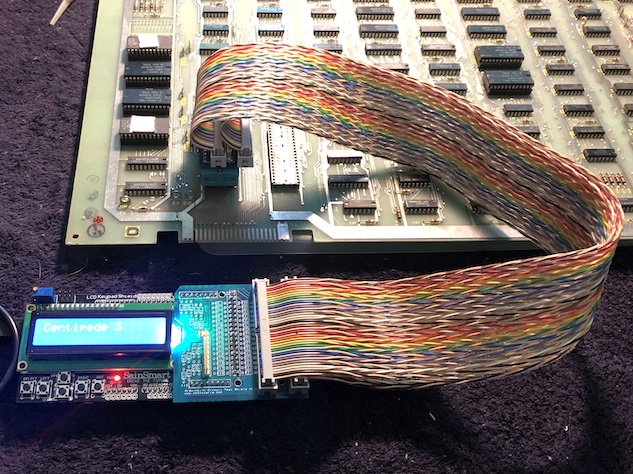
Side note: I've been meaning to mention for a while that DigiKey will custom assemble twisted-pair ribbon cables using 3M wire and connectors. They ship right away, and the cables look and work great.
IMG_4408.jpg


I bought the 20" version for $9.19US/each. Part number is M3CCA-4020K.

https://www.digikey.com/products/en?keywords=M3CCA-4020K

Ok, I'm making some progress... I've been chasing my tail a bit here.
smiley36.gif


I went back to your driver and made sure I was on the correct Centipede version and did a ROM CRC check and it's giving me the right results.

What was strange is that it wasn't triggering my scope if I has hooked up to the ROM test point. Rather than hooking it up to the ROM test point, I hooked it up to the ROM 0 test point and it triggered when reading 0x2000!

After some further testing and breaking out the Logic Probe, it appears that the ROM CS toggles between different accesses to different addresses. So if I access 0x2000 and it's Low, it will switch to High. Testing 0x2800 would then toggle ROM 0 test point's state... The High/Low toggling might actually be different, just trying to illustrate the issue.

Seems the hardware is functioning so this points to a problem with my driver code not returning memory results correctly. So time to dig into that....

Thanks for everyone's help!

 

Arcadenut

User
Credits
314CR
Ok, it was a stupid mistake on my part... Ugh...

When reading Memory I forgot to increment the address so it was always reading the same byte over and over again.... Ooops.

It worked for the RAM test because I was always writing the same byte to all addresses...
 

Arcadenut

User
Credits
314CR
Ok, for Centipede:
  • You don't need to use the Master Clock.
  • You can use either the Resistor version of the shield or the non-resistor version.

I'll hook up my Missile Command next and test that.

If that works then I'll upload the current version of my driver and the Windows software. Then I'll move on to the Z80 support and repeat the process.
 

Mc-Q

Active member
Credits
1,450CR
what are the library;s used that prevent you posting the sourcecode??

(not everybody uses windows and emulation cant handle usb drivers)
 

Arcadenut

User
Credits
314CR
Mc-Q said:
what are the library;s used that prevent you posting the sourcecode??

(not everybody uses windows and emulation cant handle usb drivers)

DevExpress for the UI

https://www.devexpress.com/products/net/controls/winforms/

and my own libraries used for Business Objects and Data Access, etc... that are proprietary to my company.

I could publish the source code but it wouldn't be much help as you wouldn't be able to compile it.

If someone wants to put out a cross-platform app they can. The device driver source on the Arduino is available. You would just need to write something to communicate to it and deal with the results.

If you wanted to, you could simply connect via a Terminal (such as the Arduino Serial Monitor) and issue commands by hand, you wouldn't even need the Windows App really. The app just makes life a lot easier.

It might run under something like Wine, not sure.
 

wondras

Newbie
Credits
89CR
Looking good! I used DevExpress components back in my Delphi days, and they were fantastic for making a polished app quickly. Great company with great tools, but yeah, problematic for open source.
 

wondras

Newbie
Credits
89CR
In other news, I was able to write/read the video RAM for Centipede using a bit more ASM trickery.

When video RAM is active, the phi0 clock to the CPU skips every other pulse. This just required waiting an extra 6502A cycle length before firing phi2, so it would coincide with the next phi0 pulse.

matching_phi0_with_skipped_pulses_-_writes.png


This allows reliable writes to video RAM, such as:

Centipede_video_RAM_writes.jpg


Reading it back was a little trickier. The data isn't available during the entire 6502 clock cycle, and the data bus is spread across four pin groups on the Arduino, so it takes a relatively long time to read. I found that by cutting the phi2 pulse short, the read could be done in one 6502 clock cycle.

So I guess it actually works... but it's just hacked into the C6502Cpu memoryRead() and memoryWrite() functions, so currently it's used all the time. I need to think about how this could be properly integrated into the code. C++ isn't my strongest point, but I do have a couple of ideas:

- Add read and write "strategy" parameters to the RAM_REGION struct, so multiple access timings can be handled internally by the CPU class. If multiple timing strategies were going to be reused across many game drivers, it would be great if you could just specify "async" or "1.5 Mhz with skipped cycles" for a block of RAM.

- Allow game drivers to subclass the CPU to substitute their own memory read/write routines (could also be done with function pointers, I think.) There's less opportunity for reuse this way, but OTOH it doesn't require changes to widely used type definitions.

It's not clear to me how widely this could/would/should be used. There's no point in making big changes if it's only going to get used once or twice, or be deemed a Bad Thing that shouldn't be done at all. Curious if anyone has any thoughts/ideas for this.

wondras2019-08-12 10:12:28
 

Arcadenut

User
Credits
314CR
I think Video RAM is a bit different then normal RAM. If you can reliably write to it should be able to see the results on screen. The only exception being if you don't have video out, but if that's the case then there is something other than RAM that is bad (typically).

For your test above, what values were you writing? I would like to try it with my App and see if I get the same results.

As for how to integrate it, you could make overloaded methods for read/write that take a parameter. This way you're not touching the original methods. Then modify the RAM_REGION to allow for the extra parameters to send to the new methods.

Something like

... memoryRead(int clockCycles)

{

...

}
 

Mc-Q

Active member
Credits
1,450CR
i think i asked before, but is there an electrical reason for sticking with the ATMEGA and not using the ARM based boards with more memory/clockspeed??
 

GadgetFreak

Active member
vacBacker
Feedback
7 (100%)
Credits
942CR
Mc-Q said:
i think i asked before, but is there an electrical reason for sticking with the ATMEGA and not using the ARM based boards with more memory/clockspeed??
I've certainly mentioned it before. I would say 5v digital IO is important which few boards have these days. But as I have mentioned before the Teensy 3.5 has 5v tolerant digital IO.
 

Arcadenut

User
Credits
314CR
Mc-Q said:
i think i asked before, but is there an electrical reason for sticking with the ATMEGA and not using the ARM based boards with more memory/clockspeed??

Probably just a matter of what was available at the time when Paul Decided to do it. (See first paragraph here: http://www.zzzaccaria.com/arcade/ArduinoMegaICT.htm)

There really shouldn't be any technical reason why this couldn't be ported to another platform as long as it has enough IO and at the right voltages. You'll have to design up new Shields to fit other devices and port the code to that platform.
 

GadgetFreak

Active member
vacBacker
Feedback
7 (100%)
Credits
942CR
Arcadenut said:
port the code to that platform.
Which is precisely why I mention the Teensy 3.5, no porting required as it can be used with the Arduino build environment. You just download and install the support libraries on the PJRC website!
 

Mc-Q

Active member
Credits
1,450CR
then i'll try it soon,

i have some Nucleo dev boards with 144pins to play with and they are fully supported by the arduino software. :)

all pins are 5v tolerant
 

Arcadenut

User
Credits
314CR
GadgetFreak said:
Arcadenut said:
port the code to that platform.
Which is precisely why I mention the Teensy 3.5, no porting required as it can be used with the Arduino build environment. You just download and install the support libraries on the PJRC website!

Haven't looked at the Teensy, are they pinout compatible too? If not then you'll at least have to remap the pins but that should be pretty trivial and could probably be handled with #ifdef.
 

Mc-Q

Active member
Credits
1,450CR
Teensy are small - almost dip package-size.

the Nucleo boards have arduino headers, but AFAIK nothing has the MEGA headers on it.

so new pin mapping / adapter boards would be needed.

it does have the advantage of being able to have 40 or 64pins - all i/o

so no more active adapters for 68000's etc.
 

wondras

Newbie
Credits
89CR
The Arduino Mega isn't ideal, but it has the huge advantage that someone has already taken the time to make it work. It's also well-documented, easy to program, cheap and still widely availalble years later. There are definitely devices today that would be better, but I'm not sure they're better enough to be worth the effort to switch.
 
Top