Arduino In-Circuit Tester: Build Project

RaveN

Active member
vacBacker
Feedback
1 (100%)
Credits
1,325CR
The issue is the Teensy doesn't output 5v either, and whilst it will output a high voltage above the TTL "high" threshold, it's not ideal, especially when you're dealing with old ICs.

You'll also have the voltage drop if you use the current limiting resistors. You can implement one of the many ways to convert the voltage level, but that's not ideal either due to delay/altering rise/fall times.
There's other things you have to consider as well, such as what are the rise and fall times using a 120mhz cpu? Do they come within the limits of TTL and older eproms?
You can make any CPU 5v "tolerant" by diode clamping, but that's not the main issue here.
 

Mc-Q

Active member
Credits
1,450CR
i dont see a need to "output" 5v,

most 8bit stuff is active-low and uses pullup resistors where needed.

anyway, i have the hardware already, so no harm in trying once i find the bits.

as for arduino:

https://github.com/stm32duino/Arduino_Core_STM32

mine: https://www.st.com/en/evaluation-tools/nucleo-f746zg.html
 

wondras

Newbie
Credits
89CR
Arcadenut said:
For your test above, what values were you writing? I would like to try it with my App and see if I get the same results.

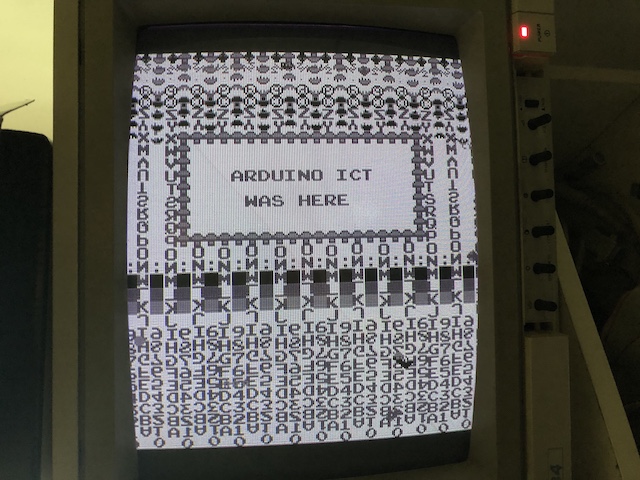
Centipede_video_RAM_writes.jpg


To get back to this question... the background was filled by looping through 0x0400-0x07ff, starting with a value of zero and incrementing on each write. From this, it became clear that the character set contains:

0 space

1-26 A-Z

27-31 misc images

32-41 digits 0-9

42-63 more images

64-255 repeat of the sequence with different orientations.

The message box was done with nested loops for the box/border, and then individual writes for each character. I don't think I'd do a real custom test function this way, but it was good as an experiment.

FWIW, using the standard memoryWrite() function resulted in a recognizable but garbled pattern.

Tying into the current tester hardware discussion, I'm curious if a faster processor like the STM32 could pull off more tricks for synchronous operation. It's still really just bit-banging, though so I guess I wouldn't expect it get much further.

Before I found this project, I was thinking an FPGA or perhaps one of the newfangled PSoCs would be the way to go. You could have full-speed synchronous operation with address/data/clock lines handled in parallel, and maybe even CPU emulation. But then I realized that realistically I wouldn't be willing or able to go that deep. I was delighted to find that an Arduino with a couple of simple adapter PCBs could accomplish most of what I really needed. One can still dream, though...
 

Mc-Q

Active member
Credits
1,450CR
the faster STM32 stuff, the F&H7's can bitbang very fast - i'v read some guy was getting 80Mhz.

i was actually thinking because of the extra speed that it could double as an eprom emulator or replace a ram chip where you could intercept or modify the content of a running game.

maybe even emulate a slow cpu on the very fastest boards

i already have a couple of projects built that emulate eproms to act as universal cartridges for Vectrex and VCS. :)

(not mine i should add - i found them online)

although i do intend to see if i can emulate *2* roms simultaniously to play NES games.
 

RaveN

Active member
vacBacker
Feedback
1 (100%)
Credits
1,325CR
"
i dont see a need to "output" 5v" - That's a bit like saying TTL and CMOS are the same.

The ARM will output a minimum of 2.4v @ VOH (which you have to consider when designing something), and that's not taking into consideration the voltage drop with external resistors, which you need to add if it's for mainstream hobbyists (like the Mega design in this thread) as it can only take 25mA per pin. It also could do with external resistors anyway to slightly slow the faster rise/fall time. That's a terrible voltage to interface with TTL.
You can't reliably test TTL devices near 2v, it's not as simple as active 0v pullup 5v.

By all means try it on the faster devices (68000+), but there's no point using it on CPUs before this as the MEGA does a good job at that.

Bear in mind the ARM is 5v "tolerant", it's not designed to be used in a 5v environment, as you're constantly relying on the ESD diodes to protect it. Any undershoots (often in arcade TTL) and you also need to address that according to that datasheet.
 

RaveN

Active member
vacBacker
Feedback
1 (100%)
Credits
1,325CR
So what stops a faulty board (assuming every board is faulty otherwise why would you be testing it) from killing your testing device through a short?
 

Mc-Q

Active member
Credits
1,450CR
well initially all the pins are inputs, so your only outputting pulses - yes a short on the board is a risk, but that can be checked beforehand.

maybe even detected by monitoring the current on the mcu.
 

Arcadenut

User
Credits
314CR
This is the first official Release. I'll be updating the Wiki documentation over the next day or so.

Let me know if you find any bugs, have questions or think it needs enhancements!

Version 1.0.0.1 (8/17/2019)

- Added Resources Menu on main Toolbar.

- Fixed Memory Ranges for ROM information in the ROM list file.

- Added ConnectToTester and DisconnectFromTester methods for scripts.

- Added Quick Scripts for connecting to Z80 and 6502.

- Added the ability to save a Memory Dump as a Raw Binary File.

- Added the ability to run Utilities from the Memory Dump. Primary use of this is to run a Disassembler on the Memory Dump.

- Added Icons to all the buttons to make things a little nicer.

- Fixed issue with the Quick Scripts not running.

- Device Page now defaults to clearing results on sending of commands.

You can download here:

http://www.arcaderestoration.com/Media/Files/ArcadePcbDebugger/ArcadePcbDebuggerSetup_1_0_0_1.zip
 

wondras

Newbie
Credits
89CR
Arcadenut said:
This is the first official Release. I'll be updating the Wiki documentation over the next day or so.

Let me know if you find any bugs, have questions or think it needs enhancements!

I haven't actually hooked it up to the tester, but I did check out the app, and it looks quite promising. Having built-in access to the MAME hardware descriptions gives you a great starting point for tackling a new game. There are a million things it _could_ do, but my top suggestions would be:

- Display memory addresses and sizes as hex; the memory map would be much easier to read this way.

- Have some built-in capability for running RAM tests. Internally, the Arduino could use the same RAM test functions as for standalone operation.

I'm not sure exactly how the RAM test could best make use of the MAME data, since not all RAM will be accessible, and there is additional info that would be useful, such as splitting into the address ranges and bits used by specific memory chips. (Getting a test error that says "0x0721 read as 0x50, expected 0x40" is considerably less helpful one that tells you it's the chip at board location A2 (which is the upper nibble of 0x0700-0x07ff in this contrived example.)

ROM/RAM testing are the most important/useful things to test, so the more that can be done without having to write custom scripts, the better.

TBH I'm pretty deep into adding new tests/games for standalone operation, but I will keep an eye on the desktop app as it as it evolves.
 

Arcadenut

User
Credits
314CR
wondras said:
- Display memory addresses and sizes as hex; the memory map would be much easier to read this way.

I'll add that as an option.

wondras said:
- Have some built-in capability for running RAM tests. Internally, the Arduino could use the same RAM test functions as for standalone operation.

Not sure what you mean here, can you elaborate? Do you mean have the memory tests that can be used stand alone? From the Windows App it's very easy to do a memory test with out the scripts. You can send the command vm:<start>,<length>,<value> and it will write and verify the value on the tester. In Script you would write Tester.VerifyMemory(<start>,<length>,<value>);

wondras said:
I'm not sure exactly how the RAM test could best make use of the MAME data, since not all RAM will be accessible, and there is additional info that would be useful, such as splitting into the address ranges and bits used by specific memory chips. (Getting a test error that says "0x0721 read as 0x50, expected 0x40" is considerably less helpful one that tells you it's the chip at board location A2 (which is the upper nibble of 0x0700-0x07ff in this contrived example.)

Yes, that can easily be added to the scripts, first step was getting the app up and running so we could develop these types of scripts. You could parse the descriptions in the memory map to find the RAM entries and whether they were readable/writable or not, but it would probably be better to just write a script for it by hand using the memory map as a reference.

My next step is going to be doing samples scripts and I'll start with using Centipede as the test board.

wondras said:
ROM/RAM testing are the most important/useful things to test, so the more that can be done without having to write custom scripts, the better.

ROM tests are easy enough in the app.

Here is an old video for testing ROMs

https://www.youtube.com/watch?v=OFnrRDb9lpA&feature=youtu.be

wondras said:
TBH I'm pretty deep into adding new tests/games for standalone operation, but I will keep an eye on the desktop app as it as it evolves.

I think both stand alone and the desktop version have important roles.
 

wondras

Newbie
Credits
89CR
And in the new-features-noone-asked-for department... I've created a set of routines for accessing the high score chip (EAROM) used in a number of early-80s Atari games. (It's not addressable as standard memory; it's more like an I/O device.)

There are routines to do a simple read test of the first few bytes, wipe the entire contents, dump contents as hex bytes to the serial port, and reprogram the device using hex bytes from the serial port. For example, my Centipede EAROM contains:

[font="Courier New, Courier, mono"]43 65 01 32 54 01 20 43 01 05 0a 04 04 06 14 03[/font]

[font="Courier New, Courier, mono"]01 0e 34 01 00 00 27 00 40 00 00 00 00 00 00 00[/font]

[font="Courier New, Courier, mono"]00 00 00 00 00 00 00 00 00 00 00 00 00 00 00 00[/font]

[font="Courier New, Courier, mono"]00 00 00 00 00 00 00 00 00 00 00 00 00 d4 aa aa[/font]

The first 9 values are the six digits of each of the three high scores (binary coded decimal, with bytes in reverse order), and the next 9 are the initials for each score, using the same codes as the character ROM (0 for space, 1-26 for A-Z). "43 65 01" is a score of 16543, and "05 0a 04" make up the initials EJD. (This is the default high score when scores are cleared.) I'm not sure what the "d4 aa aa" at the end is; it looks too short to be book keeping data, so maybe it's a checksum.

centipede-high-scores.jpg


[EDIT: I just noticed that the 18th byte (0e) should be 04 for the "D" in CAD. Either they did something weird, or my read/write routines need a little fine-tuning...]

I'm not sure how useful this is... I suppose you could use the dump/load to create fake high scores, but the main goal was to be able to verify if the EAROM is readable and writable. I wiped mine so it showed all FFs, then restored the saved data, so I now know it definitely works. These tests would also have been handy when I was fixing a couple of Tempest boards that weren't saving scores. I had to keep plugging them back into the cabinet to test.

Anyway, it'll be coming soon to a repo near you.

wondras2019-08-20 02:14:32
 

Arcadenut

User
Credits
314CR
That's awesome!

What did you do to read the EAROM?

Looking at the Memory Map I probably need to write to address 0x1680 first? What value needs to go there?

Here is V1 of my Centipede RAM test...

https://github.com/BrienKing/Arduino-2560-In-Circuit-Tester-USB-Interface/wiki/Sample-Script-to-test-Centipede-RAM

It's somewhat untested as I don't have a Centipede with bad RAM (haven't checked all my other Centipede boards yet).

Next up I'll be working on reproducing your Centipede Screen with the Box...
 

Arcadenut

User
Credits
314CR
wondras said:
Arcadenut said:
For your test above, what values were you writing? I would like to try it with my App and see if I get the same results.

Centipede_video_RAM_writes.jpg


To get back to this question... the background was filled by looping through 0x0400-0x07ff, starting with a value of zero and incrementing on each write. From this, it became clear that the character set contains:

0 space

1-26 A-Z

27-31 misc images

32-41 digits 0-9

42-63 more images

64-255 repeat of the sequence with different orientations.

The message box was done with nested loops for the box/border, and then individual writes for each character. I don't think I'd do a real custom test function this way, but it was good as an experiment.

FWIW, using the standard memoryWrite() function resulted in a recognizable but garbled pattern.

Tying into the current tester hardware discussion, I'm curious if a faster processor like the STM32 could pull off more tricks for synchronous operation. It's still really just bit-banging, though so I guess I wouldn't expect it get much further.

Before I found this project, I was thinking an FPGA or perhaps one of the newfangled PSoCs would be the way to go. You could have full-speed synchronous operation with address/data/clock lines handled in parallel, and maybe even CPU emulation. But then I realized that realistically I wouldn't be willing or able to go that deep. I was delighted to find that an Arduino with a couple of simple adapter PCBs could accomplish most of what I really needed. One can still dream, though...

Looks like I need your custom read/write code for memory to get this to work.
 

Arcadenut

User
Credits
314CR
Mc-Q said:
is the pre-compiled software 32bit, or 64bit?

and does it have any external dependences??

If you mean the Arcade PCB Debugger (Windows App), then it's 32bit or 64bit. Will run 32bit primarily.

Needs .NET Framework 4.61 or higher.

All Dependencies are included in the install (except for the .NET Framework).
 

Arcadenut

User
Credits
314CR
Mc-Q said:
thanks.

.NET 4.61??

damn i'v been in the dark, i thought the latest was still 4.5!!!

i hope MONO is 4.61 compatable!

You're further behind than that
smiley4.gif
. Version 4.8 is out, and version 5 will be out in 2020.

https://docs.microsoft.com/en-us/dotnet/framework/get-started/system-requirements

I'm not sure if MS plans on releasing 5 for Win 7 or not. I'll probably switch to 4.8 at some point.

As for Mono, it's supported up to 4.7

https://www.mono-project.com/docs/about-mono/compatibility/

The app uses DevExpress and is WinForms based so it will only run natively on Windows. Other platforms would require a VM or dual booting.

Window 7 currently supports up to .NET 4.8.
 

Bytestorm

Active member
Feedback
3 (100%)
Credits
60CR
Oh awesome work.. High time I join :). Anyone got a spare set of the latest revision pcbs for sale? Pref in Europe.

Got some konami 6809 / Konami-1 boards that I could try and add support for.. also got a Atari millipede board that I still havent found all faults on :/

Please let me know if anyone have a set of pcbs for sale. :)
 

wondras

Newbie
Credits
89CR
Arcadenut said:
That's awesome!

What did you do to read the EAROM?

Looking at the Memory Map I probably need to write to address 0x1680 first? What value needs to go there?

All the pieces are in the Atari schematics and the ER2055 datasheet, it just takes a little puzzling to fit them together. Fortnately, Atari used the same interface hardware for it in every game I've looked at. It appears to the CPU as three memory addresses:

- EAADDR (also called EAWRITE) is a base address plus a six-bit offset. Writing to it sets a latch that holds the EAROM's address lines to select which of the 64 bytes you want to read or write. It also latches the data bus, which is used for write operations.

- EACONTROL is a latch that sets the state of the EAROM's chip select, clock, and two control pins that select READ, ERASE, or WRITE mode. (An ERASE is required before you can WRITE.)

- EAREAD enables a buffer that puts the EAROM data on the CPU bus

The datasheet gives the exact steps and timings, but basically you:

[list type=decimal][*]Set the address and data by writing to EAADDR[*]Activate the EAROM in the correct mode by writing to EACONTROL. [*]For reads, use EACONTROL to send a clock pulse, then get the data by reading from EAREAD.[*]Set the chip back to idle via EACONTROL.[/list type=decimal]

Doing this remotely via serial commands might be an issue. Erase and write cycles are supposed to be 50-200 milliseconds, and I'm not sure how fussy it is about this. (I suspect Atari used the NMI timer to get such long delays without blocking the on-screen activity.) Reading should be fine, though; you can get the data anywhere from 2 microseconds to 30 seconds after the clock pulse.)

It's also worth mentioning that the EAROM is only rated for 1 million writes total, so it's good to avoid unnecessary writes.

I'll let you know when the code for it is available. You could probably just wrap the ER2055::read() and write() functions as new serial commands.

wondras2019-08-23 02:52:00
 
Top