Arduino In-Circuit Tester: Build Project

Arcadenut

User
Credits
314CR
Syrup2407 said:
Have made a start using the tester on a a Sega Space Trek PCB.

Once I had the tester setup and running I was able to confirm that two of the EPROMs were faulty. I had already confirmed with an EPROM reader that this was the case so it was good to be able to confirm that the tester is working.

I am going to change the faulty devices for 2716's (with a few mods to make them compatible) and retest.

That's awesome! How easy was the software to use for this? Any things I can change to help make it easier/better?
 

Mc-Q

Active member
Credits
1,450CR
i just tried to merge the main paul swan branch of the software with the williams and 6802 stuff - failed badly!

it would be nice if paul could merge those different branches together as he is the one who understands the changes to the 6809 core among other things. :)

i also noticed that the library manager now has a downloadable library called ""cheapLCD" or something like that that handles the buttons better than the DFR library.
 

dphirschler

Newbie
Credits
9CR
I am building one of these boards. I am in the parts collecting phase at the moment. Anyone have extras they will sell to me? I don't want to buy ten of everything on Ebay.

Optionally, has anyone worked up a BOM for Digikey?

Darryl
 

JDarcade

Newbie
Credits
8CR
Just ordered the boards. Hopefully I can find all the parts and get this cool tool working. Would be nice to work on my hyper Sports and track and field.
 

Lurch666

Active member
Feedback
21 (100%)
Credits
4,010CR
I'm so glad this thread resurfaced.

I have one of these but never really used it since I've never had a board since I got it that wasn't working to the extent that I needed to get basic CPU functions tested.

I'm now stuck on a flying shark fix that only shows brief CPU activity and after seeing this thread it reminded me I had one of these plus I have found out I happen to have the 68000 adaptor PCB for this so I'm going to get that built and relearn how to use this thing.
 

dphirschler

Newbie
Credits
9CR
I
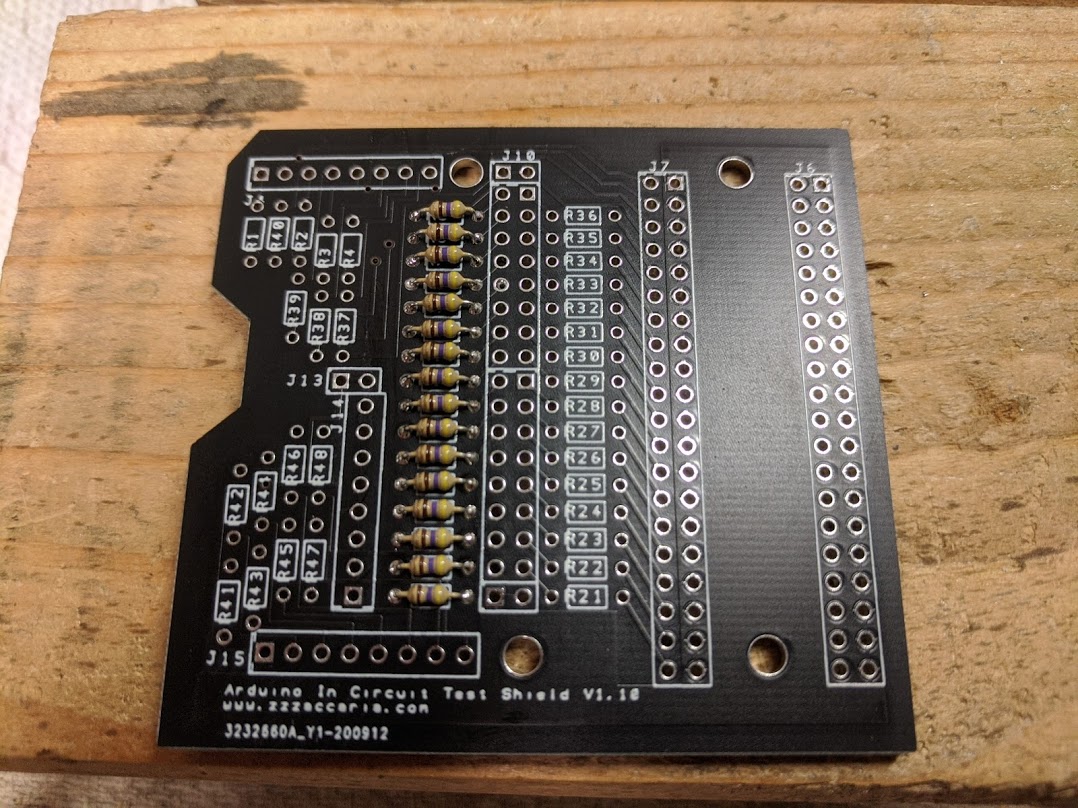
Just started building mine. It would be extremely helpful if somebody could post DigiKey part numbers for the pin headers. Also, has anybody gone ahead with the keyed boxed header pins?

Darryl
IMG_20201007_142614.jpg


dphirschler2020-10-07 19:39:28
 

JDarcade

Newbie
Credits
8CR
dphirschler said:
I
Just started building mine.  It would be extremely helpful if somebody could post DigiKey part numbers for the pin headers.  Also, has anybody gone ahead with the keyed boxed header pins?

This is what I have found. They sell them as 5 pin headers part number 952-2268-ND.
 

patzik

Active member
Credits
321CR
This week I build the ICT, compiled the firmware (still had to change the part referring to the C6809EClockMasterCpu.h as mentioned previous page) and after a few minor issues it's working great now.
I tried it on an arkanoid bootleg board I am trying to repair, and was able to verify the program roms and some of the ram, but that is about all I know how to do with it.

I see one sample project for centipede, are there no other projects available? Is there any information on how to write a project? What is possible to be tested besides roms and ram?

Any help or suggestion is appreciated.

patzik2020-10-28 20:24:10
 

patzik

Active member
Credits
321CR
Thanks for the info, wish I had the knowledge to program this myself. The windows interface looks a bit easier to 'program' for a noob like me, but still, without any instruction it's hard to figure out where to start.
 

Nes4life

Active member
vacBacker
Feedback
11 (100%)
Credits
1,113CR
You are right that there's not really a good set of docco available to explain it all. I was fortunate enough to have Paul walk me through it all when I was getting up to speed. A lot of it is reading the MAME driver and using the memory map. It can obviously only access the RAM, ROM and features that are CPU accessible. So for Arkanoid that's a Z80 and MAME code is here:
https://github.com/mamedev/mame/blob/master/src/mame/drivers/arkanoid.cpp

3x ROMs:

- 0x0000 to 0x3FFF

- 0x4000 to 07FFF

- 0x8000 to 0xBFFF

RAM:

- 0xC000 to 0xC7FF (but also possibly mirror'd from 0xC800 to 0xCFFF)

- 0xE000 to 0xE7FF (video RAM)

- 0xE800 to 0xE83F (sprite RAM)

- 0xE840 to 0xEFFF

Buttons:

- 0xD00C is the address

- Read bit 1 for P1 Start button

- Read bit 2 for P2 Start button

- Read bit 3 for Service button

- Read bit 4 for Tilt button

- Read bit 5 for Coin 1

- Read bit 6 for Coin 2

Player Button:

- 0xD010 is the address

- read bit 1 for player button 1

- read bit 3 for player button 1 on a cocktail cab

DIPS:

- 0xD018 (?) is the address

- bit 1 for 'allow continue'

- bit 2 for 'flip screen'

- bit 4 for 'difficulty'

- bit 5 for 'bonus life'

 

yorkshire_spam

Active member
vacBacker
Credits
763CR
I'm in a similar position... I want to adapt the 8080 based Space Invaders stuff to test a Universal Cosmic Monsters PCB... same MAME driver as SI, 8080bw.c but despite my software dev/electronics background I'm struggling a bit to see what I need to do to make it work with the tester....
 

Nes4life

Active member
vacBacker
Feedback
11 (100%)
Credits
1,113CR
It's got different ROM CRCs for starters which are listed in that file. It may have different DIPS and possibly button addresses (but I've not looked). In my repo there's https://github.com/Phillrb/Arduino-ICT-PVAP/tree/master/C8080Cpu which adds support for 3 Space Invaders variants. Adding another is a case of changing the CRCs and a bit of duplication.
The MAME driver is also here: https://github.com/mamedev/mame/blob/244fd4da8f42557318580bc1e623bede66df8b6c/src/mame/drivers/8080bw.cpp

In my repo I added a script that pulls out all the index values from the ROMs:

https://github.com/Phillrb/Arduino-ICT-PVAP/blob/master/extras/rom_idx_dump.sh

It's a Linux / MacOS script though. Point it at the Cosmic Monster ROMs and you are away.

Depending on my free time I might be able to add Cosmic Monsters and perhaps even Arkanoid to my repo. No promises on when I'll get around to it though!

Nes4life2020-11-05 10:46:31
 
Top