Beginner guide to Coin Mech Wiring

Flinnster

The Dino King
vacBacker
Feedback
29 (100%)
Credits
2,566CR
That 6 way connector you linked to looks more like a CD audio connector in size. The credit board pins are pretty large. But yes because most of the pins are totally unused, you can go far smaller.
I re-used one from a Naomi cabinet, it's about 8 pins long, still works a treat.
I may even have a spare, somewhere.
 

K1ngarth3r

Active member
Feedback
20 (100%)
Credits
812CR
It's okay, I have the same size here already for another cab project (Mad Dog McCree) and tested it on the connector so know it fits :)

I've ordered a pack of 5 6 ways for £3 bargain
smiley1.gif
 

Flinnster

The Dino King
vacBacker
Feedback
29 (100%)
Credits
2,566CR
Hehe.. bargain indeed. Looks like you'll have it running pretty quickly
smiley2.gif

Get your control panel pot of 10p's at the ready!
Flinnster2017-09-22 21:31:24
 

K1ngarth3r

Active member
Feedback
20 (100%)
Credits
812CR
Should be, I've got to strip the entire coin door and respray it over the weekend.

I also need another Coin Mech (C120) and a couple of coin entry buttons (one that's on this coin door is a dummy and want the paper insert matching).
 

K1ngarth3r

Active member
Feedback
20 (100%)
Credits
812CR
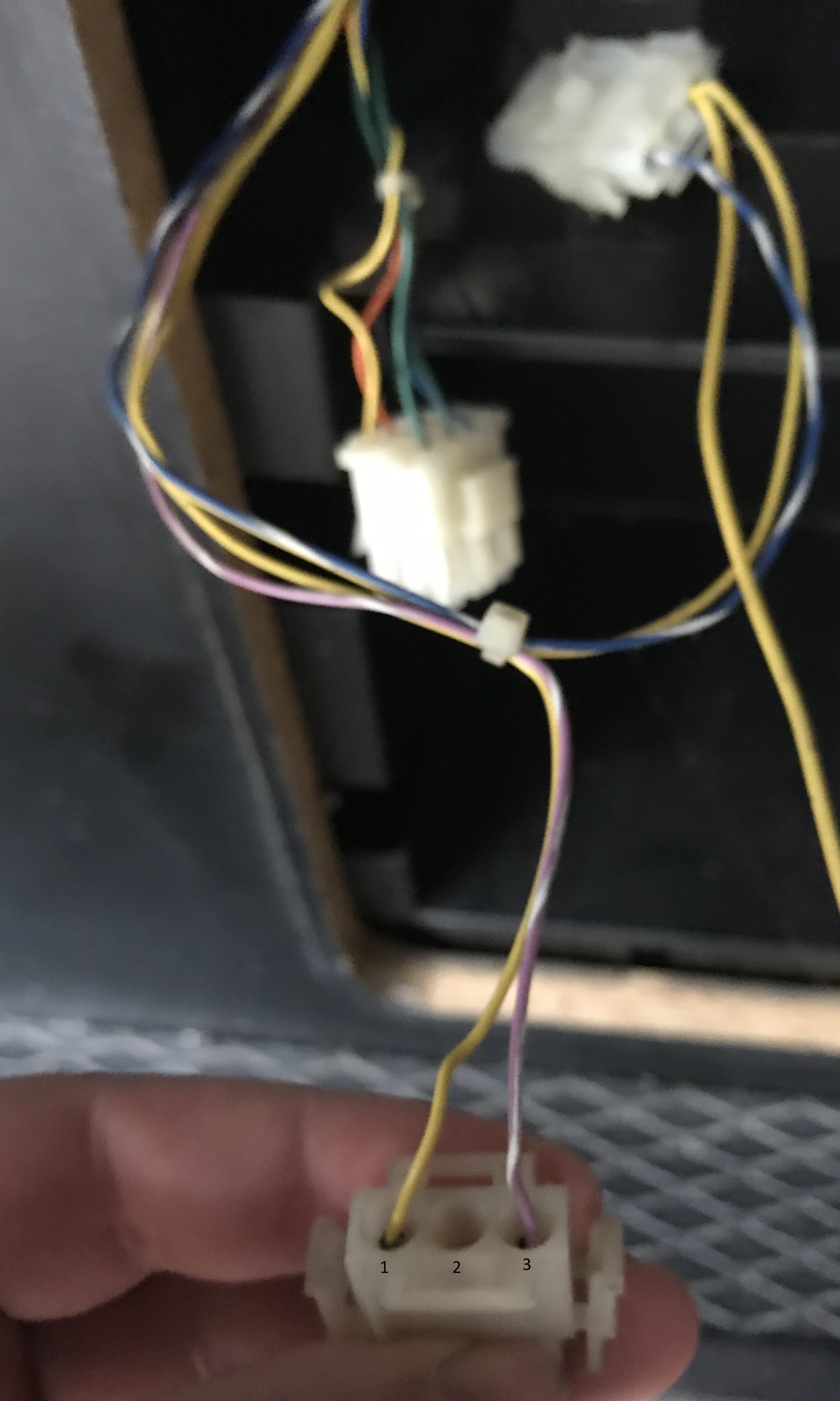
So I took some picture of the back of the connectors.

IMG_2835.JPG


9 Pin AMP

1. Blue =

2. Green =

3. Green =

4. Blank

5. Blank

6. Blank

7. Black = Coin Counter

8. Orange =

9. Yellow = 12v

IMG_2836.JPG


3 Pin AMP

1. Yellow = 12v

2. Black =

3. Pink / White = Pulse 1 Credit

Spade Connector

1.

Credit Board

1. SW1

2. SW2

3. 0V

4. 0/P2

5. LAMP

6. 12V

7. MET

8.12V

9. 0/P1

10.0V

11.KEY

12. 12V

Lamps

Both lamps have two connectors for a small spade connection.

K1ngarth3r2017-09-26 13:38:33
 

K1ngarth3r

Active member
Feedback
20 (100%)
Credits
812CR
These are the mappings I need, I've added what I think they should be based on the machine owners manual but will need to track these cables back to the JAMMA harness and Power Supply to be sure they're wired up as per the manual.

WiringDiagram.jpeg


K1ngarth3r2017-09-26 15:19:07
 

K1ngarth3r

Active member
Feedback
20 (100%)
Credits
812CR
It appears that all the cables have been replaced with different colours from the JAMMA harness > Power Supply > Connectors for the most part.

I'm tempted to re-wire everything in the correct colour as per the manual.

Here's what the manual said the wiring should look like (bearing in mind this is for the US cabinet and not the Atari Ireland cab which I have).

Manual for Pit-FighterActual WiringManual Sorted A/Z
JAMMACOLOURROLEJAMMACOLOURROLECOMMENTJAMMACOLOURROLECOMMENT
10BNSPKR+1PurpleGndNeed to check power
supply hook ups
1BN+5V RTNPower Supply
LWSPKR-2PurpleGndNeed to check power
supply hook ups
2BNRTNPower Supply
17W/BKSPARE3Red+5 voltsNeed to check power
supply hook ups
3R +5VPower Supply
18W/BNUP 14Blue+5 voltsNeed to check power
supply hook ups
4R/W+5VPower Supply
19W/RDOWN 15Orange- 5 voltsNeed to check power
supply hook ups
5OR-5VPower Supply
20W/ORLEFT 16Yellow+12 voltsNeed to check power
supply hook ups
6Y+12 voltsPower Supply
21W/YRIGHT 17 Key
22W/GNPUNCH 18White / BlueCount 1
23W/BUKICK 19 Lock 1
24W/VJUMP 110GreySpkr + 10BNSPKR+
25W/GYSPARE11 Opt.
28VSPARE12RedVid-red 12R RED
DR/W+5V13BlueVid-blu 13BUBLUE
27BK/WSW GND14BlackVid-gnd 14BKVIDEO RTN
UY/BKSPARE15 Test Sw
VY/BNUP 216YellowCoin-1 16BK/YCOIN 1
WY/RDOWN 217White / BlackStart 1 17W/BKSPARE
XY/ORLEFT 218White / Brown1P UP 18W/BNUP 1
YY/WRIGHT 219White / Red1P Down 19W/RDOWN 1
ZY/GNPUNCH 220White / Orange1P Left 20W/ORLEFT 1
aY/BUKICK 221White / Yellow1P Right 21W/YRIGHT 1
bY/VJUMP 222White1P Butn 1 22W/GNPUNCH 1
cY/GYSPARE23White1P Butn 2 23W/BUKICK 1
dGY/WSPARE24White1P Butn 3 24W/VJUMP 1
eBK/WSW GND25WhiteOpt. 25W/GYSPARE
PBNCOMP SYNC26PurpleOpt.
14BKVIDEO RTN27 Gnd 27BK/WSW GND
13BUBLUE28GreenGnd 28VSPARE
NGNGREEN 28BK/WSW GND
12R REDA Gnd ABN+5V RTNPower Supply
BBU/WCOIN CNTR 1B Gnd BBU/WCOIN CNTR 1
fBK/WSW GND BBN+12V RTNPower Supply
TBK/ORCOIN 2CRed+5 volts CR +5VPower Supply
16BK/YCOIN 1DRed / White+5 volts DR/W+5V
28BK/WSW GNDEOrange-5 volts EOR-5VPower Supply
4R/W+5VFYellow+12 volts FY+12 voltsPower Supply
6Y+12 voltsH Key
FY+12 voltsJWhite / PurpleCount 2
3R +5VK Lock 2
CR +5VLWhite Spkr - LWSPKR-
ABN+5V RTNM Opt.
1BN+5V RTNNGreenVid-grn NGNGREEN
BBN+12V RTNPGreyVid-Sync PBNCOMP SYNC
2BNRTNR Svc Sw
5OR-5VS Spare
EOR-5VTOrangeCoin-2 TBK/ORCOIN 2
UYellow / BlackStart 2 UY/BKSPARE
VYellow / Brown2P Up VY/BNUP 2
WYellow 2P Down WY/RDOWN 2
XYellow / Orange2P Left XY/ORLEFT 2
YYellow / White2P Right YY/WRIGHT 2
ZYellow 2P Butn 1 ZY/GNPUNCH 2
aYellow / Blue2P Butn 2 aY/BUKICK 2
bYellow 2P Butn 3 bY/VJUMP 2
cYellow / GreyOpt. cY/GYSPARE
dGreyOpt. dGY/WSPARE
e Gnd eBK/WSW GND
fBlackGnd fBK/WSW GND

The next step is to check which cables go to what on the power supply I guess.

K1ngarth3r2017-09-27 09:26:15
 

K1ngarth3r

Active member
Feedback
20 (100%)
Credits
812CR
Not yet, I'm still in the process of determine what's weird up where.

At the moment it almost appears there's not enough connectors to go to the credit board (or minimum at least).

I tempted to rewire absolutely everything
smiley18.gif
but might settle for just following the cables and cable managing it a bit with some labelling to make it easier to service in the future.
 

Flinnster

The Dino King
vacBacker
Feedback
29 (100%)
Credits
2,566CR
Total rewire may be overkill yeah, but bare in mind that a prevous owner/operator may have hacked around in their own way, which is why things are not matching 100%.

For sure unless you are after 100% authenticity you can ignore coin meters and coin-lockout pins.

Personally (and as I have multiple cabs) I'd really stick to the modern standard of black wires for ground, red for +5, green for -5 if it's actually needed, and yellow for +12.
You really don't want to be connecting anything from that power stuff to the wrong place, ever.
 

K1ngarth3r

Active member
Feedback
20 (100%)
Credits
812CR
I'm going for 100% authenticity for all my cabs but as long as I can tidy up the existing cabling I'll leave it as it is.

Once I have worked out what goes where I might need help figuring out the connections to the credit board and out the credit board.

For the two lamps on the coin door I guess its 12V and GND but there is a pin for LAMP on the credit board which is kind of confusing.
 

Flinnster

The Dino King
vacBacker
Feedback
29 (100%)
Credits
2,566CR
Yep I don't think it matters what you do with the coin door bulbs actually. You could take the connection from the credit board, or just connect 12v + GND directly from your loom itself (this is what I've done).

I'm sure the reason for the credit board 'lamp' connection was so that the credit board could flash the coin light for various things. But I've not yet tried that myself.
 

Zipper

User
Credits
76CR
I think lamps flash when game is partially credited up. e.g. after putting 10p into a game set at 20p a credit.
I'm personally a big fan of the straightforward mechanical, 1 coin = 1 credit, mechs!
 

K1ngarth3r

Active member
Feedback
20 (100%)
Credits
812CR
The lamp feature sounds amazing :D - So would I hook that up to the 12V or the GND? Or does it need to be a compatible lamp holder?

The Coin mech needs +5v or +12v and GND?

I guess everything else to the credit board is just as per Label? to JAMMA / Power Supply, I guess the complications are when things aren't quite matching when it comes to the wording.

For example:

Credit Board

1. SW1

2. SW2

3. 0V

4. 0/P2

5. LAMP

6. 12V

7. MET

8.12V

9. 0/P1

10.0V

11.KEY

12. 12V

Would be good to have a summary of what each one of these do?
 

Flinnster

The Dino King
vacBacker
Feedback
29 (100%)
Credits
2,566CR
I would connect the bulb first to LAMP & GND, so 5 and 3 lets say. If it doesn't light up, then you know the LAMP pin is basically acting as a GND switch.

So then try connecting the bulb to LAMP & 12v (pins 5 and 6).

If you get exciting things happening, show us what it's doing and I'll try wiring up mine that way! (All set to 20p per credit, 50p for 3, and I have tubs of 10p coins on my CPs)
smiley4.gif


Your credit board pins, I have excel boards not klingon ones but I'd say something like this...

1. SW1 ---> possibly a coin lockout override for coin1?


2. SW2 ---> possibly a coin lockout override for coin2?

3. 0V ----> Ground for switches above?


4. 0/P2 -----> Coin 2 input, goes to pin T on jamma edge


5. LAMP ------> Coin bulb


6. 12V -------> 12V out to the bulb, possibly?


7. MET -----> Coin meter / mechanical counter


8.12V -------> Probably 12v out to the 12v powered coin meter


9. 0/P1 -----> Coin1 input, goes to pin 16 on jamma edge

10.0V -----> Ground, pin 1/2 on the jamma edge


11.KEY -----> plastic blocker / no pin on the connector


12. 12V -------> 12V in from the jamma edge, jamma pin 6

Flinnster2017-09-27 14:28:06
 

K1ngarth3r

Active member
Feedback
20 (100%)
Credits
812CR
Will do
smiley1.gif


So this is what I think the credit board does, just wondering what MET means?

PinRoleDescription


1
SW1Price of play for
first game
2 SW2Price of play for
second game
3 0VGround to Power
Supply
4 0/P2Coin 2
5 LAMPPulses coin door bulb
6 12V12V to Power Supply
7 MET?
812V12V to Coin Counter
9 0/P1Coin 1
100VGround to Buld /
Counter
11KEYNothing
12 12V12v to Coin Door
Bulbs

K1ngarth3r2017-09-27 14:21:19
 

K1ngarth3r

Active member
Feedback
20 (100%)
Credits
812CR
Cool, so MET isn't used for the coin counter then? Would that be for something like a digital counter such as the type you'd see on Dragon's Lair I wonder?
 

Flinnster2

Newbie
Credits
6CR
K1ngarth3r said:
Cool, so MET isn't used for the coin counter then? Would that be for something like a digital counter such as the type you'd see on Dragon's Lair I wonder?

No it is the coin counter / meter. Just fires a pulse that makes the meter increment the dial numbers by one (or click madly if something has gone wrong!)
 
Top