Dot matrix display help

simonden

Active member
vacBacker
Feedback
20 (100%)
Credits
1,042CR
OK, So i sent some test files for and it appears that the micro-controller is stuck in reset display mode, maybe from a stuck pin on one of the logic pins.

The 93c46 keeps getting overwritten in Bytes 00 to 95 with the pure ASCII printable codes (32-127, Hex codes 20 to 7F), which I suspect is the factory default message showing what the DMD can be programmed with.
Bytes 96-127 appear to be unused and ignored by the DMD and the micro-controller. There were characters (B and K) in Bytes 96-97 of the original file, however these appear to be just left over from the previous message (and tested with random codes in bytes 96-127).

I would suggest next steps are either to test (or just replace) the logic chips and as there are only a few other components may as well do those at same time. If that doesn't work then to attempt to read the APROM of the Micro-controller in ISP mode.

simonden2016-06-27 14:18:54
 

Ronnie Dent

Active member
vacBacker
Feedback
15 (100%)
Credits
1,206CR
Thanks Simon, when you say logic chips that would exclude the ULM2003's or 2008's I think they are? as you say there is not a lot of chips on the board so I can replace those, as for reading the aprom that would I think be beyond my programmer.

I do have a logic probe for checking stuck pins but no schematics are available for this machine,

Thanks Ronnie
 

Ronnie Dent

Active member
vacBacker
Feedback
15 (100%)
Credits
1,206CR
Had a look at the chips and I have

U7 HIN237CP [size="-1"]+5V powered RS-232[/size] transmitters/receivers

U5 and U14 TD62784AP 8CH HIGH-VOLTAGE SOURCE DRIVER

U2 CD74HC154EN IC 4-TO-16 DECODER/DEMUX 24-DIP

The other one's are ULN's

Thanks Ronnie
Ronnie Dent2016-06-27 17:56:53
 

Ronnie Dent

Active member
vacBacker
Feedback
15 (100%)
Credits
1,206CR
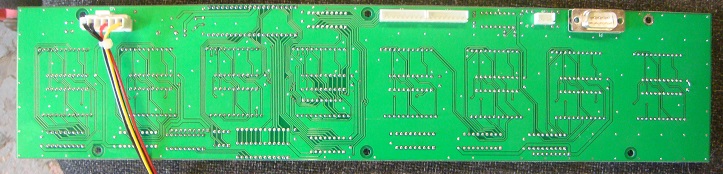
Here is a pic of the other side of the display, it has a few sockets but none used on this machine as they are covered by the backing plate apart from the Rs-232 port which has a cut out, so these displays must have been used for other things I think?

DSC04796.JPG
 

obcd

Active member
Credits
3,830CR
If there are many of those displays with the same symptoms, wouldn't a frequently failing logic chip be identified by now? The display is showing 4 text blocks of 24 characters which are exactly 96 bytes. If that behavour can't be changed, than why would the 'BK' be there in the following bytes?

Besides the test messages that started with UK, did you try any other messages that alters that BK? Maybe there is no checksum, but the microcontroller is expecting a proper termination character after every line of text like 0x0d or 0x00.

Without a working eeprom example, only the microcontroller code can be used to figure that out. If the controller was protected against reading that code, this won't work either.

I am sure it's possible to create some schematics following the pcb tracks as such displays are very symmetrical. The small white connector next to the DB9 simply carries the same RS232 signals as the DB9. No idea what the other 2 are 4.
 

Ronnie Dent

Active member
vacBacker
Feedback
15 (100%)
Credits
1,206CR
Thanks obcd, I'm trying to follow what is being said but it's all beyond me, hopefully Simon Phil or Muppz will pick up on that.

I did tonight send an email to Tecway Developments whom I think made these machines, hopefully I will get a reply.

I also doubt anyone would have looked to fix this problem before me, I guess these had a short life in the arcades before they were replaced by newer machines.

Thanks Ronnie
 

Ronnie Dent

Active member
vacBacker
Feedback
15 (100%)
Credits
1,206CR
Got a fairly swift reply from Tecway, have replied asking for schematics and the display files.

Dear Ronnie: C.C. Sandy

Acknowledge the receipt of your email.

What kind of parts you need? I am sorry that Kash Kong pusher has exceeded 5 years spare parts supply period. We could not provide some parts.

Attached above is our updated catalougues for your reference. If you need additional information to our games, pls just let me know.
 

Ronnie Dent

Active member
vacBacker
Feedback
15 (100%)
Credits
1,206CR
smiley18.gif


Dear Ronnie:

Thank you for your email.

Did you buy Kash Kong from UDC or from whom?

I am sorry that I contacted the original maker of this game who could not provide any manual or schematic drawings for the machine.

Sorry that I could not help on this case.
 

obcd

Active member
Credits
3,830CR
https://www.ukvac.com/forum/data/uploads/2289/kkong2.zip

I am afraid that's how companies work nowadays.

I am even suprised they replied on your mail. Sometimes they don't.

I tried to send another file (not sure if it worked.) It basically puts some text and terminates it with a 0x13 0x00. It's a wild guess. Just Unzip and burn the 93C46 with it as bin format. Install in the display and turn it on. See if it makes a difference. If everything remains as before, you can reread the eeprom to figure out if it reverted to the default message again.
 

Ronnie Dent

Active member
vacBacker
Feedback
15 (100%)
Credits
1,206CR
obcd said:
https://www.ukvac.com/forum/data/uploads/2289/kkong2.zip

I am afraid that's how companies work nowadays.

I am even suprised they replied on your mail. Sometimes they don't.

I tried to send another file (not sure if it worked.) It basically puts some text and terminates it with a 0x13 0x00. It's a wild guess. Just Unzip and burn the 93C46 with it as bin format. Install in the display and turn it on. See if it makes a difference. If everything remains as before, you can reread the eeprom to figure out if it reverted to the default message again.

Thanks obcd, will give that a try and keep fingers crossed.

Thanks Ronnie
 

Ronnie Dent

Active member
vacBacker
Feedback
15 (100%)
Credits
1,206CR
I got the bin file fine thanks, but it's just written over your code again and never displayed your test message! I'm also using a new eeprom 93c46. I wonder what the secret is to crack the code?

Thanks Ronnie
 

obcd

Active member
Credits
3,830CR
The 10Ct message could help.

Maybe those displays are using a controller with a different firmware that displays the 10ct instead of the text you are seeing. In that case, it's possible that their eeprom got reprogrammed to the standard message as well and it wouldn't be helpfull.

Do you have a pc with a serial port, or a "serial 2 usb" dongle? We could try that approach. (As I don't see any other approaches anymore.)
 

obcd

Active member
Credits
3,830CR
Normally, you will only need pin 2, 3 and 5

Pin 5 is GND

Pin 2 is either RXD or TXD

If you measure between -6 and -10V on the pin, it's TXD and should be connected with the RXD on the other side.

Yes, the display needs to be powered for this. You can use the PUTTY program to see if something happens on the serial port. (As hyperterminal is no longer present in windows 10) You will need to try different baudrate settings to see what it's using

The cable you showed the link 4 has no way to open the plug. If it's not correctly connected, you can't fix it. So, yes, it might be best to make your own cable.
 

Ronnie Dent

Active member
vacBacker
Feedback
15 (100%)
Credits
1,206CR
Thank you, right checked all that pin 3 is -10v well -9.75v. so should pin 3 go to pin 3 on the computer side also or pin2?

Thanks Ronnie

Edit I think I understand now so pin3 will go to pin2 on the PC and pin2 will go to pin3 on the PC?
Ronnie Dent2016-06-29 10:29:58
 

Ronnie Dent

Active member
vacBacker
Feedback
15 (100%)
Credits
1,206CR
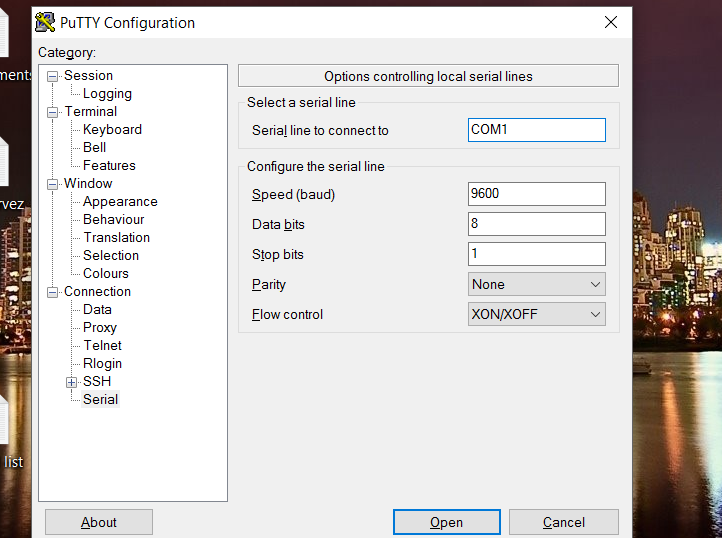
Got it all set up and hooked to the pc, got Putty open but no idea what to do? when I click open nothing happens pc just tones like it needs something else?

Screenshot_2.png
 

obcd

Active member
Credits
3,830CR
As pin 3 is having the -9.75V, it should go to the pc pin that is not having that voltage. So, yes, that should be pin 2 on the pc.

I would start with Flow Control set to None.

Commonly used baudrates are 9600, 19200 and 115200.

If you click open, putty should show you a black terminal window. Power the display after that and see if anything appears on the screen. Hit Enter a few times (with the focus on the putty window)

Maybe try h <CR> help <CR> ? <CR> and see if you can get the display it's attention.

If none of those work, you can try the same with a different baudrate.

If really nothing works, we can try to force the system into bootloader mode, but first we should try all other options.
 
Top