
You are using an out of date browser. It may not display this or other websites correctly.
You should upgrade or use an alternative browser.
You should upgrade or use an alternative browser.
Dot matrix display help
- Thread starter Ronnie Dent
- Start date

obcd said:The 93C46 should be supported as well.
So, reading and programming shouldn't be a problem.
Figuring out what data it need might be a problem.
Yes that might be the deal breaker! hopefully I will manage to fit it in my programmer and see what it has if anything, I don't suppose it could be another fault where the device is not being selected?
Thanks Ronnie
Sorry would I select device 8bit or 16 bit? I'm thinking 8bit!
Thanks Ronnie
Thanks Ronnie
Nothing is ever easy! just re installed the software as I upgraded to win10 last year and never used the programmer, it installed ok but every time i try to do anything a box pops up saying illegitimacy user id detected
Ronnie
Ronnie
Maybe a virtual xp environment can fix that issue? You can use virtualbox for that.
If the programmer is using an usb connection, it can be forwarded to the virtual machine.
Another thing you could try is Right clicking and choosing "Run As Administrator".
You can choose 8 bit mode. The results should be identical in 16 bit mode.
The interface between the microcontroller and the eeprom is pretty simple. You just need a clock, a DI and a DO line. THe 2 data lines are the data from cpu to eeprom and the data from eeprom to cpu. It's probably a direct connection between the 2 chips. CS can be used but can also be permanently connected to GND. The mode line (8 bit or 16 bit) probably is directly connected to VCC or GND as well.
obcd2016-06-22 17:48:42
If the programmer is using an usb connection, it can be forwarded to the virtual machine.
Another thing you could try is Right clicking and choosing "Run As Administrator".
You can choose 8 bit mode. The results should be identical in 16 bit mode.
The interface between the microcontroller and the eeprom is pretty simple. You just need a clock, a DI and a DO line. THe 2 data lines are the data from cpu to eeprom and the data from eeprom to cpu. It's probably a direct connection between the 2 chips. CS can be used but can also be permanently connected to GND. The mode line (8 bit or 16 bit) probably is directly connected to VCC or GND as well.
obcd2016-06-22 17:48:42
thanks obcd, I did try running as administrator but no change, the problem is installing the USB driver I tried running in compatibility mode for windows 7 but that way it says I need to run as admin or sign in! which I am anyway, when I try it as normal it says unable to install INL or something of that nature!
The wife has an old laptop with win7 but forgot the password

I know it works on that OS
Thanks Ronnie
The wife has an old laptop with win7 but forgot the password
I know it works on that OS
Thanks Ronnie
I managed to read the chip, not sure if it contains anything legible? it's 128 bytes will try and attach it here if you could look at it for me obcd please, not sure if it will tell you anything lol,
thanks Ronnie
thanks Ronnie
It looks like the characters you see scrolling on the display. Maybe try reprogramming it with another text for testing. Simply fill in hex FF for the bytes it's not using (at the end) It might just show that text or it might simply reprogram the chip with what you have now.
Is it suposed to be able to show green letters as well, or just the red ones?
You will need a hex editor to create that file.
Winhex is a program that is free and can do the job.
Is it suposed to be able to show green letters as well, or just the red ones?
You will need a hex editor to create that file.
Winhex is a program that is free and can do the job.
Thanks I have never seen it work correctly but on first boot it displays KEAON which flashes red green, I have no clue about hex editing so would not know where to start to be honest! It could take me a looong time to figure that out.
If this file looks like what it displays on the matrix now could it be that this stores the characters and the processor has the messages?
Thanks Ronnie
If this file looks like what it displays on the matrix now could it be that this stores the characters and the processor has the messages?
Thanks Ronnie

Here you go Ronnie, try reprogramming with this. https://www.ukvac.com/forum/data/uploads/1510/rd.zip
simonden said:Here you go Ronnie, try reprogramming with this. https://www.ukvac.com/forum/data/uploads/1510/rd.zip
Thanks Simon that's great, so I will need to erase the chip first?
Thanks Ronnie
Yes, but your programmer should be able to do that as part of the programming as it is electronically erasable.
EDIT: as a side note a 93c46 is a 'Serial' EEPROM which means that you can either program with a programmer or via a serial interface hence the RS232 connectors, so it was easier for field engineers to change messages without having to get to/remove the chip. i am pretty sure that the current message is just a default factory message which shows off the capabilities of what can be programmed. Hope that you like the new message

simonden2016-06-23 10:43:41
EDIT: as a side note a 93c46 is a 'Serial' EEPROM which means that you can either program with a programmer or via a serial interface hence the RS232 connectors, so it was easier for field engineers to change messages without having to get to/remove the chip. i am pretty sure that the current message is just a default factory message which shows off the capabilities of what can be programmed. Hope that you like the new message
simonden2016-06-23 10:43:41
Thanks again Simon, away to give it a bash
Seems I programmed it right, but apart from the start up message the display stays blank now? this is how it looks after programming, when I pressed programme a check box came up with all sorts of tick boxes 2 were hex one intel other Motorola, I left it on intel but if error ed so I changed to the other hex option and it seemed to work!
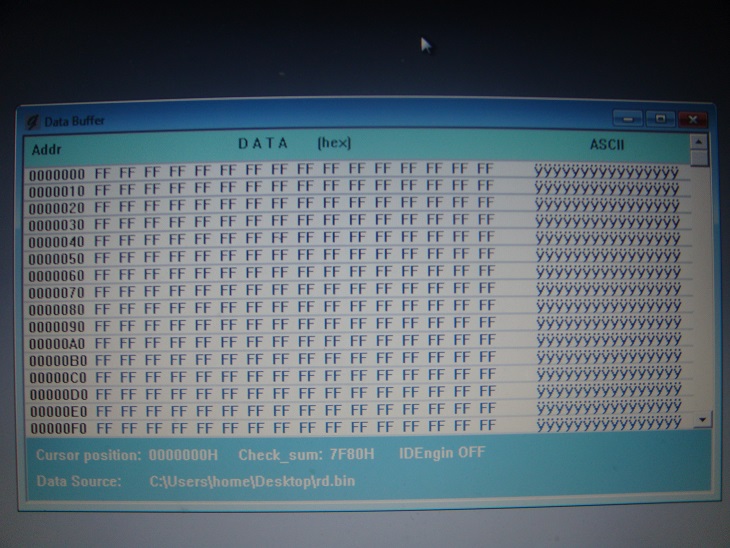
hmm well you shouldn't be seeing FF all the way as that is just showing as erased, not -reprogrammed. i actually put the following recurring text in that file:
55 4B 56 41 43 20 52 75 6C 65 73 20 4F 4B 21 20
Try programming again.
simonden2016-06-23 11:22:31
55 4B 56 41 43 20 52 75 6C 65 73 20 4F 4B 21 20
Try programming again.
simonden2016-06-23 11:22:31
Strange, when I load either your hex or the one I copied into the
buffer it shows the same on screen as above? here is a pic of that check
box that pops up when I select the file
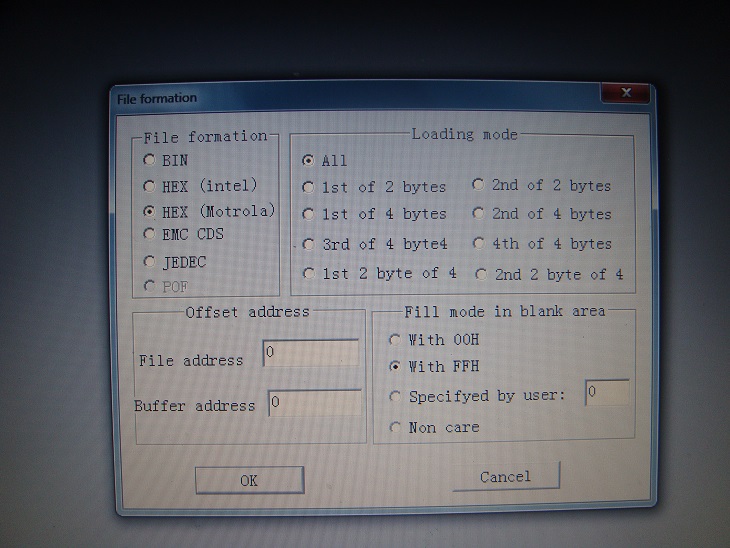
buffer it shows the same on screen as above? here is a pic of that check
box that pops up when I select the file
simonden said:Load it as a BIN file
Ah that looks different Simon, sorry me thick lol will try again!
It's working again, nothing legible looks mostly the same 0 to 9 A to Z and a bunch of characters but might be slightly altered?
Thanks Ronnie
Thanks Ronnie