You are using an out of date browser. It may not display this or other websites correctly.
You should upgrade or use an alternative browser.
You should upgrade or use an alternative browser.
Emulator Help
- Thread starter RS200Dan
- Start date


If it were me I would do the following:
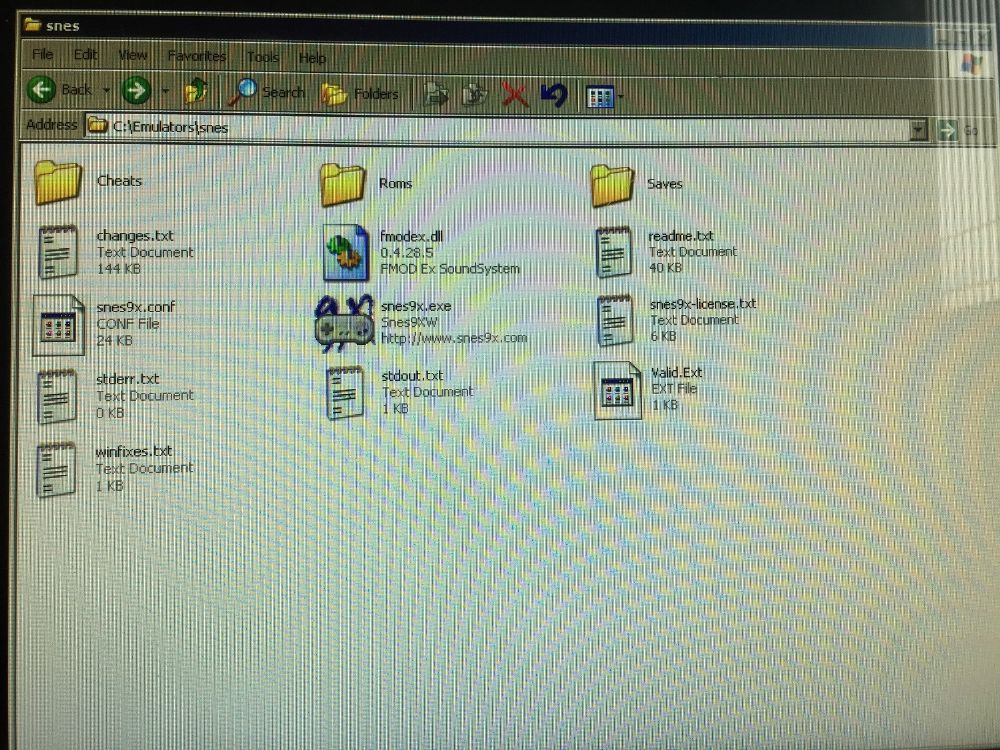
Create a new folder called SNES in C:Emulators so you get:
C:EmulatorsSNES
Copy the SNES9X files into C:EmulatorsSNES. If there isn't a folder called C:EmulatorsSNESRoms then create it. Then copy the Super Mario Kart scf file into C:EmulatorsSNESRoms.
Create a new folder called SNES in C:Emulators so you get:
C:EmulatorsSNES
Copy the SNES9X files into C:EmulatorsSNES. If there isn't a folder called C:EmulatorsSNESRoms then create it. Then copy the Super Mario Kart scf file into C:EmulatorsSNESRoms.
Right I have done all that (thanks for putting it in an easy to understand way) but Mario kart still does not show up on the games menu, I have right clicked and refreshed but still nothing. If I right click it says switch emulator but snes9x does not show up, should I go back to the emulator folder and open the snes9x folder and then click the emulator application file, will this install it on the machine?
Thanks again for all the help.
Thanks again for all the help.
Right-click on the game menu and select Options/Configuration. Then click on the Other Emu Config tab and click the New button. Give the new emu a name, such as SNES. In the Basics tab, fill in where the snes9x executable is, and where the ROMs are stored (you can click on the ... button to browse to where they are). Click OK.
Right, given you have those dirs set up here's what to do.
Run snes9x from the dir, set up resolution and controls in the options, once that is done chose to load a game from within it, play mario kart then press ecs to quit out of it, once that is done quit snes9x.
Open up zsnesw.cfg with notepad in the snes9x folder, scroll down untill you find GUIDisable = 0 and change it to GUIDisable = 1 then save and exit.
Run Mala again, go into the settings, select the other emu config tab, create a new entry called SNES, then fill in or use the search (triple dots box) to tell it the dirs you have the exe and the roms in.
Now quit out of the menu and you should have a snes option to chose from, it will scan for roms and the you can select one to play.
And done!
Run snes9x from the dir, set up resolution and controls in the options, once that is done chose to load a game from within it, play mario kart then press ecs to quit out of it, once that is done quit snes9x.
Open up zsnesw.cfg with notepad in the snes9x folder, scroll down untill you find GUIDisable = 0 and change it to GUIDisable = 1 then save and exit.
Run Mala again, go into the settings, select the other emu config tab, create a new entry called SNES, then fill in or use the search (triple dots box) to tell it the dirs you have the exe and the roms in.
Now quit out of the menu and you should have a snes option to chose from, it will scan for roms and the you can select one to play.
And done!
ZedEx48K I have run the game directly from the folder and it works but the is the wrong way round, it needs spinning round 180 degrees. I went into the options but could not find any option to do this. How do I open up notepad in the snes9x folder? there is no option to do this.