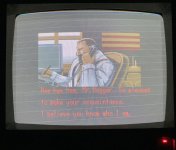
Final Fight (Soon Hwa Bootleg)

Jacmar

Active member
Feedback
1 (100%)
Credits
589CR
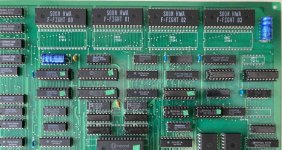
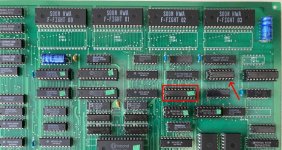
Picked this one up here from a Vaccer about a year ago. Wouldn't boot and I remember it was possibly the first non working pcb I ever bought. I had no experience or useful tools - didn't even own a scope at the time so couldn't even check the clock frequency or do other pretty basic diagnostics. Went pretty quickly into a box of 'I'll get back to that later' and there it sat until a few days ago ... As you can see it was pretty dirty and an empty socket (top right area on pic below) suggested a missing a IC ...
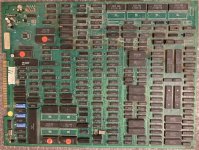
my board.jpg

For anyone with the same board , this is the Bootleg (Soon Hwa) with single OKI. ROM set ffightblb. There are quite a few PALs, GALs and HY18CV8 chips on here which don't seem to be dumped and that could be a problem but will just have to see how it goes .. powering up just gave a screen of garbage ...
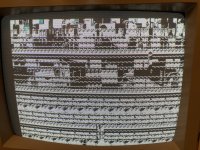
IMG_3911.JPG

Set about testing all the (testable) socketed IC's. All the RAM on this board is socketed which is really handy but only 2 of the CPU ROMs and both the Sound ROMs are in sockets.
RAM all tested good. the 2 socketed ROM's next to the CPU did not however and so I burned new ones (pgm01.3 & pgm0h.4). Also there are 3 socketed LS245's next to the jamma edge connector and 2 of those also tested bad and got replaced. All other socketed TTL tested good. The missing IC in the top right corner - fortunately I could just about make out LS163 written on the silkscreen under the socket so in went one of those ...
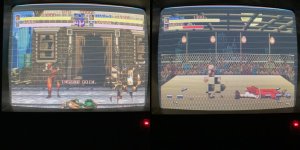
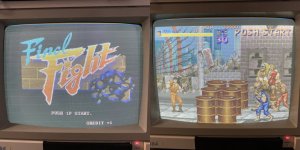
And then game booted ..sort of ... very wobbly/wavy picture at first and a 'no good' fail at 'SCROLL 1' but that cleared up with a voltage boost and then a 'no good' fail at 'OBJ RAM'
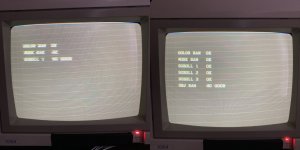
fl ram check.jpg

Which also cleared up with another voltage boost and the game started ...
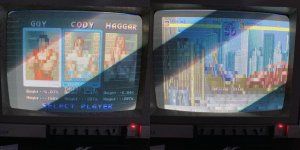
fl fgtiles.jpg

You can see that the text layer looks fine, also appears there are 2 'background' layers with one working fine (background tile layer - skyscrapers) and the other corrupted (foreground tile layer - street, buildings etc). Also, the sprite layer is missing completely ..
So at this point I set about working out which parts of the pcb circuitry handle the different layers. form the Ram test at boot you can see the program labels the layers scroll 1, scroll 2, scroll 3 and OBJ. OBJ must be the sprite layer but not sure on the others (scroll layers) these are most likely the text layer and the 2 background layers.
By shorting address pins on RAM and ROM and looking at the effect on screen it's pretty easy to work out what does what. From there you can trace to relevant TTL. the picture below shows the rough layout.
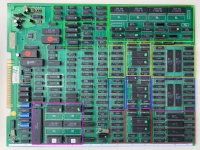
fl pcb sections.jpg

Pink section - WORK Ram - CPU / Program
White - COLOUR Ram
Red - 'SCROLL 1' - Text Layer
Blue - 'SCROLL 2' - FG Tiles
Yellow - 'SCROLL 3' - BG Tiles
Green - OBJ - Sprites

Hunting the FG tile corruption issue was fairly straight forward, probing address pins on the relevant Mask Rom's 10 & 11 (27C400 equivalent) showed some real ropey looking signals on early address lines .... Traced these address signals from the ROM's back to the outputs of a LS86 (shown below). The input signals to the LS86 looked good. Big red flag.
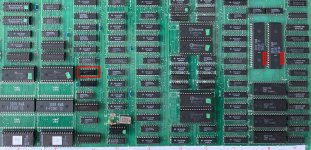
fl bad rom sigs.jpg

Made by everyone's favourite TTL manufacturer - Fujitsu. If you read online fix logs and watch videos you'll see Fujitsu TTL mentioned time and again as likely fail points and some people just swap them out soon as they see them. I've been lucky I think as I've not come across a bad one before ... maybe this is my first ... pretty confident it is bad but Sliced it to make sure ....
You can see the poor signal (on the left) and the confirmation it's bad from the slice result (on the right) below ...
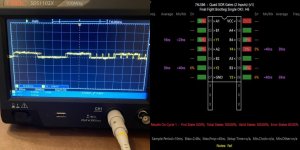
fl badls86.jpg

Cut that out and socketed in a new LS86. This fixed the FG tile layer ...
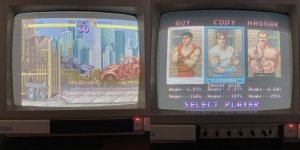
fl fg tilefix.jpg

Now need to find where the sprites are hiding. tbc ........
 

Jacmar

Active member
Feedback
1 (100%)
Credits
589CR
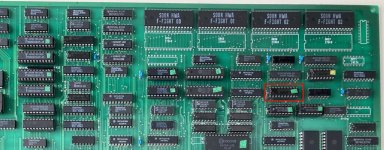
Focussing the search for the missing sprites in the area at the top of the board previously marked in green, in the area of Mask Roms F-FIGHT 00 - 03 and after a bit of probing around found something rather unusual about the socketed LS273 marked below ..

fl spr1.jpg

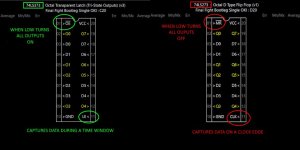
An LS273 - 8 edge-triggered D-type flip-flops, with a shared clock (CLK on pin 11) and an asynchronous master reset (/MR on pin 1)
When /MR = low - forces all outputs low regardless of clock or data. Think of it like this:
A row of 8 light switches that only change when someone rings a bell (clock). /MR is the master breaker. If the breaker is OFF, all lights are forced OFF — no matter how often the bell rings. So if the /MR pin is ALWAYS low - the chip is basically permanently turned off. And what would be the point of that ..
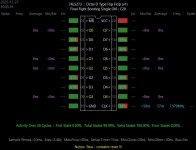
But as you can see here from the Slice of the chip ... the /MR signal is indeed stuck low, and consequently all outputs are also low despite inputs and clock all carrying healthy signals.

fl 273gnd.jpg

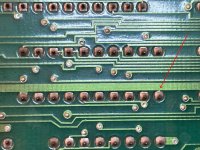
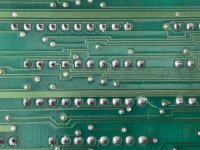
This implied an accidental short to ground on pin 1 and continuity confirmed it. Flipping the pcb over and looking on the solder side and you can see a tiny connection between the ground rail and the pin.

IMG_5942.jpg

And it looks to me like it's intentional, which makes it very weird. It also looks like the chip was originally socketed too as the soldering is all very clean and original looking. Despite it looking this way I can't think of a single reason to tie that pin intentionally to ground by the board designers. So I broke the trace (hacked at it would be a more accurate description :)

fl 273cut.jpg

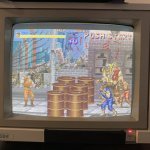
This 'turned on' the LS273 and woke up some of the sprite circuitry ......

fl spr2.jpg

I did expect to see some progress because it just seemed so wrong to have that LS273 turned off like it was but the fact it looked an intended action confuses me bigtime. It would kind of suggest the board has never ever worked properly. But why was that chip even socketed, they don't usually socket TTL at factory do they ... still lots of question regarding that ....

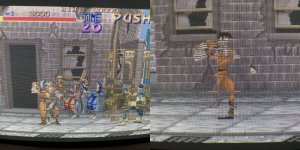
Anyway ... Progress on screen as we can now see in the pics above that some of the 8x8 sprite tiles and it looks at first as though tiles are either present and correct, or tiles are just completely missing. But sometimes tiles are rendering slightly out of position and sometimes have lines through them (below) Not that easy to see

fl spr3.jpg

During the work done so far on this board it's become clear it has stability issues. Sometimes the boot will fail on the OBJ RAM 'no good' error. I've found the boot will fail at various points depending on the voltage. Too low and it will fail on the scroll ram, turn up and it'll get to OBJ ram, turn up more and it boots fine. So it boots ok and seems stable, but then as time passes it picture can start wobbling at I need to turn the voltage down again ! It is not the RAM chips, I've tested them all in other boards and out of circuit they're all fine. I've put new ram in this board and the problems are still there. It's a big hungry board obviously and being a bootleg isn't blessed with many smoothing / decoupling caps. Voltage drop from jamma edge to other side of the board is quite big.

So at this point I add a few 220uF (biggest I had) caps and a few more little decoupling ceramics in that sprite area, in the hope to stabilise the voltage and therefore the picture on the screen. But also maybe it could help with the sprite problem as dips in voltage can cause all kinds of TTL timing issues.

IMG_5990.jpg

No change to the sprite issue but it seemed to help stabilise the board ... voltage drop across the board is now within 0.1v and it boots every time at 5.05v.

But after working on it again for a while the same problem arises and now I think about it it must be heat related. The picture wobbles only come when the board has been on for 5/10 mins or more, never at first. Now I'm thinking a chip is failing or breaking down when hot and that's causing the wobbles. How I track that down I don't really know .. maybe just leave the board on until the chip eventually fails and then it'll be easier to find ?

Either way I've also still got a missing sprite issue and can't find anything else obvious to chase down. Spent a number of hours checking all the local TTL, RAM and ROM signals, nothing stands out. There are a few oddities here and there but without schematics it's much more difficult to nail down things as an actual problem or just a quirk of the board !!
It does look similar to a sprite problem I had recently with a Double Dragon board. That proved to be a bad PROM chip that handled 'sprite timing' and there are 2 HY18CV8 chips in the sprite generation circuitry on this board which I can probe the signals of but can't tell if they're right or wrong ... If one (or both) of those are faulty then this board won't be fixable but not sure how I would know .....
Head has got a bit battered with it now so will take a break and come back at a later date with a fresh mind ... tbc
 
Last edited:

qjuk

Active member
vacBacker
Feedback
48 (98%)
Credits
1,695CR
When working on repairs, I’ll often run my finger/back of my hand over the chips to see if any appear to be getting too hot. It’s not an exact science (as some chips run hotter than others), but I’ve managed to flag up a couple of suspects/bad ic’s by doing it this way. At least if you find a chip that you think might be running too hot to the touch, you can delve deeper.

I seem to have the opposite problem to you with one of my Arkanoid boards. For the first 5 minutes or so the Vaus moves erratically left and right when controlling it, once the board has warmed up, it plays absolutely perfectly. In my case, it looks like I’ve got a cold chip somewhere. By the time you start looking around trying to track it down, the board has warmed up, it’s running fine and everything seems to check out :rolleyes:
 

Martinmurphy30

User
vacBacker
Feedback
4 (100%)
Credits
365CR
Someone may of put the 273 in the socket in place of something else, a 245 with pin 1 tied to ground is an option?....and I have found freeze spray quite good at diagnosing a hot running ic...I have an original thunder hoop that played perfectly for about 5 mins then got graphically corrupt the warmer it got, pretty much removed and tested everything on the board before using freeze spray to find it was a mask ROM... never seen this before, the ROM reads fine cold, as I did read it several times...but when it was warm was corrupt.
 

Jacmar

Active member
Feedback
1 (100%)
Credits
589CR
Progress made in the mystery of the missing sprite tiles and it's largely thanks to @Martinmurphy30 and his suggestion above in the previous post !!

I'd just assumed all along that the LS273 was the right chip in the socket and the connection on pin 1 to ground must be wrong (as explained earlier), and you would think that because under the chip, through the gap in the socket, you can read the silkscreen it says LS273. But as soon as Martin mentioned maybe the LS273 in the socket may be the wrong chip and maybe it should be a 245 (as it wouldn't be odd for that IC's pin 1 to be grounded) or something similar, a little light bulb went off ....

As Martin says, that pin 1 tied to ground would sound more plausible for a chip like a LS245 (/EN active LOW on pin 1) and I thought about that but dismissed it as the inputs and outputs are laid out differently on a 245 to a 273. But what if another chip is just like a LS273, with it's inputs and outputs on the same pins, but it's pin 1 is an Enable rather than a Reset ... And there is such a chip ... an LS373 - its a latch (rather than a flip flop) but they are quite similar in how they work ... except pin 1 is an active LOW enable, (so tied to ground would make sense - always tuned ON) and pin 11 is a Latch Enable rather than a Clock (a Latch Enable gives a longer data capture time than a clock). Picture below show the difference between the 2 IC's ...

fl273vs373.jpg

So a LS373 would actually make much more sense in this situation and so I dug out a LS373 and popped it into the socket, jumpered pin 1 back to ground and fired up the game and .... things got a bit better ...

fl 373.jpg

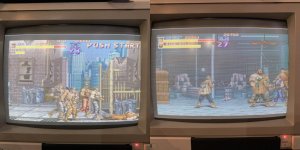
Doesn't look like much improvement on the above pictures but I was now getting sprite tiles I hadn't seen before, faces, arms, legs and when the game characters were moving around on screen pretty much all tiles were flashing in and out at different times. Still didn't look great but it was definitely better than before. Convinced this is the correct IC for the socket I've re-soldered up the ground - pin1 trace I broke earlier and removed the jumper.

OK so despite the improvement there was still a issue, but now I can see all tiles I know content is there, but not always complete or at all times. So is this a timing issue now? or another wrong chip in a socket? ... Turned out to be both !
On the picture below I have red boxed the LS273 which I've now switched for a LS373 ... and just above to the right of it is a LS163 in a socket ......

fl wrong chips.jpg

Again, I take out the chip and underneath, printed on the silkscreen is LS163 .. but what if ..... what if it's not actually supposed to be an LS163 and like before, someone has put an LS163 in there because the silkscreen says so ... it's happened already with the LS273, why not here too .....

So I go researching for IC's similar to a LS163 with a slight difference .. and step up the LS161 ...

Both 4 bit binary counters that count on the rising edge of a clock signal, the ONLY difference is the reset on pin 1.. on a LS163 (chip in socket) the reset is only checked on a clock edge (synchronous), so even if the reset goes active, nothing happens until the clock edge checks it. But on a 161, the reset happens as soon as it's activated and does NOT have to sync (asynchronous) with the clock. This small difference can have quite an effect as sprite circuits are driven by video timing, have tight windows and must reset counters exactly at tile / line / sprite boundaries.
Certainly felt like it would be worth trying ..... so out went the LS163 - in went a LS161 .... and couldn't help but laugh when I saw this ....

fl 161.jpg

I spent hours/days on this, tracing what signals went where, studying how sprite circuitry works, burned my head out with it for days ... and all along it was 2 wrong IC's in sockets. I mean I don't feel too bad I didn't get onto it sooner and I can't blame whoever put the LS273 and LS163 in those sockets because that's what the silkscreen says !!!! Just took it for granted they were right, but the smoking gun was the pin 1 tied to ground and thanks again to Martin for suggesting it may be the IC that was wrong, not the trace!

So all was looking good .... BUT then I noticed loads of random artifacting in the top portion of the screen, it didn't do it on any static screens, only gameplay and the more sprites on the screen the more of these small lines of random garbage. Popping the sprite line buffer rams out of their sockets removed all sprites from the screen (expected) but also removed all the artifacting ... so I knew this is still a sprite issue. grrrrrr. It was really difficult to get pictures of it because this graphics tile garbage flashed on and off the screen so rapidly but I've marked a few on the following picture ..... but there was loads more of them just the photo's don't really catch them, all in the top half of the screen. The more movement on the screen the more the random artifacting ....

fl art.jpg

And with this I definitely got lucky ... at first I thought ok maybe a chip on its way out, maybe actually one of the ones I put in, because I didn't notice any of this before when some sprite tiles were missing. I generally re-use TTL chips from donor boards so bound to have a few old and tired ones. Raiding my stock of TTL, I tried a few different 161's ... no change. Tried a few other LS373's ... no change. Then I came across a 74F373 and thought hmmmm this is a faster version maybe that will help, so put it in and it has cleared up all the little bits of garbage and now got a pixel perfect game !!!

fl gfx fixed.jpg

Happy Days !! 🙂
 

qjuk

Active member
vacBacker
Feedback
48 (98%)
Credits
1,695CR
Top stuff.
I’ve always said if you keep on persevering and don’t give up, you’ll get there in the end and it will be worth it.
 

Jacmar

Active member
Feedback
1 (100%)
Credits
589CR
Cheers guys, still a few things to do on this ... the stability issue which I think could actually be a sync problem, not voltage... and the sound needs checking, hopefully just a dodgy volume pot that a leg has broke off .... just not had any time to get back on it the last few days ....
I do have another Final Fight bootleg which I think might be a Final Crash, it's not in great shape but you never know do you. Sometimes the ones that don't look the best fire right up .. we'll see ... I might start it when I finish this one ..
 

Jacmar

Active member
Feedback
1 (100%)
Credits
589CR
Had a bit more of a tinker with this board as there were a few things I wasn't 100% happy with ...

Voltage is really stable now and the 'stability' problem I thought was voltage related I now suspect is just the sync and my Commodore 1084 Monitor. The sync signal from the pcb is measuring 14.7kHz which I think is on the low side and is maybe right on the edge of what the monitor can lock on to. Sometimes the image starts to wobble, sometimes it's scrolling like mad. Maybe someone who knows can tell me if this is a bit of a low sync signal for the 1084 monitor?
I need to check it in my cab to confirm, as that will handle the low sync signal better, but that's currently not kept at home so chances to do that are few and far between at the moment ...

Another thing that's bugged me with this pcb is the image on screen has always had those (slightly diagonal) retrace lines that you get on your monitor when the flyback's 'screen' adjustment is too high. I'm not very clued up on crt monitors but I think that's basically a brightness setting?
You can see what I'm talking about on the picture below ... it's not always this bad, I picked a particularly bad occurrence to illustrate, but those lines are always there

fl bright.jpg

So I looked at the pcb's RGB outputs and traced each signal from a LS174's ... the 4 outputs all go into a single resistor array (2.2k, 1k, 470, 220) and then one signal out, which goes through a 220 ohm resistor before hitting the jamma edge ... Vpp is 2-2.5v on the signals, which I thought was high, but I tested other bootlegs I've got and others have perfect picture (brightness) on the monitor and also have 2-2.5v ... either way I tried replacing the 220 ohm resistors with 470 ohm but it made no difference, well actually it may have even looked a little worse, in that the colours seemed dimmer but the overall washed out feel and the retrace lines were still there bright as ever.
So I put the 220 ohm resistors back. Not sure what else I could de here, if anyone knows what might be causing this or has any ideas to try to fix it please jump in !!
Just to clarify - this is the only pcb that looks like this on this monitor, so it's definitely this pcb ... probably just crap RGB bootleg shortcuts in design or something ...

Finally the sound ... It works now - after replacing a broken volume pot and recapping the section. But kind of wish I hadn't bothered because the sound quality is absolutely terrible. I spent a little bit of time thinking it still had an issue because it sounded so bad, but then loaded this version up in Mame and it's the same - just really really poor quality :)
 

mysticmonk

Active member
Feedback
10 (100%)
Credits
1,001CR
If someone could modify these boards (cheaply and easily being the most important bit) to get quality sound on them, it'd be a huge deal.

It seems like on many bootlegs sound quality and crappy looping is the main shortcut. Not just final fight, loads more games too.
 
Top