

I got 3 dead MVS boards from Frothmeister
the best of the 3 started up with just a static green screen, I've since learned that this a calendar issue, usually caused by a leaking battery, Sure enough all 3 boards have had battery leaks.
Anyway I was able to get this to boot up using a universe bios, but It had no sound and a problem with the Graphics as seen below

Neo Geo boot up screen works fine, and most none animated graphics are ok

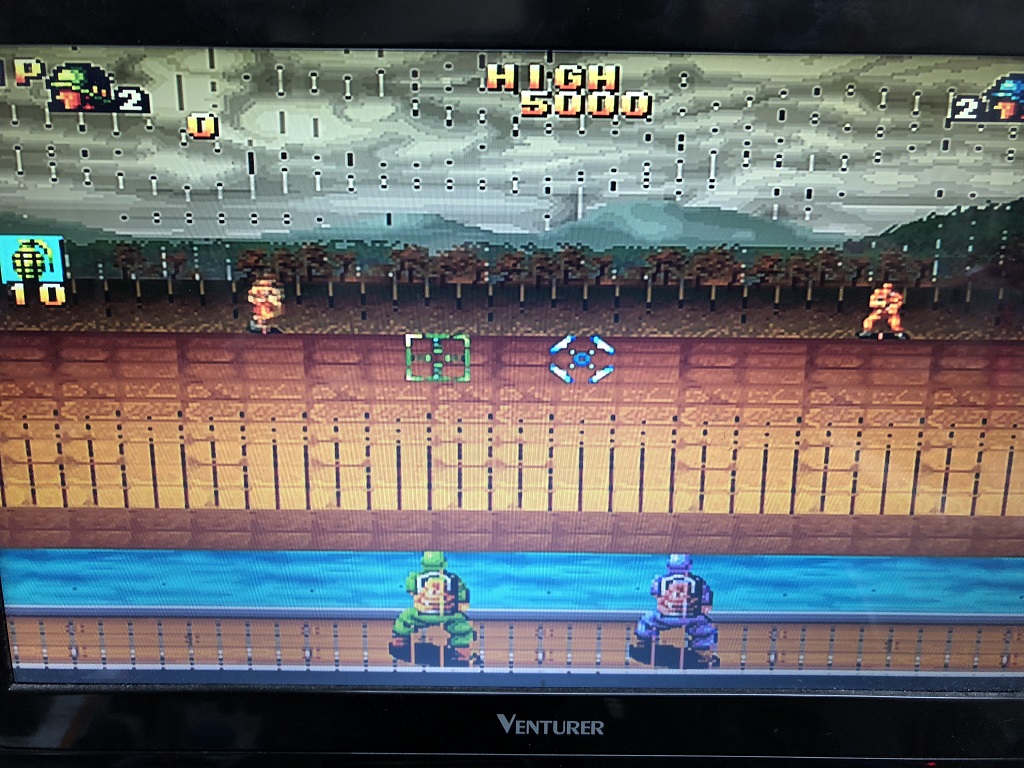
I was able to get sound working too by swapping the cartridge connector with one of the other faulty PCB's
coin up and controls work fine so this one is very close to being 100% working. just the lines to sort, am I right in thinking this is usually a RAM issue? if so how do I check which one it is?

I've been able to confirm connectivity with all the pins in the upper section near where he battery was and all the traces that look bad are still showing a good connection
Randomly probing with a logic probe did not bring this pcb back to life though

Brettster2018-03-10 16:16:14
the best of the 3 started up with just a static green screen, I've since learned that this a calendar issue, usually caused by a leaking battery, Sure enough all 3 boards have had battery leaks.
Anyway I was able to get this to boot up using a universe bios, but It had no sound and a problem with the Graphics as seen below
Neo Geo boot up screen works fine, and most none animated graphics are ok
I was able to get sound working too by swapping the cartridge connector with one of the other faulty PCB's
coin up and controls work fine so this one is very close to being 100% working. just the lines to sort, am I right in thinking this is usually a RAM issue? if so how do I check which one it is?
I've been able to confirm connectivity with all the pins in the upper section near where he battery was and all the traces that look bad are still showing a good connection
Randomly probing with a logic probe did not bring this pcb back to life though
Brettster2018-03-10 16:16:14


