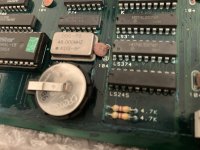
Got 2 of these non-working Mortal Kombat bootlegs from a forum member a while back. One with reported graphics issues and one dead.
Realistic aim here is to get at least one fully working from the two as there are a number of hard, if not impossible, to replace PALs, PLD's, FPGA and ZIP package DRAM on these boards ....
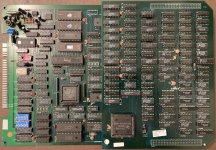

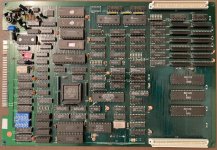
Each one is a 2 board set and the combination that produced something on screen I labelled with white stickers (top picture), the remaining combo got yellow stickers (bottom picture).
So concentrating on the 'white' board set, I checked all socketed ROM's and figured out these boards are the Victor Bootleg of rev 3.0 08/31/92. And ROM's checked out ok.
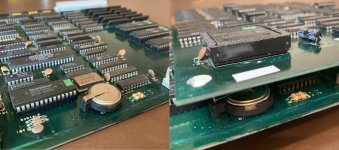
When you remove the top board you get to see what could be a major issue ....
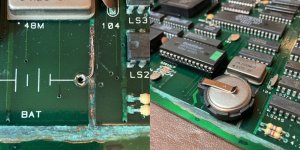
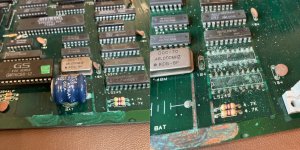
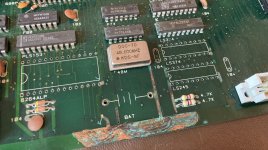
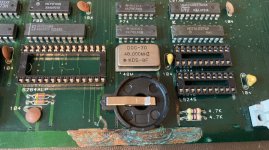
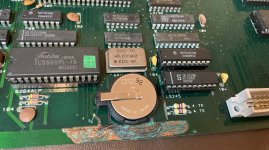
These pics taken after I removed the leaked battery ( I did this soon as I saw it) and scraped off the flaking solder mask ...
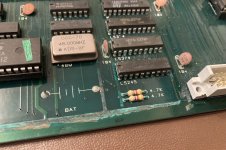
Doesn't look good (the other board is worse!) but maybe not as bad as it looks ... the corrosion doesn't seem to have penetrated the nearby TTL chip legs much, those resistors look dodgy but it does look like the larger +5v and GND tracks have 'soaked up' the majority of the leaky battery acid ...
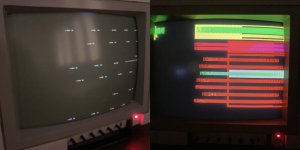
Despite this damage there is life in the game though ... and after spending some time straightening out pins on the solder side and cleaning the 2 connectors that connect the top pcb, it burst into a little bit more life and the game was clearly running ...
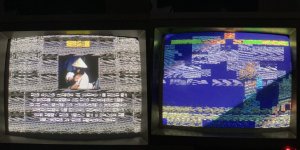
At this point I was fearing issues with some of the DRAM under the top pcb, but with no way to test it I checked anything else I could first in the hope the ZIP package ram wasn't the problem. removed the TMS34010 and checked the socket connections and swapped in and out the TMS34010 from the other (yellow) board set but this made no difference. Which probably means both are either fine (likely) or both are faulty in exactly the same way (unlikely).
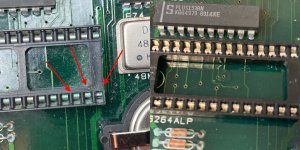
However when doing this with the larger FPGA chip on the top board I noticed some issues in the socket ...

Some of the socket pins/prongs were pushed right back in the socket, unlikely to be making any contact with the IC legs. Some on the other side of the socket too. I'm guessing this happens when you stick a probe in the gap to measure signals? So spent a while repositioning all the pins, making sure they were bent forward enough in the socket to make good contact with the IC legs. After this I was pleasantly surprised to get a pretty much fully working game ...

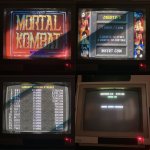
A few oddities remain .... The game is stuck on maximum credits !! and the scoreboard doesn't seem right ... No matter what I set the dipswitches to, this is how it always displays ...
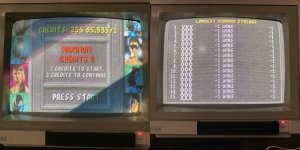
I'm thinking most of this could be due to the battery (lack of) situation. The CMOS settings stuck or something along those lines. Although setting the dipswitches to use dipswitch settings doesn't make any difference. Not sure I understand that part of it yet but I've ordered some battery holders so will put a new one in and see what happens .... I will also deal with the battery corrosion damage at that point too, but for now the game actually plays fine ... So now I can use this working set (white) to try and help fix the other set (yellow) ..... tbc
Realistic aim here is to get at least one fully working from the two as there are a number of hard, if not impossible, to replace PALs, PLD's, FPGA and ZIP package DRAM on these boards ....
Each one is a 2 board set and the combination that produced something on screen I labelled with white stickers (top picture), the remaining combo got yellow stickers (bottom picture).
So concentrating on the 'white' board set, I checked all socketed ROM's and figured out these boards are the Victor Bootleg of rev 3.0 08/31/92. And ROM's checked out ok.
When you remove the top board you get to see what could be a major issue ....
These pics taken after I removed the leaked battery ( I did this soon as I saw it) and scraped off the flaking solder mask ...
Doesn't look good (the other board is worse!) but maybe not as bad as it looks ... the corrosion doesn't seem to have penetrated the nearby TTL chip legs much, those resistors look dodgy but it does look like the larger +5v and GND tracks have 'soaked up' the majority of the leaky battery acid ...
Despite this damage there is life in the game though ... and after spending some time straightening out pins on the solder side and cleaning the 2 connectors that connect the top pcb, it burst into a little bit more life and the game was clearly running ...
At this point I was fearing issues with some of the DRAM under the top pcb, but with no way to test it I checked anything else I could first in the hope the ZIP package ram wasn't the problem. removed the TMS34010 and checked the socket connections and swapped in and out the TMS34010 from the other (yellow) board set but this made no difference. Which probably means both are either fine (likely) or both are faulty in exactly the same way (unlikely).
However when doing this with the larger FPGA chip on the top board I noticed some issues in the socket ...
Some of the socket pins/prongs were pushed right back in the socket, unlikely to be making any contact with the IC legs. Some on the other side of the socket too. I'm guessing this happens when you stick a probe in the gap to measure signals? So spent a while repositioning all the pins, making sure they were bent forward enough in the socket to make good contact with the IC legs. After this I was pleasantly surprised to get a pretty much fully working game ...
A few oddities remain .... The game is stuck on maximum credits !! and the scoreboard doesn't seem right ... No matter what I set the dipswitches to, this is how it always displays ...
I'm thinking most of this could be due to the battery (lack of) situation. The CMOS settings stuck or something along those lines. Although setting the dipswitches to use dipswitch settings doesn't make any difference. Not sure I understand that part of it yet but I've ordered some battery holders so will put a new one in and see what happens .... I will also deal with the battery corrosion damage at that point too, but for now the game actually plays fine ... So now I can use this working set (white) to try and help fix the other set (yellow) ..... tbc