
You are using an out of date browser. It may not display this or other websites correctly.
You should upgrade or use an alternative browser.
You should upgrade or use an alternative browser.
Pacman Demo
- Thread starter Hurray Banana
- Start date


Baggers69 said:Nice optimisation by the way
Maybe the original code was total crap to start with Jim

Thanks everyone.
I did try my roms in ms pac-man for mame and it worked fine. if it is I'll get hold of a ms pac board.
@Martin, Thanks for the offer Martin, but I wouldn't want to be responsible for knacking your board

Is a Ms pac-man board practically the same except for the extra ROM space? there are mighty cheapy than pac-man boards.
Ha just seen the Mame driver for ms pac, there may be issues with protection which could be a pain in the ass (unless I'm reading the notes wrong)
I must admit I'm not familiar with Pac Man hardware but I've just had a scan through the driver and it would seem that an Ms Pac Man board is just a Pac Man board with an auxiliary board plugged into the Z80 socket. Would it not be possible to just remove the auxiliary board and put a Z80 in the socket and then you'd have a Pac Man board?

I didn't think there was any such thing as a Ms Pac board specifically? Sure it's not a bootleg?
I would have thought a bootleg Pac board would be fine as long as it's not a completely different one like a Falcon or something.
I would have thought a bootleg Pac board would be fine as long as it's not a completely different one like a Falcon or something.

cmonkey said:I must admit I'm not familiar with Pac Man hardware but I've just had a scan through the driver and it would seem that an Ms Pac Man board is just a Pac Man board with an auxiliary board plugged into the Z80 socket. Would it not be possible to just remove the auxiliary board and put a Z80 in the socket and then you'd have a Pac Man board?
Essentially yes. You would obviously have to replace the Ms Pac roms with Pac Man ones but the Ms Pac board is just an extra aux board on a Pac PCB.
Thanks guys that gives me something to look. Cheers
I'd be interested in your opinions here guys.
How much time should you spend in the vsync code, currently I'm just blitting sprite data across and doing timers and counting stuff. Everything else is in the main loop which when complete sits and waits for a flag to say vsync has executed.
Question 1: Is the tilemap scroller too large to sit in the vsync code? - or does it matter if vsync takes 240 scanlines to execute as long as you can guarantee it will complete before the next interrupt triggers.
---------------
Pixel scrolling would be cool (still gonna get this working for a demo), but not practical in terms of full screen and game logic. If I go with whole tile scrolling, like my current demo, that means sprite characters maybe need to move in 8 pixel jumps.
I've knocked up a video using the 2d engine I wrote for my students to demonstrate what I want and what I think is practical. I slowed the updating down so you can see the effects:
Question 2: What should I go for?
a) What should I go for slower 8 pixel jumps horizontally
b) Attempt 4 way scrolling using 8 pixel jumps
c) go for a smaller screen area
d) small screen area but attempt to get pixel scrolling working (using 2 pixel jumps)
e) go for a speedy scrolling game to make use of the 8 pixel jumps
f) is the pixel movement for sprites and and flick scrolling a column impracticle (and awful) - that's what the top viewport is doing.
it may be a mixture of the above ideas.
Cheers
Eric
How much time should you spend in the vsync code, currently I'm just blitting sprite data across and doing timers and counting stuff. Everything else is in the main loop which when complete sits and waits for a flag to say vsync has executed.
Question 1: Is the tilemap scroller too large to sit in the vsync code? - or does it matter if vsync takes 240 scanlines to execute as long as you can guarantee it will complete before the next interrupt triggers.
---------------
Pixel scrolling would be cool (still gonna get this working for a demo), but not practical in terms of full screen and game logic. If I go with whole tile scrolling, like my current demo, that means sprite characters maybe need to move in 8 pixel jumps.
I've knocked up a video using the 2d engine I wrote for my students to demonstrate what I want and what I think is practical. I slowed the updating down so you can see the effects:
Question 2: What should I go for?
a) What should I go for slower 8 pixel jumps horizontally
b) Attempt 4 way scrolling using 8 pixel jumps
c) go for a smaller screen area
d) small screen area but attempt to get pixel scrolling working (using 2 pixel jumps)
e) go for a speedy scrolling game to make use of the 8 pixel jumps
f) is the pixel movement for sprites and and flick scrolling a column impracticle (and awful) - that's what the top viewport is doing.
it may be a mixture of the above ideas.
Cheers
Eric
Time spent in the vblank routine varies from game to game. I've reversed (either fully or partially) lots of games in my time on this planet and I've seen minimal vblank routines which complete in 1 or 2 scan lines and extensive vblank routines which take 30 to 40 scan lines. Best thing is to play a few of your favourite games in MAME and drop into the debugger (if you drop into the debugger ad-hoc then you'll usually drop in at the start of the vblank) when there's a large amount of stuff going on on-screen. Then set a breakpoint at the end of the routine and continue execution. That way when the breakpoint is triggered you can see where the raster has got to.
The golden rule is USUALLY to ensure the vblank routine ends BEFORE the raster enters the visible screen area (the area that can possibly be updated by your game engine). Don't forget that the visible screen area varies from game to game (sometimes starting at scan line 8, sometimes at 16, etc).
For comparisons :
Pac-Land - vblank start = 240, vblank end = 241 (pretty much just increments the in-game counters and polls the P1/P2 inputs)
Super Locomotive - vblank start = 224, vblank end = varies from 15 to 17
Out Run - vblank start = 223, blank end = 229
The Out Run vblank does the following :-
copies palette data from rom to palette ram (only when loading a new stage)
updates the tile maps
cycles the sky palette (only when loading a new stage)
fades palettes from one to the next (only when loading a new stage)
reads buttons/steering wheel/accelerator/brake/gear stick
does outputs (motor control/etc)
increments master game timers
increments in-game timers
updates the on-screen timers
prints number of credits in the machine
sets the position of your car on the road
checks for service mode button being pushed
It also varies based on your target hardware. This is because later/more advanced hardware will abstract tile layer scrolling, sprite movement, etc to a level where the movements will only ever happen during the vblank (as dictated by the hardware) so you're free to update sprite positions, scroll tilemaps, etc during the active raster period as the hardware won't actually move them until the vblank.
I don't know whether Pac Man hardware does this or not, I do know that L System hardware does this.
The above rules seem to only apply to sprite movement and tile map scrolling. In your case you don't actually have a scrolling tile map as such as you're cheating to scroll the tiles so I'd doubt the rules apply to that! You can usually change tiles or turn them on/off, etc instantaneously, without needing to wait for the vblank.
You'll only really find out whether you're getting artefacts (i.e. if your tilemap scroller is taking to long) by running it on real hardware. MAME lulls you into a false sense of security sometimes. Believe me, I talk from painful experience in this respect!
In theory you could run the entire game engine from inside the vblank routine, there's nothing to stop you from doing it. I've personally never seen an example of a game written that way but there's a first for everything! Like you say, if your vblank routine has not finished by the time the raster hits the position for the vblank routine to start then you WILL drop frames in your game, guaranteed.
As to which scroll method to use, well that really does depend heavily on the style of game you're planning on writing. Some game styles suit the second style better, some suit suit the third style better. You really need to decide on game style before you can make the choice of scroller style.
The golden rule is USUALLY to ensure the vblank routine ends BEFORE the raster enters the visible screen area (the area that can possibly be updated by your game engine). Don't forget that the visible screen area varies from game to game (sometimes starting at scan line 8, sometimes at 16, etc).
For comparisons :
Pac-Land - vblank start = 240, vblank end = 241 (pretty much just increments the in-game counters and polls the P1/P2 inputs)
Super Locomotive - vblank start = 224, vblank end = varies from 15 to 17
Out Run - vblank start = 223, blank end = 229
The Out Run vblank does the following :-
copies palette data from rom to palette ram (only when loading a new stage)
updates the tile maps
cycles the sky palette (only when loading a new stage)
fades palettes from one to the next (only when loading a new stage)
reads buttons/steering wheel/accelerator/brake/gear stick
does outputs (motor control/etc)
increments master game timers
increments in-game timers
updates the on-screen timers
prints number of credits in the machine
sets the position of your car on the road
checks for service mode button being pushed
It also varies based on your target hardware. This is because later/more advanced hardware will abstract tile layer scrolling, sprite movement, etc to a level where the movements will only ever happen during the vblank (as dictated by the hardware) so you're free to update sprite positions, scroll tilemaps, etc during the active raster period as the hardware won't actually move them until the vblank.
I don't know whether Pac Man hardware does this or not, I do know that L System hardware does this.
The above rules seem to only apply to sprite movement and tile map scrolling. In your case you don't actually have a scrolling tile map as such as you're cheating to scroll the tiles so I'd doubt the rules apply to that! You can usually change tiles or turn them on/off, etc instantaneously, without needing to wait for the vblank.
You'll only really find out whether you're getting artefacts (i.e. if your tilemap scroller is taking to long) by running it on real hardware. MAME lulls you into a false sense of security sometimes. Believe me, I talk from painful experience in this respect!
In theory you could run the entire game engine from inside the vblank routine, there's nothing to stop you from doing it. I've personally never seen an example of a game written that way but there's a first for everything! Like you say, if your vblank routine has not finished by the time the raster hits the position for the vblank routine to start then you WILL drop frames in your game, guaranteed.
As to which scroll method to use, well that really does depend heavily on the style of game you're planning on writing. Some game styles suit the second style better, some suit suit the third style better. You really need to decide on game style before you can make the choice of scroller style.
Thanks Adrian for this.
I think I need to write two games. One fast paced the other slower. got a couple of ideas.
I'll try the debugger drop in on a few games.
time is now limited for the next couple of weeks as I help students finish game projects, got about 50 on the go.
I think I need to write two games. One fast paced the other slower. got a couple of ideas.
I'll try the debugger drop in on a few games.
time is now limited for the next couple of weeks as I help students finish game projects, got about 50 on the go.
Hurray Banana, as cmonkey states, your vblank time varies on the project you're working on, it does what it needs to do.
As for which game you should do, it depends on what you want to do with your game.
Is it an 8 way scroller, if you're wanting to go with pixel scrolling, it will EAT all your characters just doing one block, as there are 64 ( 8*8 ) pixels of positions that each character could be, and there are 4 character positions that one character could be in, i.e. when it scrolls you overlap the next character cell, so 4*64 = all your 256 characters, this also means because you've not got any more free characters you can't have ANY tile next to another as it wouldn't scroll correctly, so you'll have to give that idea a miss.
Fast 8 pixel tile scrolling would enable you to have a huge variation in background characters, so there are gains there even though you're then limited to 8 pixel movement.
you could do 4 pixel movement? it would take a lot fewer characters to do a single character image in all permutations, and give you slower movement.
Screen coverage is again up to your personal preference.
For example with PacManicMinerMan, I was lucky as the Speccy version was only 16 pixels high, so I just put text message in the bottom area you could put a panel in the bottom area or whatever should you need extra processing time.
Hope this helps.
As for which game you should do, it depends on what you want to do with your game.
Is it an 8 way scroller, if you're wanting to go with pixel scrolling, it will EAT all your characters just doing one block, as there are 64 ( 8*8 ) pixels of positions that each character could be, and there are 4 character positions that one character could be in, i.e. when it scrolls you overlap the next character cell, so 4*64 = all your 256 characters, this also means because you've not got any more free characters you can't have ANY tile next to another as it wouldn't scroll correctly, so you'll have to give that idea a miss.
Fast 8 pixel tile scrolling would enable you to have a huge variation in background characters, so there are gains there even though you're then limited to 8 pixel movement.
you could do 4 pixel movement? it would take a lot fewer characters to do a single character image in all permutations, and give you slower movement.
Screen coverage is again up to your personal preference.
For example with PacManicMinerMan, I was lucky as the Speccy version was only 16 pixels high, so I just put text message in the bottom area
you could put a panel in the bottom area or whatever should you need extra processing time.Hope this helps.
Cheers for the advice appreciated guys, lot's to think about
Still thinking of ideas for games using this hardware, but having a lot of fun thinking of new things to try and just technically do on this hardware.
Little way from getting some working code to show you (I know how I'm gonna do this - but haven't worked out the finer data structures required or implementation specifics yet), but here's a tease of what I'm attempting to get this hardware to do.

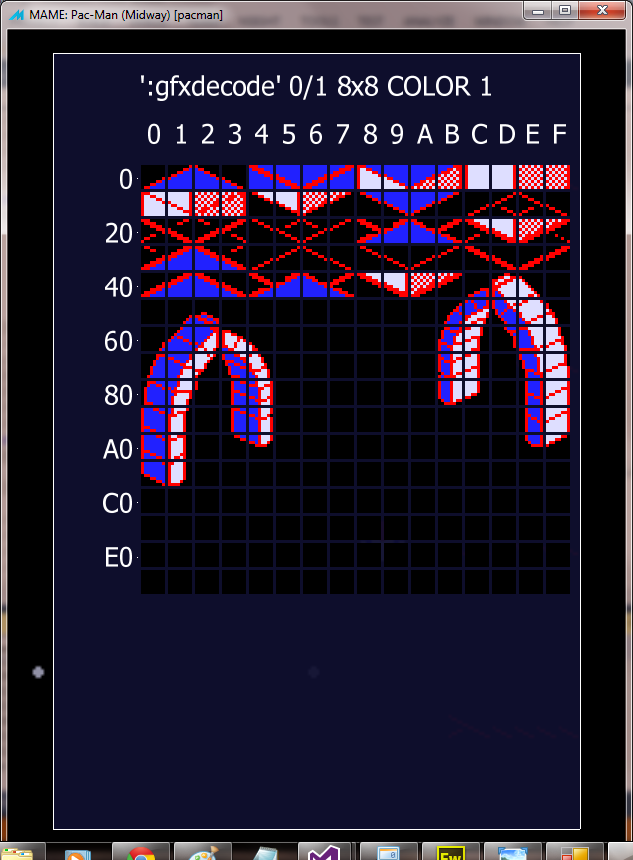
Little way from getting some working code to show you (I know how I'm gonna do this - but haven't worked out the finer data structures required or implementation specifics yet), but here's a tease of what I'm attempting to get this hardware to do.
ps there might be scrolling too


omg, ... knight lore?Hurray Banana said:... here's a tease of what I'm attempting to get this hardware to do.
joe34 said:omg, ... knight lore?Hurray Banana said:... here's a tease of what I'm attempting to get this hardware to do.
Well the two arch ways are from Knight Lore, it's just gonna be a demo, not possible to do re-draw in-front objects with this hardware, could do it easy if you had a foreground tilemap (drawn after the sprite layer) as well as a background tilemap.
I think If I watched Adrian's L system demo correctly that hardware does have a tilemap that renders in front of one of the sprite layers, so that would be a more suitable target for a bit of isometric fun.
What I'm trying to do is see what you can do by using data illusions and tricksy use of the 6 sprites. available.

Great work Eric! You need a time machine so you can go back 20 years and get involved with those Amiga cracktros.
The Z80 has inbuilt dram refresh, and I assume all boards with older cpus have dedicated external circuitry to do this (rather than it being software based). Does this mean in the various projects so far, no one has had to worry about dynamic RAM?
The Z80 has inbuilt dram refresh, and I assume all boards with older cpus have dedicated external circuitry to do this (rather than it being software based). Does this mean in the various projects so far, no one has had to worry about dynamic RAM?
Hurray Banana said:I think If I watched Adrian's L system demo correctly that hardware does have a tilemap that renders in front of one of the sprite layers, so that would be a more suitable target for a bit of isometric fun.
Looking good Eric.

L System has 4 layers, comprised of two tile layers, a sprite layer and a text layer. Tiles in the foreground tile layer have a sprite-to-tile priority bit which controls whether the sprite moves behind the tile or appears in front of it. Sprites always appear in front the of the background tile layer. Text layer appears on top of all layers. Sprite-to-tile layer priority is VERY important in creating realistic game worlds.
That sounds more flexible than I originally thought. you could definitely do an iso game with that setup.