No, I only said about the tantalum because it was the strangest thing I'd seen in a while and the noise you described seemed similar too mine. I had all the volume pots turned right down as low as they'd go as well. It's a different set up to your PCB but the tantalum actually intermittently let out puffs of smoke and I noticed really tiny beads of what looked like solder on the amps heatsink. I couldn't see any damage to it but when I changed it to an electrolytic the problem was sorted. Worth popping out of circuit to test just in case.

You are using an out of date browser. It may not display this or other websites correctly.
You should upgrade or use an alternative browser.
You should upgrade or use an alternative browser.
Taito Space Invaders Cocktail Repair
- Thread starter Clabs
- Start date
bones said:TBH it does sound like mine did.
Thanks for the pointers mate. It is encouraging that yours made the same kind of racket and especially so that your volume control also made little or no difference.
I think there is only one tantalum bead near to the amp so definitely worth checking out.
Thanks again.
Mark
I have edited my earlier post 2 times, make sure you read the whole (new) post. Saying that, I just saw your video and I hear other sounds now too, so I thing the problem is further upstream. Sounds like all the sounds get triggered continuously and fight each other.
Both 74ls174's are clocked by a single 74ls42 (ic13 or ic18) I think either this ic's is bad or one of the inputs. The inputs are 3 address lines and I assume these are ok, and the "sample' signal, but I haven't found where this is generated yet. My next step would be replacing this 74ls42 and see what happens....
I don't think one tantalum would trigger all these sounds....
patzik2022-05-20 20:53:05
Both 74ls174's are clocked by a single 74ls42 (ic13 or ic18) I think either this ic's is bad or one of the inputs. The inputs are 3 address lines and I assume these are ok, and the "sample' signal, but I haven't found where this is generated yet. My next step would be replacing this 74ls42 and see what happens....
I don't think one tantalum would trigger all these sounds....
patzik2022-05-20 20:53:05
Bones - thank you and definitely worth looking at if the racket continues. And - your question about the fan kicked my sore butt into freeing up the rusted nuts on the fan bolts and pulling the fan out. The grill behind the fan was so clogged up. Once the fan was released from all that mess, it actually runs really smoothly and relatively quietly (i'm used to Noctua quiet PC fans!). So, once I clean up the fan housing, the fan should go back in without hacking the wiring

Patzik and Lurch - thank you so much, your posts quite literally just appeared so don't know what is going on there but they are very much appreciated.
Lurch - thank you for confirming that the 74LS174 are exactly the same as M53374. I have got some of those on order just in case.
Patzik - Thank you for such a detailed response - really appreciate it. I have ordered a few 74ls42's too, together with some sockets (dual wipe of course). They should all be here early next week, so looking forward to making some more progress.
Thanks chaps!
Patzik and Lurch - thank you so much, your posts quite literally just appeared so don't know what is going on there but they are very much appreciated.
Lurch - thank you for confirming that the 74LS174 are exactly the same as M53374. I have got some of those on order just in case.
Patzik - Thank you for such a detailed response - really appreciate it. I have ordered a few 74ls42's too, together with some sockets (dual wipe of course). They should all be here early next week, so looking forward to making some more progress.
Thanks chaps!
I had a spare hour this evening so had a go at trying Patzik's suggestions.
The first was try turning each pot up/down to try and isolate the noise. This doesn't make a difference to the background noise which is disappointing, but it does adjust the noise of the various sound effects.
It's odd because I had vr1-vr7 turned all the way to the right (when looking at them with the little plastic adjusting wheels in front of you), assuming they must all be turned up to full that way. But, for me, that is the lowest setting. If I turn them back to the left, the system sounds are audible again.
That's not true of the master volume though. Turning it left turns it down. Maybe that is just a quirk of the design. And, there is another oddity, even with the master volume turned right down, it is very loud. Turning it up makes it deafening.
The next test was grounding pin 12 of the 74ls174's to see if one of the sounds disappears. It does on IC14 so nice detective work, Patzik
.
Having had to listen to the racket this thing makes again for the past hour or so, I do concur that the sound appears electronically generated - it sounds too clean for interference.
None of this made any difference to the corrupt display, btw.
So, I think the next step will be to try changing that 74ls42 @ IC13. My board has a M53242P in that position but the 74ls42 seems to be the replacement.
Hopefully parts will arrive tomorrow so I will let you all know how I get on.
Cheers, Mark
.
The first was try turning each pot up/down to try and isolate the noise. This doesn't make a difference to the background noise which is disappointing, but it does adjust the noise of the various sound effects.
It's odd because I had vr1-vr7 turned all the way to the right (when looking at them with the little plastic adjusting wheels in front of you), assuming they must all be turned up to full that way. But, for me, that is the lowest setting. If I turn them back to the left, the system sounds are audible again.
That's not true of the master volume though. Turning it left turns it down. Maybe that is just a quirk of the design. And, there is another oddity, even with the master volume turned right down, it is very loud. Turning it up makes it deafening.
The next test was grounding pin 12 of the 74ls174's to see if one of the sounds disappears. It does on IC14 so nice detective work, Patzik
Having had to listen to the racket this thing makes again for the past hour or so, I do concur that the sound appears electronically generated - it sounds too clean for interference.
None of this made any difference to the corrupt display, btw.
So, I think the next step will be to try changing that 74ls42 @ IC13. My board has a M53242P in that position but the 74ls42 seems to be the replacement.
Hopefully parts will arrive tomorrow so I will let you all know how I get on.
Cheers, Mark
.
Following Patzik's suggestion, this afternoon I replaced 74ls42 @ IC13 (I installed a socket same as before). I already mentioned that my board had a M53242P at that position but 74LS42 seems to be the replacement. This has made a noticeable improvement to things. The horrible rasping background noise has gone and so have the graphic glitches (Nice one, Patzik
)
While this is a vast improvement, there are still a few problems with the sound:
1: There is a constant sound like the UFO (but different, because when the UFO does appear, it is at a higher pitch). This is controlled by VR7 and according to the manual, this should be the UFO when destroyed.
2: I get a loud hum in place of the invaders advancing. This is controlled by VR6.
3: The sound volume has quietened down considerable from what is was but now seems a little quiet, even with mater volume VR8 turned all the way up. I have nothing to compare it to though so that might just be how it is supposed to be.
Here is a quick video showing how it is now:
Now that the display corruption is sorted out, it is clear that there are issues with the monitor colours. The greens are very feint and some of the other colours don't look quite right. I wonder if someone has been in there before me and fiddled with the monitor pots?
The other thing I noticed was that I tested Player 2 for the first time and the screen does not rotate. That might well be a dip switch setting. Anyway, that and the monitor can wait until the sounds are properly sorted out.
I guess the next step would be to to replace the two 74LS174 and see if that helps. Does that seem sensible?
Anyway, it is great to have actually made some noticeable progress so thank you Lurch and Patzik for your advice and for keeping me going.
Cheers, Mark
While this is a vast improvement, there are still a few problems with the sound:
1: There is a constant sound like the UFO (but different, because when the UFO does appear, it is at a higher pitch). This is controlled by VR7 and according to the manual, this should be the UFO when destroyed.
2: I get a loud hum in place of the invaders advancing. This is controlled by VR6.
3: The sound volume has quietened down considerable from what is was but now seems a little quiet, even with mater volume VR8 turned all the way up. I have nothing to compare it to though so that might just be how it is supposed to be.
Here is a quick video showing how it is now:
Now that the display corruption is sorted out, it is clear that there are issues with the monitor colours. The greens are very feint and some of the other colours don't look quite right. I wonder if someone has been in there before me and fiddled with the monitor pots?
The other thing I noticed was that I tested Player 2 for the first time and the screen does not rotate. That might well be a dip switch setting. Anyway, that and the monitor can wait until the sounds are properly sorted out.
I guess the next step would be to to replace the two 74LS174 and see if that helps. Does that seem sensible?
Anyway, it is great to have actually made some noticeable progress so thank you Lurch and Patzik for your advice and for keeping me going.
Cheers, Mark
Do you have a tv with a composite input that you can use to see if it is the monitor or the pcb?
During the video the sound of the “ufo destroyed” goes away, is this because the pcb turns it off or did you turn down the volume?
Did you have a test rom (sorry I forgot)?
To have the screen turn around you have to set cocktail mode with the dipswitches, if you want to find out what they do you can look in the manual, but I often just start the game in mame and there you can nicely see what they do and how to set them.
You’re getting close to a full repair
patzik2022-05-24 20:42:53
During the video the sound of the “ufo destroyed” goes away, is this because the pcb turns it off or did you turn down the volume?
Did you have a test rom (sorry I forgot)?
To have the screen turn around you have to set cocktail mode with the dipswitches, if you want to find out what they do you can look in the manual, but I often just start the game in mame and there you can nicely see what they do and how to set them.
You’re getting close to a full repair
The 2 sounds that are incorrect have one thing in common and that is ic14 the 74ls174 that you were thinking about, the other one should be ok I think. But right behind it on the schematic is a open collector buffer so it could just as well be this buffer, this one is ic18 a 74ls17 (probably a m53217p on your board). To find out which one it is (assuming it is one of these 2 ic's) you would need a scope since the 7417 sinks a 12v load in the ufo circuit. But knowing you don't have this, just do a coin toss

patzik2022-05-24 21:16:45
patzik2022-05-24 21:16:45
Hi Patzik
The only tv I have with a composite input is upstairs and is a big heavy thing. I have a mate bringing over a small colour portable today/tomorrow so I can hopefully give that a go then. I think I would be connecting to pin 18 T for a B&W output. Or, is there a way of connecting for a colour output?
During the video, it is me turning down the ufo sound so the hum could be heard more easily.
I do have a test ROM. This proved the memory was good but that the shifter was bad. It was mentioned earlier in the thread that I should have left the eproms in place to test the addressing/buffers. I don't know if I still need to do that.
With regards to the screen rotating, the manuals I have read seem to give conflicting info. I think it is switch 6 that needs to be on. I have had a mess about with the dip switches but it doesn't work properly. In player 2 mode, the controls do pass to the player 2 side, but the screen doesn't rotate. Also, when messing about with the dip switch bank, the player 2 cannon sometimes moves to the left on its own. The solder side of the board does look like the dip switch pack has been resoldered at some point so I need to check that with a meter to see if all is well there.
I do have a scope but I am afraid it is much more capable than I am
 . I am not sure how I would go about testing that. I do have spare 74ls174 and sockets so it might be easier for me to change out IC14 and see if there are any improvements. I also have a m53217p on order as I can get that one pretty quickly.
I will let you know how I get along.
Cheers as always, Mark
The only tv I have with a composite input is upstairs and is a big heavy thing. I have a mate bringing over a small colour portable today/tomorrow so I can hopefully give that a go then. I think I would be connecting to pin 18 T for a B&W output. Or, is there a way of connecting for a colour output?
During the video, it is me turning down the ufo sound so the hum could be heard more easily.
I do have a test ROM. This proved the memory was good but that the shifter was bad. It was mentioned earlier in the thread that I should have left the eproms in place to test the addressing/buffers. I don't know if I still need to do that.
With regards to the screen rotating, the manuals I have read seem to give conflicting info. I think it is switch 6 that needs to be on. I have had a mess about with the dip switches but it doesn't work properly. In player 2 mode, the controls do pass to the player 2 side, but the screen doesn't rotate. Also, when messing about with the dip switch bank, the player 2 cannon sometimes moves to the left on its own. The solder side of the board does look like the dip switch pack has been resoldered at some point so I need to check that with a meter to see if all is well there.
I do have a scope but I am afraid it is much more capable than I am
I will let you know how I get along.
Cheers as always, Mark
And another update from me.
I had a spare hour or so this afternoon so I replaced the 74ls174 @ IC14. Same deal as before with a double wipe socket.
The result is more improvements
. The constant ufo destroyed sound is fixed and works only when the ufo is destroyed. The loud hum that was supposed to be the noise of the invaders advancing has also gone. The invaders advancing sound is kind of fixed but only sounds correct with it turned way down with VR6. When it is turned almost all the way down, you can just about make out the 4 descending notes but when you turn it up, it kind of distorts and you can just make out one repeating sound. Here is another quick video to show what I mean:
You will see from the video that the other thing changing IC14 has fixed is the screen rotation - this now works as it should (together with the player 2 controls ) which was totally unexpected but a lovely surprise.
Oh - all the other sounds now seem to be working correctly as well so definitely getting there

Cheers, Mark
Clabs2022-05-25 14:46:45
I had a spare hour or so this afternoon so I replaced the 74ls174 @ IC14. Same deal as before with a double wipe socket.
The result is more improvements
You will see from the video that the other thing changing IC14 has fixed is the screen rotation - this now works as it should (together with the player 2 controls ) which was totally unexpected but a lovely surprise.
Oh - all the other sounds now seem to be working correctly as well so definitely getting there
Cheers, Mark
Clabs2022-05-25 14:46:45

Lurch666 said:Just remembered that the chips you replaced to sort the sound can also affect the shifter.
try the test rom again with the shifter plugged in and see if it works now.
If it does you could go back to the original romset.
Hi Lurch. That is a good idea to try the shifter again with the test ROM because I know that those shifters are hard to come by these days. I will probably stay with the SI romset because I am pretty certain that is what this table originally came with, but I am interested to see what the Space Wars romset plays like. I will give that a go a bit later and let you know how I get on.
I spent some time looking at the sound issue and most of it was adjusting the 8 volume controls. The adjustments are slightly erratic so I will give the pots a clean with switch cleaner. I found that by juggling VR6 and the master volume control, I could get the advancing invaders sound to be acceptable. The only one left that is not quite right is that there is a background his with the UFO sound. It is not obtrusive though and perhaps I am expecting too much from something that is 40+ years old!
I also had a go at adjusting the monitor. Green was very feint, the other colours were just not right, and characters on screen were a bit fuzzy. I didn't have high hopes for such an old monitor but here is a quick video of how I got along:
To say I was pleased is an understatement, and I never imagined I would have such a good outcome. All the colours are back as they should be, vibrant and in focus. My phone camera really doesn't do it justice and I am now actually starting to love this thing

I still have other issues to deal with: I seem to have introduced a fault with coining up while messing about with this other stuff and then more trivial things like getting the service switch to work, 7800 key for the front locks and then cosmetic things like instruction underlays, refinishing the legs - that sort of thing.
All in all though, a good day!
Cheers, Mark
Clabs2022-05-26 21:43:01
I also had a go at adjusting the monitor. Green was very feint, the other colours were just not right, and characters on screen were a bit fuzzy. I didn't have high hopes for such an old monitor but here is a quick video of how I got along:
To say I was pleased is an understatement, and I never imagined I would have such a good outcome. All the colours are back as they should be, vibrant and in focus. My phone camera really doesn't do it justice and I am now actually starting to love this thing
I still have other issues to deal with: I seem to have introduced a fault with coining up while messing about with this other stuff and then more trivial things like getting the service switch to work, 7800 key for the front locks and then cosmetic things like instruction underlays, refinishing the legs - that sort of thing.
All in all though, a good day!
Cheers, Mark
Clabs2022-05-26 21:43:01

morning
I had Mark Haysman fix my boards as I had various sound issues and what a great job he done. Looking at your picture issue interests me.
I have a judder around the ‘score two’ area of the screen and my picture is not as good as your one, so good job I say

Is the judder due to my PSU (original one in place) or what pots did you adjust on the monitor board pls?
I’m in the process of restoring a pt2 colour taito table top for info.
Thankyou
Mark
I had Mark Haysman fix my boards as I had various sound issues and what a great job he done. Looking at your picture issue interests me.
I have a judder around the ‘score two’ area of the screen and my picture is not as good as your one, so good job I say
Is the judder due to my PSU (original one in place) or what pots did you adjust on the monitor board pls?
I’m in the process of restoring a pt2 colour taito table top for info.
Thankyou
Mark
Hi Lenty - good job on getting your boards repaired. I am not familiar with Mark Haysman but glad he did a good job for you.
If the voltages on your power supply are pretty stable then I would say it is your monitor. It might be something simple like a dirty adjustment potentiometer. The other thing you could do to confirm is hook up a tv with a composite input if you have one.
My monitor is a Hitachi and this is the diagram I followed.
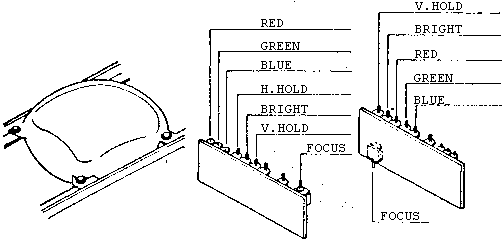
Mine was like the drawing on the right and I only adjusted brightness, red, green & blue. Just be careful poking about in there and try and take a pic of the current pot positions before you start, so you can kind of get back to where you were if it makes it worse.
Hope that helps
If the voltages on your power supply are pretty stable then I would say it is your monitor. It might be something simple like a dirty adjustment potentiometer. The other thing you could do to confirm is hook up a tv with a composite input if you have one.
My monitor is a Hitachi and this is the diagram I followed.
Mine was like the drawing on the right and I only adjusted brightness, red, green & blue. Just be careful poking about in there and try and take a pic of the current pot positions before you start, so you can kind of get back to where you were if it makes it worse.
Hope that helps
Yes - I did the adjustments with the monitor in place. Space is a bit tight but if you tilt your board stack up at 45 degrees on the left hand side of the cabinet, that gave me enough room. I don’t know if that is the best way, so always interesting to hear how others go about this.
What is wrong with your original power supply that is making you consider swapping it out for an aftermarket one? Are your voltages out? What readings do you have? If the voltages are out, I would definitely get that addressed before you tinker with anything else.
If it isn’t working properly, my preference would always be to repair the original PS. Perhaps it’s just me but I do like to keep things original - and the stock PS does seem to be pretty hardy. If you don’t have the tools to fix it, I don’t expect it would cost much to have it repaired.
Hope that helps.
What is wrong with your original power supply that is making you consider swapping it out for an aftermarket one? Are your voltages out? What readings do you have? If the voltages are out, I would definitely get that addressed before you tinker with anything else.
If it isn’t working properly, my preference would always be to repair the original PS. Perhaps it’s just me but I do like to keep things original - and the stock PS does seem to be pretty hardy. If you don’t have the tools to fix it, I don’t expect it would cost much to have it repaired.
Hope that helps.