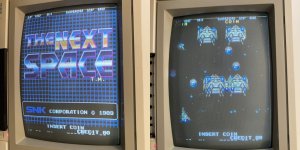
The Next Space (Bootleg)

Jacmar

Active member
Feedback
1 (100%)
Credits
611CR
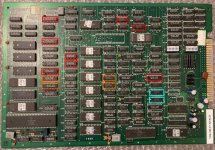
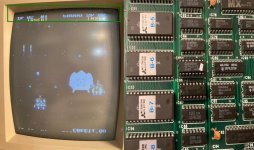
Bootleg board which is just giving a black screen and no sound ....
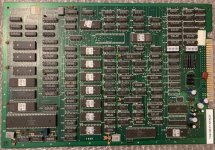
IMG_3859.JPG

Visual check over the board and all looks fine except I see there is no sound amp ! .. That can be sorted later ..

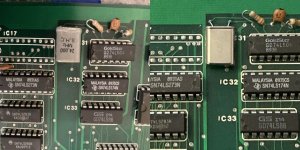
Checked the clock signals and all was looking fine until I got to the crystal at the top of the board, it says 24Mhz but I was getting readings of around 95 Mhz !!
Also when I touched one of the pins on that crystal I got some diagonal white lines, like interference, on the screen. Ordered some 24Mhz crystals ... Hopefully this will give me a picture ..

Why would a board have 3 crystals ? 3 different clocks, for what? The 18Mhz next to the CPU obviously for the 9Mhz clock for the 680000 .. Then there's a 4Mhz one and the suspect 24Mhz one .. one for video ? one for sound CPU ?

Also, anyone know what audio amp I can put in here when I come to look at the sound ?
 

Jacmar

Active member
Feedback
1 (100%)
Credits
611CR
New 24Mhz crystals arrived, swapped out ......

crystals.jpg

And Voila !!!!

fix1 crystal.jpg

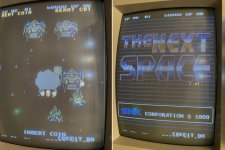
Looking good! just have a dashed line along the bottom of the screen and a dotted line across the top.. Doubt that is supposed to be there

I'll check the input controls and look next at the sound amp ... did some research the other night and I think I'll be able to put a UPC1181 amp in here. Pin out seems to match what I can work out (still very much a beginner at all this) and I have one on another board which will probably just be a donor board anyway I can take off and try ... tbc
 

Jacmar

Active member
Feedback
1 (100%)
Credits
611CR
Controls work 👍and we now have full sound after adding a NEC C1181H amp (y)

Just those dotted lines at the top of the screen where the first row or two of characters should be, and that bottom line of dashes ... could that be something to do with horizontal counters or something? hopefully just a TTL chip? ... tbc
 

Jacmar

Active member
Feedback
1 (100%)
Credits
611CR
Cheers mate, first one risen from the dead so to speak, brilliant feeling

Went over the board with the logic probe but couldn't find any obvious (to me) issues. Hooked up the Slice and tested as many chips as I could.
14 Failed - in some form or another ... Marked RED = FAIL, ORANGE = OTHER ERROR, BLUE = NOT ACTIVE

slice failed chips.jpg
IC 18 , 21 , 25 & 106 (LS273) - All failed on outputs - 21 and 25 also reporting bad GND/clip position, but not the case !?
IC 26 (LS373) & 27 (LS244) - Passed cycle 1 but would not go further as reporting bad GND/clip position - again not the case!?
IC 36 & 37 (LS161) - Failed on outputs and /MR pin
IC 65 & 66 (LS153) - Passed cycle 1 but would not go further as reporting bad GND/clip position - again not the case!?
IC 74 & 89 (LS74) - Failed on outputs
IC 108 & 109 (LS74) - Slice reporting NOT ACTIVE

Interestingly, when the slice clip is on IC 65 the dotted line at the top of the screen mostly goes away, and when clipped on IC 66 the dotted line goes away completely ... looking at the results (pics below), it seems to me the slice is reporting changing states on the Ground and +5v pins which is why it thinks the clip position is wrong/bad ground? I've no idea if I'm interpreting this right but won't hurt to swap out the IC 66 and maybe 65 to see if responsible for the issue....

65-66 slice.jpg
(It doesn't matter where the clip is oriented on the chips, the inverted/bad shift/gnd error is reported)
 

Jacmar

Active member
Feedback
1 (100%)
Credits
611CR
Well it was all going a bit too well wasn't it. Took out the 2 LS153's , along with a pad or two and a tiny trace or two 😖😖🤣🤣 Then lost hours fiddling trying to fix them and get sockets in, then out, then in again....finally got all connections as they should be... put the original153's back in to make sure everything was back how is was before I butchered it .... and it's worse😂😂 Now I'm missing every other line in my sprites ☹️
lines.jpg
FFS 😂

Not sure if it's something I've done (most likely) or a new fault has showed up, but I'm getting the same readings on the slice as I was before I started de-soldering so maybe it is something new.
Anyway enough for today 😴
 

andyJay

User
Credits
84CR
never seen this game in my life; and l love 2D shooters!

best of luck! and you've given me a kick up the arse in terms of using slice :)
 

Jacmar

Active member
Feedback
1 (100%)
Credits
611CR
Had a day off it yesterday after ballsing it up on Saturday ... went over my (not so) handywork looking for signs of where I may have messed up when socketing IC 65 and 66 ..
Wondered if I'd broken a trace somewhere on the outputs, and that would be why half the sprites are now missing, but outputs were all showing continuity to RAM or TTL. Then I noticed 2 of the pins on IC 66 (input pins 10 & 11) which should have been connected by a tiny trace on the underside of the board were not giving continuity. (Can't work out why or how I've done that because they are right next to each other and the trace looks fine). Re-made the connection and fired up the board .. Sprites are fully back !!!!
after 153 sockets fix.jpg

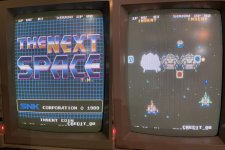
Still got the dotted lines at the top which I was hoping to get rid of but just glad to be back where I was with this. Then remembered the whole point of why I put sockets in :) I only had one spare good LS153 but swapped it out for IC66 first and the red lines have gone ! Was getting similar lines through enemy sprites when they turn white when shot, those lines have gone too. Left it running a little while and rebooted a few times and still all good

LS153 replace.jpg

Put the removed LS153 in my tester and got 'test failed - over current protection' - anyone know what that means ??? The other LS153 in IC65 tested fine.
Haven't had chance to slice these chips again to see what I get now a dodgy one has been removed but I will next time I'm on this.

LS153 fail.png

So now all that's left to fix are the lines at the bottom of the screen, which I've now realised are actually the top layer of characters ( 1P 02 HI 50000 2P 02 ) that are missing at the top of the screen! So it looks like the problem is the screen is being drawn in the wrong place, the first vertical? horizontal? line is being drawn on the screen at the end instead of the beginning. Anyone know what the likely culprit may be for that? or do I just look at some of the other chips the slice failed or just didn't like .... I was really pissed off on Saturday night after breaking it/making it worse and had to remind myself it doesn't matter if I f**k it up, it's all just a learning curve, anyway buzzing again now:) .... tbc
 

Jacmar

Active member
Feedback
1 (100%)
Credits
611CR
Been looking back over Slice test results and reading/learning/researching the last few days how the screen is displayed and this is my understanding of it..
So I have a problem where the text layer’s first column of pixels, which should appear at the far left of the screen, was instead being drawn at the far right. This suggests that something in the horizontal counters circuitry is not running quite right, maybe the counters are running slightly too long before resetting.
I believe this game runs at standard resolution 256x224 meaning the screen is 256 pixels wide. So it would need to count 0-255 then reset, to be working correctly.
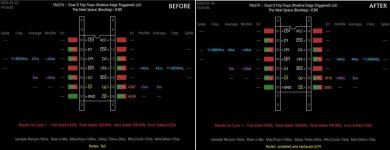
This led me to a pair of LS161 chips (IC36 & 37) which both failed Slice.
I believe a pair of LS161 can handle the horizontal counting to 256 (0-255) as follows:
  • First LS161 (Lower 4 Bits): Counts from 0 to 15 repeatedly. Outputs 4-bit values (Q0-Q3). Generates a carry-out (TC) signal on pin 15 when it overflows from 15 to 0.
  • Second LS161 (Higher 4 Bits): Receives the carry-out from the first LS161 as an enable signal. Counts in steps of 16, from 0 to 15 (effectively 16-255 in the full range). When it reaches its final count (should be 255), it should trigger a reset.
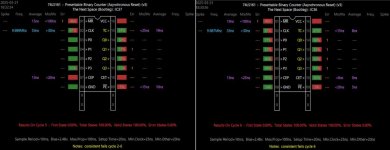
And what is really interesting is when you look at the data from the Slice for those 2 LS161 chips .....

2x 161 h counters.jpg
(IC 37 is the first counter, IC36 the second counter in the sequence)
I remember I ran the test repeatedly on these chips (because it felt like they 'only just' failed) and they always failed after between 2-6 cycles. But generally IC37 (first counter) failed earlier in the test than IC36 (second counter) - so is IC37 bad and carrying the counting error to IC36 .... But the really interesting thing is if you look at the fail number on the outputs -it was always 1, and on the /MR (master reset) always 1 .... can't be a coincidence surely .. the game seem to be drawing the picture with 1 pixel 'wraparound' on the screen, and these 2 chips, very likely horizontal counters, failing with 1 error every time ... hmmm.
I checked the /MR signal and it comes form a LS139 (IC107) which passed the slice test (doesn't mean it's not bad). So I think the obvious thing to do first is change the first LS161 at IC37. This is the chip most likely at fault (the way I'm looking at it) then if no change I'll also replace the second LS161 at IC36. If no change I'll move to the LS139 providing the reset signal .... tbc
 

Jacmar

Active member
Feedback
1 (100%)
Credits
611CR
Swapped out IC37 but no change, then swapped out IC36, also no change - still got first column of the text layer at the wrong end of the screen. :(
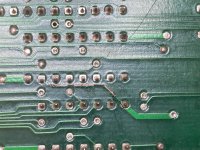
While I was doing that work I noticed a broken trace on the other side of the board .. this should be connecting pin 7 (GND) of IC104 (LS32) and pin 15 (/EN) of the adjacent IC105 (LS157) but was not showing continuity .. not sure how I've missed this up to now ...
IMG_4018.JPG
So I also fixed this and was hopeful but still no change. Interestingly both the LS161's at IC36 & 37 are now passing slice testing every time, both using replacement 161's and the original ones. but still have this text issue... So no obvious benefit visually to repairing the trace and the work on the 161's but maybe it's improved an issue I've not seen yet, who knows. Can't have hurt though.

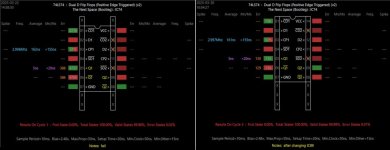
So moved away from that area and had a look back at a couple of the other original chips which failed slice testing and there are 2 LS74 chips at IC74 and IC89 which failed. They are under a bank of 3 LS161's at the top of the board, IC89 had errors in the 4 thousands on the outputs so while I had the time and the soldering gear out I whipped out IC89 and replaced it. Hasn't fixed the error and still getting fails on the outputs but lower numbers now ....
IC89.jpg

Looked at the other nearby failed LS74 at IC74 and this also now has some differences since the first time sliced .. (haven't changed this chip though)

IC74.jpg

fail numbers are lower, but also have the opposite signals on the Q2 outputs, I presume because now D2 is no longer floating (maybe due to the repaired trace). But then that side of the flip flop is maybe not being used as there is no clock input on pin11, so those outputs are maybe redundant.
Not sure this chip is faulty, the fact IC89 was showing similar fails but was not at fault makes me think this chip is the same.
Not sure what to do next ....
 
Last edited:

Jacmar

Active member
Feedback
1 (100%)
Credits
611CR
Had another go at this board last night and fired it up to a completely black screen, no boot, no sound, nothing. Checked the voltages, clock, reset etc and the 24mhz crystal I put in at the beginning of all this was giving me a really weird signal, not really doing anything mostly and I was getting the same symptom I had at the very beginning - nothing on screen. Assumed the crystal was knackered, which seemed odd it being new, so replaced it and no change, nothing on screen.... as I was trying to get a reading however I knocked the resistor next to it with my probe and got a short sound from the speaker, touched it again and the RAM/ROM test popped up, then froze. The resistors leg had snapped at the body and was only making contact when I pressed it. Replaced it and board booted, hooray ...back to where I was previously :rolleyes:
Spent some time shorting data pins on TTL chips and RAM to see if I can find which chips are controlling the drawing of the screen, there is a bank of 3 LS157's (IC's 2,3,4) which seemed to show signs of being involved. These 3 chips all fail SLICE with prop time under 200ns , but 200 or more and they pass ... could this be it? A slow 157 not resetting the screen draw on time and resulting in the 1 pixel wraparound ... thought I'd check voltage on these chips make sure they are getting enough juice, and on IC 2 slipped one of the multimeter probes and shorted the +5v to the enable next to it.... mini spark and burning smell , toasted the 157 😣
Ah well, forced into a replacement I would probably have tried anyway, but it's made no difference, new chip also fails SLICE on prop times under 200ns ...
Back to playing with shorting data lines on these chips and got this when shorting a data input to its output on IC 4..
157 short.jpg
This is the first time I've been able to produce the line of text at the top complete like that, ok there is some other text missing and those sprites at the bottom which should not be there but this must play a part in the positioning of the text layer ...
The S input for this chip, and the other LS157s IC2 and IC3 in this group of 3, comes from pin 3 (CLK) of a LS74 (IC74) on the other side of the board ... which also failed SLICE.
So next steps are replace IC74, IC4, IC3 in that order. tbc
 

Jacmar

Active member
Feedback
1 (100%)
Credits
611CR
Swapped out IC74 and no difference.... starting to feel I might be chasing an issue I don't understand enough about yet, (or maybe doesn't even exist ... do I need to test this on a proper monitor maybe see if the issue is still there - it probably will be) and might just be swapping out chips that are fine or for the wrong reasons ... hmmmm .. The game runs perfectly well and maybe I'll actually play it a bit before I come back to it with more knowledge/experience ..
 

funk

Active member
vacBacker
Feedback
4 (100%)
Credits
518CR
Can't remember where it was I'd heard it previously, but I'm sure I've come across someone chasing a problem before and it turned out to be the monitor and/or supergun not playing nice with the board. Great thread this though. Don't give up! Sure someone will be able to lend a hand soon too.
 

Jacmar

Active member
Feedback
1 (100%)
Credits
611CR
Cheers guys, yeah that's why I've taken a break on this one for now so I'm not chasing a problem on the pcb that potentially isn't there .. soon as I can test it on another monitor I will (y) Just picked up a cabinet with a CRT in that maybe needs a bit of looking at so when I get that up and running I'll try it in there !
 
Top