TnF Diagnostics

Purity

The Oracle
vacBacker
Feedback
17 (100%)
Credits
2,999CR
shoestring said:
Thats an interesting fault.
It was reporting back a different CRC sum at every reset.

I
suspect it's just adding the new results ( crc chk ) to the previous
before reset, RAM is still intact so it's going to do weird things :)

I
think it's unlikely that my testrom will find your issue. Sprite ram
only holds data associated with the sprite itself ( like what and where
it goes on the screen ) so that isn't your actual problem. I would be
looking later on in the circuit.

Have you checked the 2149 rams at 14a and 14b ? These are the line buffers.

Thanks for the new version of the rom. Working much better now
smiley32.gif
Just uploading a video to show you

The 2149 ram was the very first thing I desoldered and socketed when I first initially looked at the PCB. I have tested both at 14a and 14b and they both pass ABI chipmaster tests

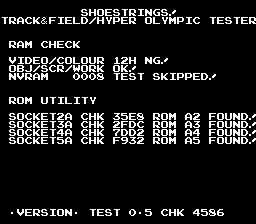
The only thing I've noted so far with the diagnostics is that some characters seem to be blank. I mention this on the video

The only other work I have done on the PCB apart from test the ram is replace the sockets on the roms C11, 12, 14, 15. I think I also tested the 083 @ C16
Purity2015-07-28 23:19:44
 

shoestring

Newbie
Credits
159CR
Seems like you're on to it. Unfortunately that part of the circuit is not mapped to anything I have control over so at this point I think it's going to come down to a logic fault.

Maybe take a look at the 4 x ls163 ( counters ) before the 2149s.

As for the missing tiles, I haven't seen your video yet.

Edit: OK I've noticed that the wrong tile is being displayed for the forward slash. I'll look into this anbd see what I can come up with. This may relate to the missing tiles you've described.

Actually. The correct tile is being displayed, it's just that your character set appears to be slightly different when compared with T&F/Centuri in MAME. See tile 0xe2. shoestring2015-07-29 00:18:23
 

shoestring

Newbie
Credits
159CR
This update should fix the character bank issue where it tries to display the extra bank which is non-existant. ( there's only 3 )

Test version 0.2

http://www.pastefile.com/w6WVRe

Up to test 0.3 now.

This will identify a bootleg. rom1a,rom3a are the only differences.

http://www.pastefile.com/FWLD8t

Any future version will include the CRC of the current test software in the version string at the bottom of the screen :)shoestring2015-07-29 03:25:01
 

Purity

The Oracle
vacBacker
Feedback
17 (100%)
Credits
2,999CR
I'm using test 0.3 If I cycle bank the characters then everything looks fine. If I cycle flip and then cycle bank I'm still getting the extra white bank like on the video
 

shoestring

Newbie
Credits
159CR
Smart thinking! I never thought of that. I only checked to see if it was equal to 0xc0 ( 0x40 is bank 1, 0x80 is bank 2 ) when it's possible for it to be greater than that if you flip first then increment banks.

Now I can just xor the value with 0xc0 and it retains all the other attributes we want to keep like flip & colour.

Hopefully this works now, seems to work on my side of things & i've tried different combos.

test 0.4

http://www.pastefile.com/TVnCXushoestring2015-07-29 17:25:22
 

shoestring

Newbie
Credits
159CR
Thanks for reporting back. The colour and flip attributes should be retained as the character bank is incremented through bank0 to bank2. I just hope no strange combination breaks it :). I think my test case is pretty good though.

I have updated the binary with the necessary changes and uploaded it to JAMMArcade. So we are now up to BETA 1.0

I am now looking forward to someone testing some failed ram chips to see if it identifies the correct pcb device locations. I am particularly interested in it being able to identify individual 4 bit rams ( 2114s ). Also, I am not sure about the following because Konami schematics are difficult to interpret.

1 x 2128 - Video RAM ( 0x3000 - 0x37ff ) 11H or 12H ??
1 x 2128 - Color RAM ( 0x3800 - 0x3fff ) 11H or 12H ??

Anyone have any ideas if 11H or 12H is video ram ?
 

shoestring

Newbie
Credits
159CR
Test version 0.5 is done.

This fixes the speech in the sound test menu.

Speech starts from sound index 0x80

http://www.pastefile.com/3sDZpp

If you believe there are any sounds missing please let me know.shoestring2015-07-31 04:31:06
 

shoestring

Newbie
Credits
159CR
The 4 x 2114s are also used for CPU RAM and scroll RAM.

There are two 2128s in that area. One is for the tiles ( backgrounds ) and the other is used for colour. But my question is, which one of the two is for the video ram ? It will either be 11H or 12H.

If my assumptions ( based on MAME ) are correct then you should only see white text if you pull the colour ram and my test rom will report 12H bad ( is that correct or did u pull 11H ? ). If you pull the other SRAM then you should see a screen filled with zeros in different colours.

video ram pulled.
0001.png

color ram pulled
0002.png
shoestring2015-07-31 08:35:37
 

Purity

The Oracle
vacBacker
Feedback
17 (100%)
Credits
2,999CR
I'm not sure if 11H or 12H are in sockets or soldered to the PCB. I've not pulled either yet

I can do that if you want me to? It may mean desoldering them though

I'll take a look shortly

Purity2015-08-01 11:27:46
 

shoestring

Newbie
Credits
159CR
Thanks so much for this update :)

It appears I have the two mixed up but that's easily fixed.

So 12H is the video ram and 11H appears to be the colour ram.

You should be hearing a sound ( sound used for whistle in the game ) as my testrom detects a fault with either video/colour ram, this is to tell you that there's something wrong with the video. I'm not hearing the sound but I suspect I need to wait for the system to come up before playing any sounds as I've noticed the beginning part of the music in the test rom is clipped.

Here is test 0.6 with the above mentioned fixes.
http://www.pastefile.com/fneWMa

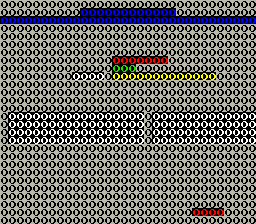
Notice the runner ? ( don't ask me how he got there... but he is staying :) )

I've just realised that I used the stack ram early on before testing the ram, so I am going to have to wre-write a small portion of the code where i clear the video/colour and sprite ram ( i used a jsr to the routine which is bad this early on ). I'll update this in the next test release ( 0.7 ).
 

shoestring

Newbie
Credits
159CR
Here is test 0.6a in case you don't hear anything. You should hear 5 beeps or less.

http://www.pastefile.com/th9tv4

This is a bit of an experiment to determine how long I need to wait around before playing sounds.

If less than 5 beeps then I obviously need to increase the time of my loop.

I was thinking 5 beeps for bad ram and 6 beeps for bad color ram ( since they're on two seperate 2128/6116 devices ).

Worst case scenario is that there will be nothing displayed on the screen at all, we need redundancy and playing sounds seems like a logical way to go about it.
shoestring2015-08-04 04:27:23
 
Top