
You are using an out of date browser. It may not display this or other websites correctly.
You should upgrade or use an alternative browser.
You should upgrade or use an alternative browser.
TnF Diagnostics
- Thread starter Purity
- Start date


shoestring
Newbie
- Credits
- 159CR
Great. Just wondering if you have the 4x2114s socketed ?
In a future version ( 0.7 ) I'd like someone to look at those to verify that I'm correctly identifying individual 2114sshoestring2015-08-06 22:38:13
In a future version ( 0.7 ) I'd like someone to look at those to verify that I'm correctly identifying individual 2114sshoestring2015-08-06 22:38:13
shoestring said:Great. Just wondering if you have the 4x2114s socketed ?
In a future version ( 0.7 ) I'd like someone to look at those to verify that I'm correctly identifying individual 2114s
Yes I have socketed the 2114's in anticipation of being able to test them out with your diagnostics rom
I have independently checked them and they are working as expected. Same with the 2128 rams at 11H, 12H
The only ram I've not pulled is the 2128 @ 6A but happy to socket that if it helps progress the rom
Purity2015-08-06 22:49:07
shoestring
Newbie
- Credits
- 159CR
It should currently be able to identify individual 2114s as you pull them and report them as bad.
The test rom will probably fall over though, as that area is also used for work ram and I am using the stack later on for storing variables and such. That's the reason why it's better to wait until the next version before pulling the 4bit rams. I will need to suspend any further checks when the actual work ram is detected as bad, otherwise my program will get lost and go into oblivion as it tries to use the stack.
Edit: Some tech
As for 6a ( nvram ), not really necessary. Verifying 2kx8bit rams is fairly straight forward. It's more tricky when you're dealing with 4bit rams, as pairs of two are combined to read/write 8bits of data. So in the process of finding one that is faulty, I test the lower 4 bits ( 0xf ) & upper 4 bits ( 0xf0 ) by using a mask after reading back the 8bit value that doesn't match the value written previously
In theory this is straight forward but I've only been programming the 6809 for a few weeks and I'm still learning. So for example. If I write 0x55. And read back 0xd5 then I can exclusive OR both values together to reveal which nibble is bad.
01010101 - 0x55
11010101 - 0xd5
-------------
10000000 - 0x80
The result reveals that the upper nibble ( 4 bits ) is bad.shoestring2015-08-07 00:41:15
The test rom will probably fall over though, as that area is also used for work ram and I am using the stack later on for storing variables and such. That's the reason why it's better to wait until the next version before pulling the 4bit rams. I will need to suspend any further checks when the actual work ram is detected as bad, otherwise my program will get lost and go into oblivion as it tries to use the stack.
Edit: Some tech
As for 6a ( nvram ), not really necessary. Verifying 2kx8bit rams is fairly straight forward. It's more tricky when you're dealing with 4bit rams, as pairs of two are combined to read/write 8bits of data. So in the process of finding one that is faulty, I test the lower 4 bits ( 0xf ) & upper 4 bits ( 0xf0 ) by using a mask after reading back the 8bit value that doesn't match the value written previously
In theory this is straight forward but I've only been programming the 6809 for a few weeks and I'm still learning. So for example. If I write 0x55. And read back 0xd5 then I can exclusive OR both values together to reveal which nibble is bad.
01010101 - 0x55
11010101 - 0xd5
-------------
10000000 - 0x80
The result reveals that the upper nibble ( 4 bits ) is bad.shoestring2015-08-07 00:41:15
shoestring
Newbie
- Credits
- 159CR
Test V0.7
http://www.pastefile.com/Y1LB78
Some small changes.
1. Removed code relying on stack until 2114 ram checks complete. ( sprite, scroll, main ram )
2. Sprite ram, scroll ram and main ram is distributed over the 4 x 2114s, any error on any four of the devices will suspend further checks until the faulty 2114s are replaced. See attachment for how this will look.
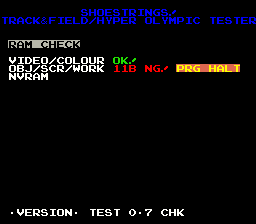 shoestring2015-08-07 07:06:02
http://www.pastefile.com/Y1LB78
Some small changes.
1. Removed code relying on stack until 2114 ram checks complete. ( sprite, scroll, main ram )
2. Sprite ram, scroll ram and main ram is distributed over the 4 x 2114s, any error on any four of the devices will suspend further checks until the faulty 2114s are replaced. See attachment for how this will look.
shoestring
Newbie
- Credits
- 159CR
So the beeps tell you there was an issue with the video & colour. I was trying to play 5 but at least 3 made it in.
As for 11a/10b, I'll try reproducing it.
shoestring2015-08-07 21:25:12
As for 11a/10b, I'll try reproducing it.
shoestring2015-08-07 21:25:12
Can you do different beeps (sounds) for video and colour so easier to identify which one is not working?
Also is it possible to ident any of the other roms to ensure they are what is expected?
Apologies I realise now that you do the nvram test (with the dip switch) so that is in essence testing that the 2128 at 6A is ok
Purity2015-08-07 21:18:18
Also is it possible to ident any of the other roms to ensure they are what is expected?
Apologies I realise now that you do the nvram test (with the dip switch) so that is in essence testing that the 2128 at 6A is ok
Purity2015-08-07 21:18:18
shoestring
Newbie
- Credits
- 159CR
Edit:
I don't think it's possible to test the other ROMs but I will look into it.
As for the sounds, I do plan on using 5 beeps for bad ram, 6 beeps for bad color ramshoestring2015-08-07 21:31:07
I don't think it's possible to test the other ROMs but I will look into it.
As for the sounds, I do plan on using 5 beeps for bad ram, 6 beeps for bad color ram
shoestring2015-08-07 21:31:07
shoestring
Newbie
- Credits
- 159CR
Here is 0.8 - http://www.pastefile.com/ObAttV
I was unable to reproduce the problem in MAME.
I doubt 0.8 will fix the problem but I just cleaned up some of the code associated with the issue to make troubleshooting easier later.
You can see that the last error message for 10b is shown correctly in the video momentarily but then goes right off the screen as soon as I clear the scroll ram with zeros.
This is the right thing to do however, you're probably pulling a 2114 that is directly associated with the scroll ram area being utilized. So that's causing some weird problems. In 10b's case, up until this point text looks almost centered until I try clearing the scroll ram. For total failures of the ram it's obvious that this may not be a good idea but it may be ok for partial failures. I'll need to explore this further.
Edit:
My thoughts are that I should only attempt to clear RAM that is intact/error free but you would think that it shouldn't make
a difference if its pulled ?? Engineers please help!!
 shoestring2015-08-08 12:05:56
I was unable to reproduce the problem in MAME.
I doubt 0.8 will fix the problem but I just cleaned up some of the code associated with the issue to make troubleshooting easier later.
You can see that the last error message for 10b is shown correctly in the video momentarily but then goes right off the screen as soon as I clear the scroll ram with zeros.
This is the right thing to do however, you're probably pulling a 2114 that is directly associated with the scroll ram area being utilized. So that's causing some weird problems. In 10b's case, up until this point text looks almost centered until I try clearing the scroll ram. For total failures of the ram it's obvious that this may not be a good idea but it may be ok for partial failures. I'll need to explore this further.
Edit:
My thoughts are that I should only attempt to clear RAM that is intact/error free but you would think that it shouldn't make
a difference if its pulled ?? Engineers please help!!
shoestring
Newbie
- Credits
- 159CR
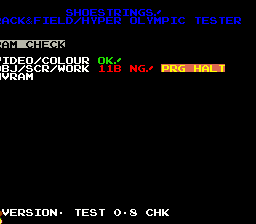
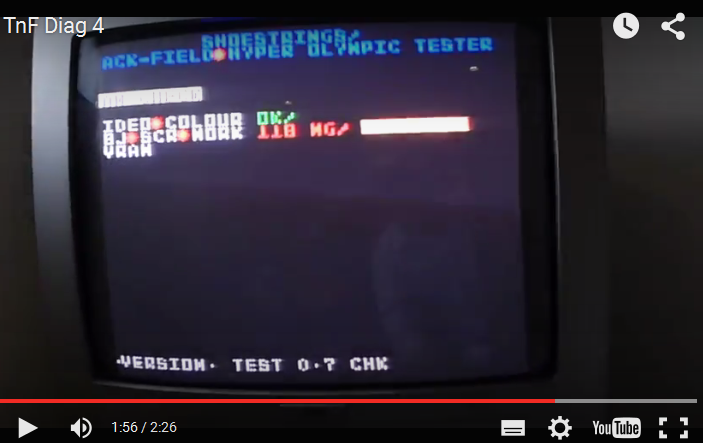
I've been able to reproduce the issue and hopefully I'm on the right track. See below screenshot for when 11B is pulled. ( Notice the picture slightly to the left )
11B is the lower 4 bits of spriteram2, 10a is the upper 4 bits of spriteram2. When you pull 11B, the lower 4 bits (0b0-0b3 )to the 503 custom are pulled high somehow. This is my theory as to why the picture isn't centered or goes way off the screen when one of the others is pulled. With the ram back in and my test rom running, 0b0-0b3 should all be low ( between 0x1c40 - 0x1c5f )
I simulated this by forcing an error & writing 0x0f from 0x1c00-0x1fff to get the attached screenshot.
Still need this confirmed. Anyone with a logic probe can test this theory out for me ?
Edit: bits 0b0-0b3 also go to the 502 via an LS377, the sprite lookup table bi-polar prom at 16B & 4x 1k resistors.
From MAME
From video
 shoestring2015-08-10 05:21:17
11B is the lower 4 bits of spriteram2, 10a is the upper 4 bits of spriteram2. When you pull 11B, the lower 4 bits (0b0-0b3 )to the 503 custom are pulled high somehow. This is my theory as to why the picture isn't centered or goes way off the screen when one of the others is pulled. With the ram back in and my test rom running, 0b0-0b3 should all be low ( between 0x1c40 - 0x1c5f )
I simulated this by forcing an error & writing 0x0f from 0x1c00-0x1fff to get the attached screenshot.
Still need this confirmed. Anyone with a logic probe can test this theory out for me ?
Edit: bits 0b0-0b3 also go to the 502 via an LS377, the sprite lookup table bi-polar prom at 16B & 4x 1k resistors.
From MAME
From video
shoestring
Newbie
- Credits
- 159CR
It's possible that you won't see anything with a logic probe, there might not be much voltage but just enough for the 503 to see it.
Also regarding your sprite issue, it is possible that you have a dead 502 custom at 16A.
Also regarding your sprite issue, it is possible that you have a dead 502 custom at 16A.
shoestring
Newbie
- Credits
- 159CR
Possible solution. Since my theory was that removing spriterams caused 4 lower or upper bits to go high, I've come up with a workaround and set the remaining ram contents to 0xff instead of zero.
Picture will be slightly to the right. Hopefully this handles all cases and partial memory failures on all boards out there.
Try pulling multiple 2114s as well. ( it will only report 1 bad 2114 at a time, we want to verify that my fix can handle all cases )
Test 0.9
http://www.pastefile.com/2vHiSW
shoestring2015-08-10 05:05:44
Picture will be slightly to the right. Hopefully this handles all cases and partial memory failures on all boards out there.
Try pulling multiple 2114s as well. ( it will only report 1 bad 2114 at a time, we want to verify that my fix can handle all cases )
Test 0.9
http://www.pastefile.com/2vHiSW
shoestring2015-08-10 05:05:44
I tested the latest rom out today, and can pull all the 2114's out without issue. I then starting putting them in one, by one, and each time it identified where the missing one was, so looks good
i didn't notice that the screen had shifted
Purity2015-08-15 21:29:11
i didn't notice that the screen had shifted
Purity2015-08-15 21:29:11

shoestring
Newbie
- Credits
- 159CR
Great. In MAME it's off ever so slightly. Maybe a pixel off to the right. You won't see it unless you're really looking for it.
I'd like to see how it handles partial failure of the 2114s. Setting it to 0xff seems like a safe bet though.
I will need to implement the same measures in the Hyper Sports test rom as well.
I'd like to see how it handles partial failure of the 2114s. Setting it to 0xff seems like a safe bet though.
I will need to implement the same measures in the Hyper Sports test rom as well.