Troubleshooting ABI Boardmaster 4000

dorkshoei

Newbie
Credits
115CR
dorkshoei said:
3.0 doesn't work either when programmed onto the 27C020. I'm going to try 2.73 next (http://www.jammarcade.net/files/Equipment/Firmware/ABI/bm4k-273.zip) but I'm juggling this and taking care of 2 and 4yo :)

As I said, 2.21 (read from the original 27C2001) works correctly when programmed onto the 27C020

I just ordered some M27C2001-15XF1 off eBay as this is what came installed (version 2.21)

v2.73 didn't work either. The only thing that I am able to get to work using the 27C020s is v2.21 that the device programmer (BK 866/Elnec Beeprog) itself read.

I happen to have the 351B104BD adaptor for the Data IO Unipak2b. I used the DataIO to program the 27C020s with v3.10 and that didn't work either.

I used the Elnec to program a new GAL with Porchy's DEC402 image and this works fine in the unit with the original M27C2001/v2.21 chips. Makes no difference with the other versions.

Weird. No clue what is going on.
 

porchy

Active member
Feedback
5 (100%)
Credits
993CR
Sorry if you said in an earlier post but what version PAL(s) do you have other than the 402? I'm quite curious to know what the differences may be.
I kinda wish I'd traced the PAL connections out when I owned one of these things
 

dorkshoei

Newbie
Credits
115CR
Hi Jon.

The first unit came with version 1.00 on two 27C1001A EPROMs. The PAL is an unmarked PAL16L8. My belief is that DEC402 handles the changed addressing for the larger EPROM sizes used by v2.00 and above.

I saved the PAL16L8 off to a JED when I got the first unit but I had no idea if it was protected and whether the save was any good. It seems to contain varied data (not all 1s).

I just used the second unit (v2.21) and paldump to save the PAL16L8 to ABLE format. I was going to ask what software you originally used to convert the 402 from ABLE to JED. I've found PALASM but not yet tried to setup a dos install env for it. Supposedly WinCUPL will do it but it seems limited to Microchip devices.

The initial (1.00) unit stopped working. Eventually when I fix it, I'll reverify I have good versions of it's software saved and send it to you to upload to the site. I'll send the v2.21 (from the second unit also).
 

dorkshoei

Newbie
Credits
115CR
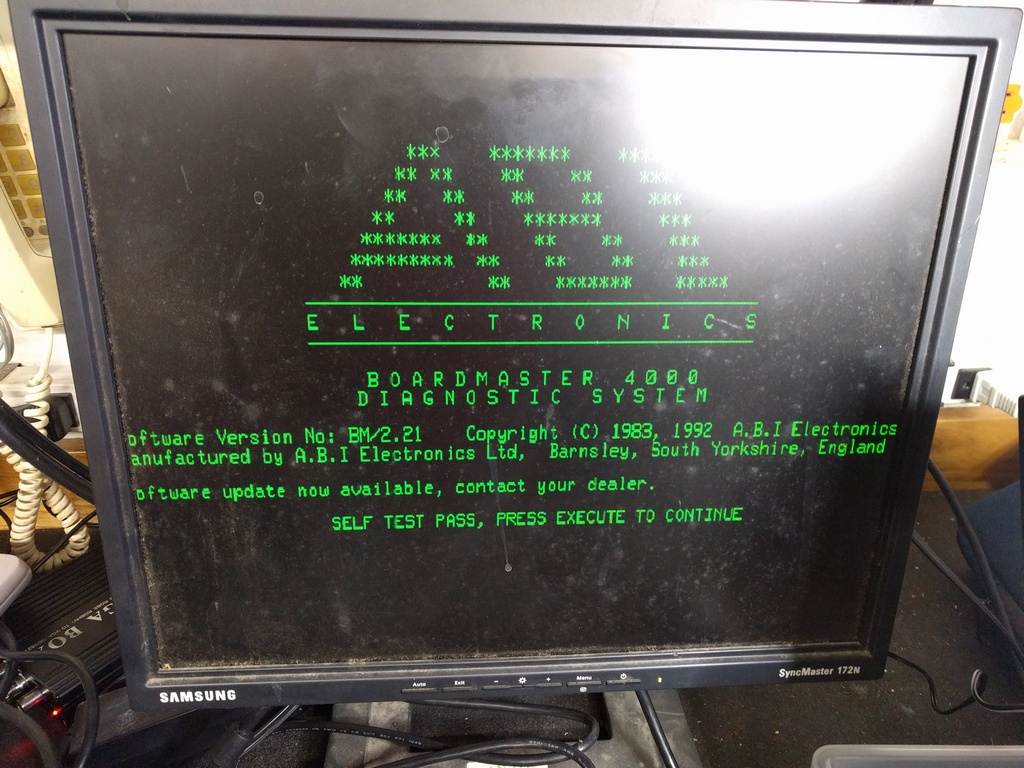
And on the topic of v2.21 which the unit came with, I find it it amusing that it advertises there is already an update available :)

IMG_20181007_120853.jpg
 

dorkshoei

Newbie
Credits
115CR
New eproms arrived today. 27C2001. Chinese but they pass the Elnec device-id test.

Only version that will boot is v2.21 which is what the unit came with (on 2x 27C2001).

I don't think it has anything to do with the EPROMs.

As I said before, the PAL is labelled 402. If I burn a new one using Porchy's 402 image, nothing changes (v2.21 continues to work, no other version will boot).

The only thing I can think of is that I'd read something about the timekeeper needing to be cleared but the ABI 3.10 upgrade instructions make no mention of needing to do this, and it implies v2 and v3 systems can be upgraded using the 3.10. The timekeeper is soldered in.

Annoying.
 

ENNAB1977

Newbie
Credits
6CR
I have abi BoardMaseter 4000 the screen damaged, so i tried to make an adapter from MDA to VGA

the screeen i am using is DELL E176FPc

The connection as follow :


[list type=decimal][*] Ground[*]Ground[*]not connected[*] not connected[*]not connected[*]not connected[*]TTL Video + 470 Ohm[*]Hor Sync[*]Vertical Sync[/list type=decimal]


The VGA connection as follow :


[list type=decimal][*]not connected[*]Green with TTL + 470 Ohm[*]not connected[*]not connected[*]Ground[*]ground[*]ground[*]ground[*]not connected[*]Ground[*]not connected[*]not connected[*]Hor Sync[*]Vertical Sync[*]not connected[/list type=decimal]
Correct


but the screen remain Black

and it is not showing any data


Ace`

PlanB contributor #1
Feedback
38 (100%)
Credits
3,844CR
The Dell monitor probably isn't MDA compatible, almost no lcds are. Even the ones that do work don't officially support it and aren't 100% perfect. Try and pick up a BenQ BL702A. Otherwise you'll need a converter box.
 

Macro

Active member
vacBacker
Feedback
4 (100%)
Credits
1,987CR
As Ace said, MDA is 18Khz, VGA is usually 31Khz

some monitors are backward compatible (all the way back to CGA - 15Khz - normal arcade mode) but not many
 

Ace`

PlanB contributor #1
Feedback
38 (100%)
Credits
3,844CR
Also make sure your Boardmaster has the video output chip (CRT9053) installed. The chip was discontinued while the Boardmaster was still being produced so later models have an empty socket.
 

ENNAB1977

Newbie
Credits
6CR
Dear ACE & Marco,

Thank you a lot guys, i appreciate you fast response , and regarding to the signals comes out from the BoardMaster i already tested the signal using oscilloscope, and to make sure my friend has one working and tested all the boards one by one, and mine working perfectly.

My question is if the monitor has 31Khz and the Boardmaster is 18 Khz then the monitor frequency is more than the source so the bandwidth can cover if it is vice versa then yes it won't work .. correct me if i am wrong !!

Another question Before i order BL702A BenQ screen is the above mentioned connection earlier is correct !!! ?!!

ABI Connection

[list type=decimal][*] Ground[*]Ground[*]not connected[*] not connected[*]not connected[*]not connected[*]TTL Video + 470 Ohm[*]Hor Sync[*]Vertical Sync[/list type=decimal]


VGA connection :


[list type=decimal][*]not connected[*]Green with TTL + 470 Ohm[*]not connected[*]not connected[*]Ground[*]ground[*]ground[*]ground[*]not connected[*]Ground[*]not connected[*]not connected[*]Hor Sync[*]Vertical Sync[*]not connected[/list type=decimal]
Again a big fat thanks guys for you reply ,,,
 

Macro

Active member
vacBacker
Feedback
4 (100%)
Credits
1,987CR
Unless the monitor is a multisync (i.e. has a large range) then the 18Khz horizontal signal will be outside of the range the monitor can accept.

from the specs for the Dell monitor you list it is 30 kHz to 81 kHz (automatic)

check here for likely candidates
 

deepjari

Newbie
Credits
19CR
trm said:
Some months ago I picked up a job lot of dead/partially working ABI Boardmaster 4000s. I already had one which was an older BM4K model with a reflective LCD screen but these are the newer models which have a backlit LCD.

My original ABI reported self-test faults on power up which was suspected by the seller as being related to the PSU. The unit still works fine so I was happy with it, but I'd had no luck fixing the fault and ABI weren't any help so when I had the chance to pick up some more units I figured it was a good time to try swapping assemblies from each until I can isolate the parts triggering the self test failures, as the fail codes don't give any clues that I can determine.

So this thread is about the examination and hopeful fix of as many of these ABIs as I can.

My plan is to take the 4 devices that I have, record the self-test errors and then swap sub-assemblies over until I can alter the fault codes. My theory is that if I can swap e.g. a PSU and change or stop a fault code, then I'll know that is a good PSU so it can be swapped into another unit to see whether that unit's fault is PSU related. Well, that's the plan ;)

So first step is to categorise the units and their faults. I've got one out on loan which I'm going to have to call back in at some point (sorry Rob
smiley11.gif
) but I'll record the units and their faults below.
 

deepjari

Newbie
Credits
19CR
any body can help.
My ABI board master 4000 is not in working the mcu HD64180 is fail due power problem.the crystal is also not working X1 and X2 and both are not readable.any body can help.
 

Ace`

PlanB contributor #1
Feedback
38 (100%)
Credits
3,844CR
Have you checked the power supply voltages? I rebuilt one a while back and about half the caps had leaked. They were high quality japanese nichicons but they're still 30+ years old at this point.

If the crystals are burnt like your other thread says it could be fried beyond repair. Can you take pictures of it the damage?
 

porchy

Active member
Feedback
5 (100%)
Credits
993CR
Ace` said:
Again check the power supply / voltages if you haven't already and also check the eproms on the bottom of the system if you've got a eprom reader/burner.

You used to be able to get all the firmware versions here http://www.jammarcade.net/firmware/ but the page looks to be broken at the moment.

Most downloadable stuff has been moved to the wiki

https://www.jammarcade.net/wiki/index.php?title=ABI_Boardmaster_4000_Tester
 

Ace`

PlanB contributor #1
Feedback
38 (100%)
Credits
3,844CR
Thanks porchy.

If the eproms are okay it could be any number of things causing the cpu to not run / crash. I'd check the nvram, if the battery is bad it'll still work but with the incorrect time. However if the ram itself is bad I don't think it'll run at all. You can stick a 0.6" 6116 2k x 8 type ram in its place.
 
Top