
You are using an out of date browser. It may not display this or other websites correctly.
You should upgrade or use an alternative browser.
You should upgrade or use an alternative browser.
Problem Blazing Angels Sit Down HELP PLEASE
- Thread starter athena
- Start date

I hear you but Mach storm is running fine and my system should be ok with those requirements surely? Your system is obviously more punchy but considering I’m putting this away in a cabinet once sorted having anything crazy powerful would frankly be wastedare you using SSD? some games load textures in realtime.
How do I know if I’m saved on SSD or HD you think that could make difference?
Ok the Star Wars file has been saved in my C drive. (I fear this is correct so that won’t help me) I was hoping that was the silly mistake I was making. Buggerssd will be so much faster i cant put numbers on it - 2digit multiplier!
even if you have a 15,000RPM scsi drive the ssd has instant seek while the mechanical drive has to move the heads
That's good work so far mate 
I didn't know about the curvature fix for POD as I've not messed enough with it yet, I need to get mine updated in SW cab to play all these games
It doesn't make sense POD runs slower than Mach Storm, I hadn't tried that on my Nephews machine but POD wasn't to bad with GT1030
https://www.emuline.org/topic/1663-arcade-pc-star-wars-battle-pods-namco-system-es3/page/11/
above link saying about Win 10 settings for GPU (Don't use Win 10 myself)
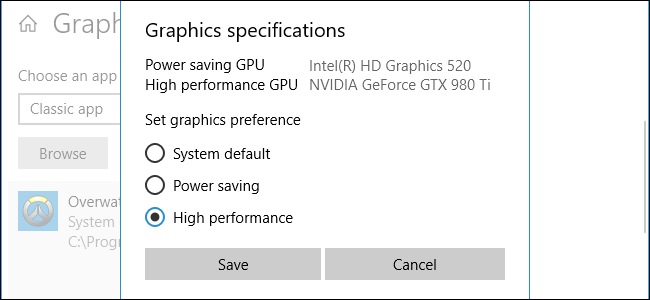
 www.howtogeek.com
No idea if thats any help
I didn't know about the curvature fix for POD as I've not messed enough with it yet, I need to get mine updated in SW cab to play all these games
It doesn't make sense POD runs slower than Mach Storm, I hadn't tried that on my Nephews machine but POD wasn't to bad with GT1030
https://www.emuline.org/topic/1663-arcade-pc-star-wars-battle-pods-namco-system-es3/page/11/
above link saying about Win 10 settings for GPU (Don't use Win 10 myself)
How to Choose Which GPU a Game Uses on Windows 10
Windows 10 now lets you select which GPU a game or other application uses right from the Settings app.
www.howtogeek.com
No idea if thats any help
AfternoonThat's good work so far mate
I didn't know about the curvature fix for POD as I've not messed enough with it yet, I need to get mine updated in SW cab to play all these games
It doesn't make sense POD runs slower than Mach Storm, I hadn't tried that on my Nephews machine but POD wasn't to bad with GT1030
https://www.emuline.org/topic/1663-arcade-pc-star-wars-battle-pods-namco-system-es3/page/11/
above link saying about Win 10 settings for GPU (Don't use Win 10 myself)
How to Choose Which GPU a Game Uses on Windows 10
Windows 10 now lets you select which GPU a game or other application uses right from the Settings app.
No idea if thats any help
View attachment 17586
Well thank you for trying to help further, I have just implemented the settings to use Graphics card highest performance with this .exe file but it’s made no difference and still stuttering.
It’s doing my head in now. Like you said Mach Storm which runs perfectly requires more power than SW! So work that out. I’ve tried everything and I know my PC can easily deal with it. So far all only been loaded in attract mode as no controls set to start game etc but SW in attract starts to give you headache, Mach Storm looks stunning and buttery smooth. Also bonus they had included the Mach storm dome fix in the patch so it was automatically corrected.
https://support.serato.com/hc/en-us...-use-your-dedicated-GPU-on-a-Windows-computer
I'm wondering if anything in settings, there are different ones you can download and the ini settings aren't all the same, some have different screen resolutions set, audio levels
there saying about changing settings in this to get it running faster on lower spec machine
https://www.emuline.org/topic/1663-...tr_sl=fr&_x_tr_tl=en&_x_tr_hl=en&_x_tr_pto=sc
could check the basesystem.ini in the Mach Storm folder and compare to Battlepod, in Pod its in folder Engine/config
[SystemSettings]
; NOTE THAT ANY ITEMS IN THIS SECTION WILL AFFECT ALL PLATFORMS!!!
StaticDecals=True
DynamicDecals=True
UnbatchedDecals=True
DecalCullDistanceScale=1.0
DynamicLights=True
DynamicShadows=True
LightEnvironmentShadows=True
CompositeDynamicLights=True
SHSecondaryLighting=True
DirectionalLightmaps=True
MotionBlur=True
MotionBlurPause=True
MotionBlurSkinning=1
DepthOfField=True
AmbientOcclusion=True
Bloom=True
bAllowLightShafts=True
Distortion=True
FilteredDistortion=True
DropParticleDistortion=False
bAllowDownsampledTranslucency=False
SpeedTreeLeaves=True
SpeedTreeFronds=True
OnlyStreamInTextures=False
LensFlares=True
FogVolumes=True
FloatingPointRenderTargets=True
OneFrameThreadLag=True
UseVsync=False
UpscaleScreenPercentage=True
Fullscreen=False
AllowOpenGL=False
AllowRadialBlur=True
AllowSubsurfaceScattering=True
AllowImageReflections=True
AllowImageReflectionShadowing=True
bAllowSeparateTranslucency=False
bAllowPostprocessMLAA=False
bAllowHighQualityMaterials=True
MaxFilterBlurSampleCount=16
SkeletalMeshLODBias=0
ParticleLODBias=0
DetailMode=2
MaxDrawDistanceScale=1
ShadowFilterQualityBias=0
MaxAnisotropy=4
MaxMultiSamples=1
bAllowD3D9MSAA=False
bAllowTemporalAA=False
TemporalAA_MinDepth=500
TemporalAA_StartDepthVelocityScale=100
MinShadowResolution=64
MinPreShadowResolution=8
MaxShadowResolution=1120
MobileShadowTextureResolution=1120
MaxWholeSceneDominantShadowResolution=1344
ShadowFadeResolution=128
PreShadowFadeResolution=16
ShadowFadeExponent=.25
ResX=1280
ResY=720
ScreenPercentage=100.000000
SceneCaptureStreamingMultiplier=1.000000
ShadowTexelsPerPixel=1.27324
PreShadowResolutionFactor=.5
bEnableBranchingPCFShadows=False
bAllowHardwareShadowFiltering=False
TessellationAdaptivePixelsPerTriangle=48.0
bEnableForegroundShadowsOnWorld=True
bEnableForegroundSelfShadowing=False
bAllowWholeSceneDominantShadows=True
bUseConservativeShadowBounds=False
I'm wondering if anything in settings, there are different ones you can download and the ini settings aren't all the same, some have different screen resolutions set, audio levels
there saying about changing settings in this to get it running faster on lower spec machine
https://www.emuline.org/topic/1663-...tr_sl=fr&_x_tr_tl=en&_x_tr_hl=en&_x_tr_pto=sc
could check the basesystem.ini in the Mach Storm folder and compare to Battlepod, in Pod its in folder Engine/config
[SystemSettings]
; NOTE THAT ANY ITEMS IN THIS SECTION WILL AFFECT ALL PLATFORMS!!!
StaticDecals=True
DynamicDecals=True
UnbatchedDecals=True
DecalCullDistanceScale=1.0
DynamicLights=True
DynamicShadows=True
LightEnvironmentShadows=True
CompositeDynamicLights=True
SHSecondaryLighting=True
DirectionalLightmaps=True
MotionBlur=True
MotionBlurPause=True
MotionBlurSkinning=1
DepthOfField=True
AmbientOcclusion=True
Bloom=True
bAllowLightShafts=True
Distortion=True
FilteredDistortion=True
DropParticleDistortion=False
bAllowDownsampledTranslucency=False
SpeedTreeLeaves=True
SpeedTreeFronds=True
OnlyStreamInTextures=False
LensFlares=True
FogVolumes=True
FloatingPointRenderTargets=True
OneFrameThreadLag=True
UseVsync=False
UpscaleScreenPercentage=True
Fullscreen=False
AllowOpenGL=False
AllowRadialBlur=True
AllowSubsurfaceScattering=True
AllowImageReflections=True
AllowImageReflectionShadowing=True
bAllowSeparateTranslucency=False
bAllowPostprocessMLAA=False
bAllowHighQualityMaterials=True
MaxFilterBlurSampleCount=16
SkeletalMeshLODBias=0
ParticleLODBias=0
DetailMode=2
MaxDrawDistanceScale=1
ShadowFilterQualityBias=0
MaxAnisotropy=4
MaxMultiSamples=1
bAllowD3D9MSAA=False
bAllowTemporalAA=False
TemporalAA_MinDepth=500
TemporalAA_StartDepthVelocityScale=100
MinShadowResolution=64
MinPreShadowResolution=8
MaxShadowResolution=1120
MobileShadowTextureResolution=1120
MaxWholeSceneDominantShadowResolution=1344
ShadowFadeResolution=128
PreShadowFadeResolution=16
ShadowFadeExponent=.25
ResX=1280
ResY=720
ScreenPercentage=100.000000
SceneCaptureStreamingMultiplier=1.000000
ShadowTexelsPerPixel=1.27324
PreShadowResolutionFactor=.5
bEnableBranchingPCFShadows=False
bAllowHardwareShadowFiltering=False
TessellationAdaptivePixelsPerTriangle=48.0
bEnableForegroundShadowsOnWorld=True
bEnableForegroundSelfShadowing=False
bAllowWholeSceneDominantShadows=True
bUseConservativeShadowBounds=False
I’ve finally got this original PSU open for pics but I certainly can’t see anything visually wrong. Was expecting something to look black, tried to show various angles but not that easypictures from the inside i meant
so you connected 240v while it was in voltage-doubler mode
fuse, MOV, main caps are the things to check - the rest probably survived
somebody else did this on another forum - i'll try to find it and link it.
Attachments
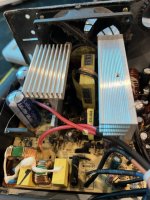
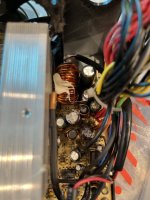
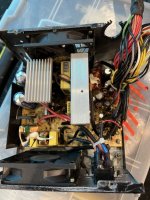
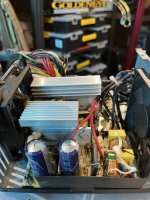
Ah the swelling at top is exploded? In that case I think I found another smaller one but someone told me that they can just swell etc so I didn’t know. But now you’ve confirmed that I’ll get a replacement psu. My friend had a few but was told none were compatible ?!The 2 Big Blue Capacitors have exploded to start with
I would just buy another PSU for that PC, any with same connections and wattage will do, it's not a high spec PC, nice to have original working anyway
So basically same connections and wattage and its good to go? I completely agree id like to get the original sorted so its a back up / option
Found this one. Assuming possible blown too.The 2 Big Blue Capacitors have exploded to start with
I would just buy another PSU for that PC, any with same connections and wattage will do, it's not a high spec PC, nice to have original working anyway
Attachments
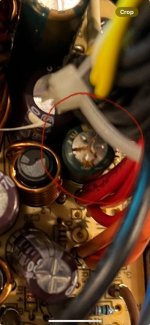
Is this ok?main caps are blown, fuse in black sleeving is probably blown, that may be it.
output cap is blown but i can tell you thats unrelated.
if you buy a new psu then try to get a SeaSonic brand or EVGA
corsair are said to be o.k. aswell
Attachments

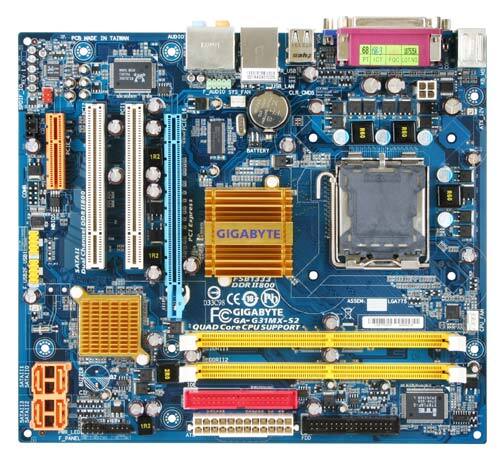
going on your label that's the mainboard, Gigabyte boards are pretty reliable, I always bought them as never really had issues with them, wouldn't need much of a PSU to power that PC
Pretty similar to the boards I'm running but mine are AMD CPU, only issue now is 2 ram slots and DDR2 so I need to upgrade some of mine for the games

That's a decent mid range PSU. I've bought quite a few Fractal Design PC cases from that seller.Is this ok?
PSU's have shot up in price over the past few years so it seems a reasonable price.
Whilst Seasonic is a top tier brand who used to make all their own PSU's and also were OEM for other brands like Corsair, sadly they no longer make their budget PSU's such as the M12 range.