If I’m running tekno parrot on a different pc will that still run risk of needing to be bypassed or does it not matter if off tekno parrot.??you cant bypass it, you already said your not a pc expert.
you would need to have hacking skilz and know how to use software like IDApro

You are using an out of date browser. It may not display this or other websites correctly.
You should upgrade or use an alternative browser.
You should upgrade or use an alternative browser.
Problem Blazing Angels Sit Down HELP PLEASE
- Thread starter athena
- Start date

With tecknoparrot you will not need to bypass any protection as there is none , One thing you will need it to be able to wire the controls up to an IPAC/APAC as you need a way for the controls to communicate with the PC. You will need to learn installing O/S , Installing and configuring parrot , Wiring controls ect. You only have the new PC hooked up inside the old one with PSU ect is removed so no need to do owt with that.
It can be a job for a novice if you can follow videos and instructions, Should be fun !!!
Dave.
P.S I am going to wack it on my driving cab I think , Although I aint a fan of new new arcade stuff I would like to play Outrun 2 on it !
It can be a job for a novice if you can follow videos and instructions, Should be fun !!!
Dave.
P.S I am going to wack it on my driving cab I think , Although I aint a fan of new new arcade stuff I would like to play Outrun 2 on it !
PC specs for it are low but Ideally wantsyou need to know the spec of the original pc
I have the Joystick and Throttle from These machines, It has a box with little usb game controller interface for controls. not sure where the start button works from but should be the USB as the joystick/throttle runs from it, plugs straight in PC USB so should work fine in TeknoParrot, if it's standard PC running with windows then he can play other flight games toothe reason the buttons didnt work may have been protection recognising it was not original,
as for parrot - i suggest you look into how it will interface to your controls and such
https://service.globalvr.com/downloads/blazingangels/040-0168-01_Blazing_Angels_Manual.pdf
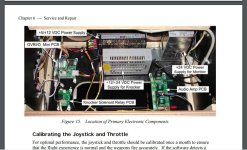
The board on top left GVRI/O Mini PCB I'm sure what is with mine, I used it to connect my Star Wars controller to PC and use Joystick/Throttle for playing for the other space/flight games so teknoparrot should just see it, depends what other buttons the cab has? where the Start Button wired too but I would of thought that
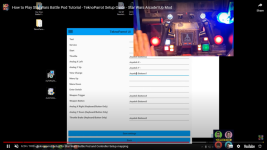
Actually I sat and watched the video posted on YouTube about tekno parrot and specifically SW pod. But showed step guide so I’d give it a go, just take my time.With tecknoparrot you will not need to bypass any protection as there is none , One thing you will need it to be able to wire the controls up to an IPAC/APAC as you need a way for the controls to communicate with the PC. You will need to learn installing O/S , Installing and configuring parrot , Wiring controls ect. You only have the new PC hooked up inside the old one with PSU ect is removed so no need to do owt with that.
It can be a job for a novice if you can follow videos and instructions, Should be fun !!!
Dave.
P.S I am going to wack it on my driving cab I think , Although I aint a fan of new new arcade stuff I would like to play Outrun 2 on it !
Outrun 2 love it and Mario Kart.
This bit about IPAC etc I’ve no idea about any of this I’ll be looking at that next now. I assumed if I linked it up the existing controls on my cabinet would just work but clearly not lol
Ok so my currentPC specs for it are low but Ideally wants
I have the Joystick and Throttle from These machines, It has a box with little usb game controller interface for controls. not sure where the start button works from but should be the USB as the joystick/throttle runs from it, plugs straight in PC USB so should work fine in TeknoParrot, if it's standard PC running with windows then he can play other flight games too
https://service.globalvr.com/downloads/blazingangels/040-0168-01_Blazing_Angels_Manual.pdf
The board on top left GVRI/O Mini PCB I'm sure what is with mine, I used it to connect my Star Wars controller to PC and use Joystick/Throttle for playing for the other space/flight games so teknoparrot should just see it, depends what other buttons the cab has? where the Start Button wired too but I would of thought that
View attachment 17388
sounds like, if I’m following haha. Buy pc mentioned above, get tekno loaded up onto it and chosen games to play added?Ah usb ! Amazing if it is. So so much easier. I was just assuming , my wife says i assume to much
Hopefully when you plug controls into new pc windows picks up drivers ect.
Dave.
Plug it in and see if controls work as normal? If they don’t there are further work arounds?
Question is with the original PC, does it run the USB Interface from a usb on that USB Adaptor card seen in first pics
https://service.globalvr.com/troubleshooting/ba.html
Global VR
https://service.globalvr.com › troubleshooting
Try a different USB cable. Reboot the game. Replace PCI USB card if faulty. Faulty PCB, Make sure that all connections to the GVRI/O Mini PCB are secure ...
https://service.globalvr.com/troubleshooting/ba.html
Blazing Angels Troubleshooting Guide
Global VR
https://service.globalvr.com › troubleshooting
Try a different USB cable. Reboot the game. Replace PCI USB card if faulty. Faulty PCB, Make sure that all connections to the GVRI/O Mini PCB are secure ...
Ok so my current
sounds like, if I’m following haha. Buy pc mentioned above, get tekno loaded up onto it and chosen games to play added?
Plug it in and see if controls work as normal? If they don’t there are further work arounds?
In theory , i have never actually seen on so i would look to Bobs on the usb part.
Dave.
https://parts.globalvr.com/gvr-static-suppression-board-990-0014-ba/
https://service.globalvr.com/reference/gvrio-ae&pl.htm
Everything runs off that I/O board then, I know when I looked at them there are ones setup for Flight games then another for Driving, the Need For Speed Carbon has them too but slightly different firmware for driving I guess
https://service.globalvr.com/reference/gvrio-ae&pl.htm
Everything runs off that I/O board then, I know when I looked at them there are ones setup for Flight games then another for Driving, the Need For Speed Carbon has them too but slightly different firmware for driving I guess
Basically yeahOk so my current
sounds like, if I’m following haha. Buy pc mentioned above, get tekno loaded up onto it and chosen games to play added?
Plug it in and see if controls work as normal? If they don’t there are further work arounds?

It should work as everything is running from that USB and you can just setup joystick/buttons in controller setup.
You can still sort original PC out at some point and plug that back in anytime, that's bonus with these PC based games
You can still setup the Test, Service, Start as well so should work just same. I'm trying to remember if I had any drivers for the USB or if it just works,
SEE THIS PAGE http://forum.arcadecontrols.com/index.php?topic=135310.80 shows the SPudlogic connected to PC
@Bods once again thank you for the input. Same for everyone else who has helped so far. I know @Mc-Q got a bit exasperated with me but I promise it was unintentional. As explained, what I know about PCs makes me dangerous to touch them. Lol
I’ve agreed to buy that PC mentioned and hopefully shall get it tomorrow. Which will give me weekend if I can find time to bugger about with it and hopefully get it running. Or after getting nowhere for hours I could find I’ve decided to have a large bonfire lol
I’ve agreed to buy that PC mentioned and hopefully shall get it tomorrow. Which will give me weekend if I can find time to bugger about with it and hopefully get it running. Or after getting nowhere for hours I could find I’ve decided to have a large bonfire lol
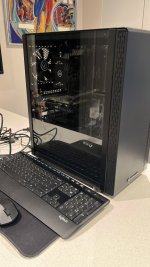
lol yes but I discovered I could just stick it on tv in kitchen with hdmi for now. Ok so I’ve been at this for 5 hours now my brain is melting and I hate everything!
I’ve been a Mac user for so long that windows is so alien to use just navigating around it has been such a headache.
I’ve got f loads of space on drives but this thing won’t use anything other than the 5gb on the one drive whatever that is.
So in summary I think I’ve downloaded the teknoparrot, c++ and direct thing
I’ve downloaded the game files which took hours for some reason. Now I’m stuck.
I’ve not managed to find any .exe files
I think I’ve just got in more of a mess as I’ve gone on and now I really just don’t know about anything. Officially hate it. Knew i would.
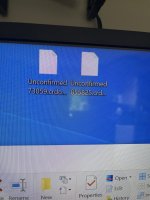
No idea why blazing and Star Wars ended up saying unconfirmed pic below
I’ve been a Mac user for so long that windows is so alien to use just navigating around it has been such a headache.
I’ve got f loads of space on drives but this thing won’t use anything other than the 5gb on the one drive whatever that is.
So in summary I think I’ve downloaded the teknoparrot, c++ and direct thing
I’ve downloaded the game files which took hours for some reason. Now I’m stuck.
I’ve not managed to find any .exe files
I think I’ve just got in more of a mess as I’ve gone on and now I really just don’t know about anything. Officially hate it. Knew i would.
No idea why blazing and Star Wars ended up saying unconfirmed pic below
Attachments
Ok so UPDATE!! I’ve now managed to download 3 of the 4 I wanted
Blazing Angels - Appears 100%
Mach Storm - Appears 100% with easy selectable dome screen fix
Star Wars BP - appears I’ve removed dome issue with a patch but it’s still really really stuttering.
What’s weird is Mach Storm runs on same system in a dome, bigger game file as well and smooth as a babies bum so why is Star Wars still stuttering.
I’m sure the PC I bought was more than capable so please anyone have any fix or suggestion??
My pc spec is
I5 processor 10th gen, 16gb Ram. 256 SSD, 1 TB HDD, GTX 1660 Super GPU
Am I missing anything obvious? The fact Mach storm is running ok makes this even more unusual (always the game you care about)
Blazing Angels - Appears 100%
Mach Storm - Appears 100% with easy selectable dome screen fix
Star Wars BP - appears I’ve removed dome issue with a patch but it’s still really really stuttering.
What’s weird is Mach Storm runs on same system in a dome, bigger game file as well and smooth as a babies bum so why is Star Wars still stuttering.
I’m sure the PC I bought was more than capable so please anyone have any fix or suggestion??
My pc spec is
I5 processor 10th gen, 16gb Ram. 256 SSD, 1 TB HDD, GTX 1660 Super GPU
Am I missing anything obvious? The fact Mach storm is running ok makes this even more unusual (always the game you care about)
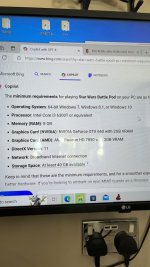
To even make it easy I’ve attached pic of required specs, my pc should be ok
I’ve got win 10
I’ve got double Ram needed
I’ve got i5 better over i3
My GC is 1660 super not 660
I’ve got over spare 180 gb space not necessary 40gb
Am I missing anything obvious? A box that needs ticking? Another fix patch?
I’ve got win 10
I’ve got double Ram needed
I’ve got i5 better over i3
My GC is 1660 super not 660
I’ve got over spare 180 gb space not necessary 40gb
Am I missing anything obvious? A box that needs ticking? Another fix patch?