First fix frogger on galaxian bootleg

drbible

User
vacBacker
Feedback
2 (100%)
Credits
98CR
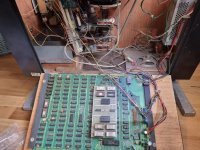
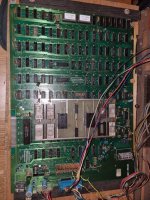
Going to have a go at fixing this board. Not sure why as I do have an original frogger I could wire into the cab. However it seems close enough to working and I've nothing to lose so thought I'd give it a go. I've never fixed a board before so am a product of you tube mostly. Don't fancy my chances tbh.
Anyway story so far:
Really weird wiring and filthy board.
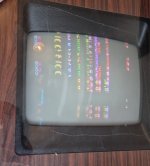
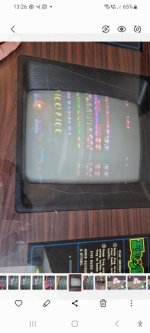
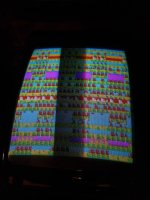
It fires up with graphic issues but sound all seems fine.
20230122_123604.jpg
Screenshot_20230124_132612_Gallery~2.jpg
 

Attachments

  • Screenshot_20230124_132612_Gallery.jpg
    Screenshot_20230124_132612_Gallery.jpg
    47 KB · Views: 13

drbible

User
vacBacker
Feedback
2 (100%)
Credits
98CR
So, one very kind VAC member sorted me some new EPROMs.
Also I cleaned the board up and soldered the broken chip legs.
However it's now worse than ever I.e. graphics similar but no sound for some reason.

So, current questions:

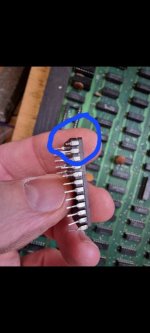
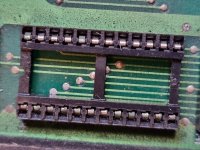
I'm not sure about this chip housing as it looks corroded but I can't seem to remove it. Is it just brute force or is there a way to get these off?
20230209_145952.jpg
Checking the chips most have 5v running through them. All on the rom board ok but the EPROMs show about 1v - is that normal or should all the chips on the board be showing the same?
20230312_193829.jpg
20230312_170013.jpg
 

NivagSwerdna

Active member
Feedback
1 (100%)
Credits
744CR
>>> All on the rom board ok but the EPROMs show about 1v - is that normal or should all the chips on the board be showing the same?
That's not great. You should have a solid 5V (or near-ish) between the opposite corners... pin 12 and pin 24.

Remind me what type they were and what they got replaced with... 2716s?
 

ArcadePCB

User
vacBacker
Credits
509CR
And you should replace at least that socket you've taken a picture of it. I recommend using the expensive machined sockets, but at least new double wipe sockets. The socket shown in the picture is oxidized and will not make good contact. Before you start seraching for faulty chips, you should make sure all the sockets and the chips placed into them are in good condition.
But only replace sockets if you are able to: you have to have the right tools and you have to know how to do it. Otherwise you'll ruin the board. I know what I'm talking about because I'm restoring 2 boards for a few weeks now someone else has 'worked' on before. Dozends of traces have been ripped off and just covered by soldering new sockets on. That's a very time consuming work to fix this if you want the board look good again and you don't want to put dozens of jumper wires accross the board.
 

drbible

User
vacBacker
Feedback
2 (100%)
Credits
98CR
And you should replace at least that socket you've taken a picture of it. I recommend using the expensive machined sockets, but at least new double wipe sockets. The socket shown in the picture is oxidized and will not make good contact. Before you start seraching for faulty chips, you should make sure all the sockets and the chips placed into them are in good condition.
But only replace sockets if you are able to: you have to have the right tools and you have to know how to do it. Otherwise you'll ruin the board. I know what I'm talking about because I'm restoring 2 boards for a few weeks now someone else has 'worked' on before. Dozends of traces have been ripped off and just covered by soldering new sockets on. That's a very time consuming work to fix this if you want the board look good again and you don't want to put dozens of jumper wires accross the board.
Yes I'm keen to replace that socket but I can't get it off the board and don't want to use too much force. What's the best tool for removing it? Presumably once it's off I can clean up those connectors. This is def the next thing to try.
 

ArcadePCB

User
vacBacker
Credits
509CR
I don't konw where you come from and if you can read German language websites - but if you can, I would highly recommend this website, if you can't, use www.deepl.com for translating. I think this is way the best method because everything else leads to ripped off traces and vias. Trying to remove the solder pin by pin isn't a way I'm trying to do anymore (despite I have a professional Weller desoldering station), because there is always one or two pins on the top side where the solder is stuck to the pad even when the pin seems to be free. This i why you rip off the traces connected when trying to pull of an obviously 'free' socket.
Another method (usually works on smaller ICs and sockets): you put on much solder on the solder side so all pins are connected. Heating the whole row of pins at once by moving the soldering iron along the row and swapping between both rows trying to make both rows fluid at once you may be able to pull the socket out, too. Use a soldering station that has enough power - a cheap soldering iron won't work here. But be careful, sometimes some solder drops through the pin wholes - avoid getting it on your fingers, that's very painful. If successful, remove the solder and clean up the flux from the pcb.
 
Last edited:

Lurch666

Active member
Feedback
21 (100%)
Credits
4,160CR
Desoldering a chip or socket is one of the trickiest things to learn while starting repairs.
As stated you can do more damage if you are not careful. It took me a while to figure out the best method for me to remove stuff off a PCB. There are various youtube videos covering this.
You are best with a scrap PCB to practice on.
 

Phils Arcade

Senior Member
vacBacker
Feedback
9 (100%)
Credits
1,387CR
As mentioned above, trying to remove IC sockets is really hard at times.

If all the traces are only on the bottom then desoldering should be fairly easy. I say fairly with a large dose of salt.

You should be able to get away with a soldering iron and manual solder sucker. If the IC or socket is really bad then you can cut the thing out leaving enough go the leg protruding so that you can remove each pin at a time. Very time consuming to say the least, but for really stubborn ones it may be the only choice. You may need to use some flux and fresh solder on the pins to help the solder to flow. Also, a lot of these old boards you'll be working on have lead solder so if you're doing a lot, an extraction system or plenty of ventilation with a small fan blowing across your work area is a must. Don't be breathing all that in.

If the traces are on both sides of the board, then removing even the solder from the solder side it could still be joined on the component side. This is probably what is happening to you. this is where a desoldering station helps, though, again, it's not always the case.

If stuck DON'T try to force it as you'll pull the traces off the top of the board, and it's a real pain trying to fix. Check where it's getting stuck and concentrate on that pin. It might help to put the soldering iron on the pin, quickly remove it and wiggle the pin around the hole, hoping it doesn't solder itself back. It might help to solder the pin and remove the solder again.

In cases like this, and I want to save the chip I'm removing, I've a hot air gun I'll use. Remove whatever I can with the soldering iron, again using flux and fresh solder to get it started, suck as much of that solder up or use copper braid to help remove some of the more stubborn areas, then if stuck, use the hot air gun around the area that's stuck while pulling gently with an IC extractor or chip puller. The chip or socket should simply pull free.

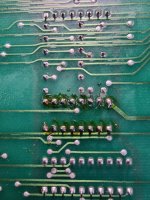
Once out clean up any solder left around the hole, I'll typically use the copper braid for that, so you're left with a nice clean solder free area. Sometimes when the IC or socket has been removed you'll find a trace hidden underneath may be broken and was the source of the issue you have. Fixing traces is a whole other story.

Best of luck on the board, and once you know what you're doing, it doesn't get any easier :) only joking, it does.
 
Last edited:

drbible

User
vacBacker
Feedback
2 (100%)
Credits
98CR
>>> All on the rom board ok but the EPROMs show about 1v - is that normal or should all the chips on the board be showing the same?
That's not great. You should have a solid 5V (or near-ish) between the opposite corners... pin 12 and pin 24.

Remind me what type they were and what they got replaced with... 2716s?
The originals were these and the ones you made were 2716s yep (thx again btw).20230124_125252.jpg
 

drbible

User
vacBacker
Feedback
2 (100%)
Credits
98CR
OK, really appreciate all the advice. More you tube and Google work required til I'm ready tonstep up to the desoldering task I'd say. Although I don't mind taking risks with this board tbh as I have a back up plan for the table. That said would be amazing to get it running as it is.

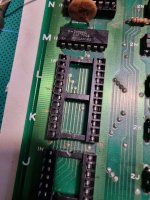
Can I not just remove this plastic bit to clean up the metal connectors that receive the IC pins though? I've seen pics of boards with the plastic housing removed. Or is it attached in some way that you actually have to desolder the pins as well?
16787081559023812103667206589600.jpg
Also discovered last night nil voltage running thru this chip too and when I removed it there was quite a lot of oily residue in the connector. Will check again later now it's all dry.
16787082849906924500654735809827.jpg
 

drbible

User
vacBacker
Feedback
2 (100%)
Credits
98CR
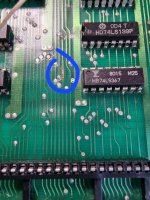
OK, update on this if anyone can take any more. I'm stepping away from the chips themselves for a bit (not least to put off the desoldering) to check out issues w the circuit itself. The marked locations in the pic don't have any voltage. The small ones may be right but presumably the eprom and cpu chips should be showing 5v no matter what's happening in the game.
I presume with these bootlegs a schematic is out of the question too.
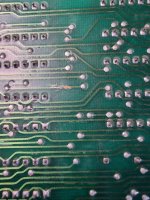
Anyway found two broken traces that it's now my priority to fix. Looks like someone's had a go before with solder but I'm planning to bridge them with wire as never seen it done w solder before.
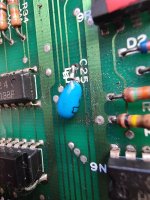
There are also these 2 slightly dodgy looking solder repairs on the board too which I don't like as they may have some crossover but I'm leaving them for now.
Not holding my hopes up but this is all good practice!
20230314_153841.jpg
20230314_145739.jpg
20230314_145509.jpg
20230314_145913.jpg
 

NivagSwerdna

Active member
Feedback
1 (100%)
Credits
744CR
OK... in these scenarios the first thing to do is slow down...

In Post#3 you show a screen full of graphics... it seems semi frogger like... perhaps you could up load a video of the sequence as it starts... or a more in focus shot of that screenful if that's what you get immediately on power on.

In Post#11 you are suggesting lack of power at the Z80A... really? Note: that a Z80 doesn't take it's power from opposite corners... you need to measure between pins 11 and 29?

In Post#12... it looks OK... some people object to flux residue but it doesn't look destroyed. The repaired traces may be OK... use a DMM on Continuity mode to check from places on either side of the dodgy bit. Solder might be OK for a slightly damaged trace, a bit of wire, 30 AWG stripped Kynar, laid along the top probably a bit better but again arguable.

I suspect it's more working than you think.
 

Phils Arcade

Senior Member
vacBacker
Feedback
9 (100%)
Credits
1,387CR
Remember when you are looking at chips to go and look up their pin outs on a data sheet.

Also be careful as some TTL chips, those 74xx chips may have the same number but a letter will point to a different pin configuration, for example:
The common I.C. 7401 is a quadruple 2 input NAND gate. the 74LS01 has a different pinout to the 74H01.

This is something that may not be apparent when looking up the data sheet. Other chips may have different configurations as well.
 

NivagSwerdna

Active member
Feedback
1 (100%)
Credits
744CR
I presume with these bootlegs a schematic is out of the question too.
If it's like the one I have it follows the original schematic pretty closely... https://www.arcade-museum.com/manuals-videogames/G/Galaxian.pdf
There is a difference... For fun I'll see if you can work it out.... :) For what you are up to you will probably never notice.
Sometimes the board numbering, along the edge, differs but once you work out the co-ordinate system you should be OK.
 

drbible

User
vacBacker
Feedback
2 (100%)
Credits
98CR
OK... in these scenarios the first thing to do is slow down...

In Post#3 you show a screen full of graphics... it seems semi frogger like... perhaps you could up load a video of the sequence as it starts... or a more in focus shot of that screenful if that's what you get immediately on power on.

In Post#11 you are suggesting lack of power at the Z80A... really? Note: that a Z80 doesn't take it's power from opposite corners... you need to measure between pins 11 and 29?

In Post#12... it looks OK... some people object to flux residue but it doesn't look destroyed. The repaired traces may be OK... use a DMM on Continuity mode to check from places on either side of the dodgy bit. Solder might be OK for a slightly damaged trace, a bit of wire, 30 AWG stripped Kynar, laid along the top probably a bit better but again arguable.

I suspect it's more working than you think.
Good advice much appreciated.
Didn't know that about the Z80. It has continuity but shows no voltage with power. The chip housing is the same.
The start up looks the same with all the old and new eprom combinations AND crucially the same with the CPU chip removed.
Scratches have continuity so left them. Found and fixed this fwiw.
Here's the start up pic....can't get the video to upload this time but basically this screen appears straight away and doesn't change.
20230314_162143.jpg
20230314_191230.jpg
 

Attachments

  • 16788210026265969328368109971160.jpg
    16788210026265969328368109971160.jpg
    79.6 KB · Views: 13

Phils Arcade

Senior Member
vacBacker
Feedback
9 (100%)
Credits
1,387CR
At least this shows that the Z80 processor is running fine or you wouldn't get anything. It's accessing the graphics ROMs as can be seen in their image and the video circuitry looks okay since you are getting a stable image.

Does the screen stay like that solidly or does it flick off and go back to that content again? Just wondering if the watchdog is being triggered.
 

drbible

User
vacBacker
Feedback
2 (100%)
Credits
98CR
OK so somethings going on in the z80 then, thats good. Screen stays as is with very occasional flicker of graphics. Once it had a loud beep as well but that happened when i was testing voltages. Is there a dirty way I could wire 5v to the z80 pin 11 or is that a really bad idea.
 
Top