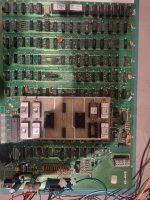
First fix frogger on galaxian bootleg

NivagSwerdna

Active member
Feedback
1 (100%)
Credits
744CR
If that is the case then you can pretty much ignore the CPU, ROM and system RAM sections.

You need to get confident with your logic probe and start moving through the video sections
 

drbible

User
vacBacker
Feedback
2 (100%)
Credits
98CR
From that info, out of interest, how can you rule out the RAM sections? I had suspected the VRAM address lines.
Anyway today i probed the horiz pos lines as graphics seem bunched up on horiz axis. I noticed the logic on some pins at 4M and 5M through the buffers isn't correct I.e. the input is diff to the output. Are these 74367's prone to failing?
 

NivagSwerdna

Active member
Feedback
1 (100%)
Credits
744CR
These things are quite old so anything can have failed! Anything that flips and flops, buffers, XORs, ANDs... they all have failures... RAM more so.
You should print out the schematic at a scale you can read and sellotape it together... you can then follow the logic through.

Also... Look at the Galaxian trouble shooting guides.... in particular I think numbers instead of sprites has a common cause.

I was merely suggesting that system RAM and ROM might be OK.... VRAM, Object RAM and Sprite RAM... that's a different story.

Of course where you have something that occurs more than once and is socketed... you can always swap it and see what happens!
 

drbible

User
vacBacker
Feedback
2 (100%)
Credits
98CR
Had a look today some of the Vram lines are constant low. Is there a way to 'coin up' and start the game with the pcb on a workbench so I can check if these lines activate when the game starts doing something? All I have connected to the board on the bench is power and video at the moment.
 

drbible

User
vacBacker
Feedback
2 (100%)
Credits
98CR
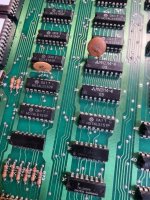
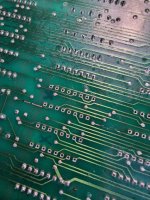
So, set about replacing these (2F, 2E & 3E) or atleast getting them socketed....and discovered these broken traces. Almost definitely the cause of the logic probe readings 🙄. Anyway I've not repaired a trace before - what's best, just a blob of solder or a wire bridge? One of them is quite a big break for solder I'd say. I'm hoping this is the reason that the board seems to be getting worse (all zeros on screen now). Also expect this is self inflicted so need to take more care.
20230521_130704.jpg

20230521_133324.jpg
 

drbible

User
vacBacker
Feedback
2 (100%)
Credits
98CR
Made some progress with the logic probe looking over data lines. There are 3 x faulty 7408's at 2R, 2N and 6H. Are these prone to fault? Found these from 2 of the RAM chips stuck LO at d1.
I will replace.
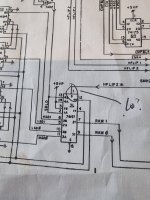
Also found this stuck at LO and not sure if it's a red herring (see pic, pin 1). Traced back the HFLIP signals and found another broken 7408 that is HFLIP 1. Can't find where HFLIP 2 goes on the schematic. What does HFLIP mean/do anyway?
Last thing - I can't get to some of the chips that are under the ROM daughter so just hoping they are OK.
Really need some progress after replacing these 7408s otherwise going to be gutted.20230522_112057.jpg
 

NivagSwerdna

Active member
Feedback
1 (100%)
Credits
744CR
Use a fibreglass pen to expose something shiny to solder onto.
Buy some 30AWG solid core wire. Strip it and lay it along the line of the broken trace. Then solder it over the trace. For a complete job glue it in place.
Try not to introduce faults faster than you fix them ;)
 

drbible

User
vacBacker
Feedback
2 (100%)
Credits
98CR
Use a fibreglass pen to expose something shiny to solder onto.
Buy some 30AWG solid core wire. Strip it and lay it along the line of the broken trace. Then solder it over the trace. For a complete job glue it in place.
Try not to introduce faults faster than you fix them ;)
Valid comment 🤣......pinning high hopes on these 7408's now for some actual forward progress.
 

drbible

User
vacBacker
Feedback
2 (100%)
Credits
98CR
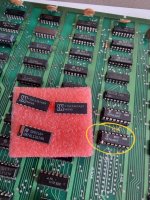
Advice required - I've received these ICs to replace one or more of the indicated 75LS367s on the board. Are these all the same chips I.e. does the different lettering and the orientation marks on the new ones make any difference or is it all OK so long as it is 74LS367 of some sort? Weirdly when I did the same for a replacement 74LS04 the board seemed to get worse I.e. went into reset whereas it atleast booted up before. 20231006_135252.jpg
 

drbible

User
vacBacker
Feedback
2 (100%)
Credits
98CR
Anyone know where I can find the reset switch or equivalent on a bootleg like this? Or even where it is located on a true Galaxian for that matter (can't tell from my schematic).20231006_195026.jpg
 

NivagSwerdna

Active member
Feedback
1 (100%)
Credits
744CR
Anyone know where I can find the reset switch or equivalent on a bootleg like this? Or even where it is located on a true Galaxian for that matter (can't tell from my schematic).View attachment 11026
As above. Not everything is always present on bootlegs so maybe your reset will have to be more creative.

Generally you would leave reset alone as it forms part of the watchdog circuit. You probably already know this... the counter increments on each frame and if it overflows then it causes a reset. The program, if successfully running, aims to reset the counter on every frame so the reset never happens.

There is a solder pad that allows you to inhibit the counter so the watchdog is disabled which can be useful when diagnosing faults in the situation where things are sufficiently knackered that the watchdog is not being reset. This should be open for normal operation.
 

Attachments

  • Screenshot_20231007-101943.png
    Screenshot_20231007-101943.png
    133.4 KB · Views: 9

ArcadePCB

User
vacBacker
Credits
509CR
"Weirdly when I did the same for a replacement 74LS04 the board seemed to get worse".

It maybe you've got a 'fake' 74LS04. This means, it may be marked 74LS04, but it's really a 74HC04 or a 74HCT04. I had this situation also already. The problem is, the functionality is the same - but levels, delay time, etc. are different. There may be situations you won't even recognize it's not the chip you're expecting it is, but in other situations (especially, if the device is used 'out of spec') this will prevent correct functioning of the circuit. Sometimes you have to use a replacement of the same manufacturer for repair if the specs haven't been followed when designed. These are no good designs, but the only way to bring such a design back to life is to use exactely the same chip that was used originally. Some chips of the same type from different manufacturers are interchangeable when used wihin the specs, but they may behave different when exceeding spec limits. An example is using digital logic ICs in an analogue way. Especially when using CMOS 40xx logic some engineers used to realize a delay time inserting a resistor in series to the output of one gate and a capacitor in parallel to the input of another gate. This results in a delayed signal indeed - but how much the delay is depends on the switching levels of the input of the second gate. So using the same IC type form another manufacturer may change the delay time.

 

drbible

User
vacBacker
Feedback
2 (100%)
Credits
98CR
There's something deeper going on that I'm missing now but I can't find any power issues or obvious visible things I've done like leave a few disintegrated chips lying on the board.
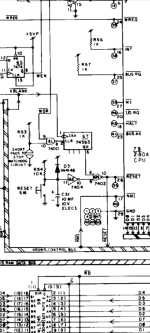
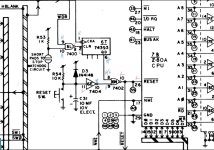
Reset stuck low and reset cct looks like this. H/L being a pulse. I presume that pin 11 at 6E ought to be H. However without a reset switch to check I'm lost again (and going rapidly backwards (again)).Screenshot_20231008_164902_Outlook.jpg
 

NivagSwerdna

Active member
Feedback
1 (100%)
Credits
744CR
6N is a NOR

A H at either input will cause the CPU in reset.

If pin 9 is H this will cause a reset. In normal operation this should ALWAYS be L. And the input pin 11 of 6E should be H, pulled high by R54. The only exception to that is when power is applied for the very first time... pin 11 of 6E will have zero volts until C31 charges up (through R54). The initial charge thing is to keep the CPU in reset as the board is powered on.


.
 

drbible

User
vacBacker
Feedback
2 (100%)
Credits
98CR
So, replace c31 and/or R54 except they arent marked on this bootleg.
All the reset cct chips seem to be doing their jobs. Can I force pin 11 high to see if it triggers the reset high and therefore proves the fault lies in c31 or its equivalent.
 

NivagSwerdna

Active member
Feedback
1 (100%)
Credits
744CR
Resistors in non-power circuits rarely fail. It is more likely that you have missing power or a broken trace. It is possible that the capacitor is shorted but again probably unlikely.
Just use some deductive reasoning as you probe around.
On my Galaxian bootleg the components are located almost identically to a real one.
 

ArcadePCB

User
vacBacker
Credits
509CR
Have you checked the reset switch already? To draw pin 11 / 6E low, there are 3 possibilities in this circut:
- Reset SW is shorted or there's a short circuit on the PCB. Check the solder side of the PCB for bend IC pins or solder spots.
- C31 is shorted as mentioned above.
- R54 is open. This would not lead to a defined low level at pin 11, but it would lead to a floating pin 11 which could be interpreted as a permanent low. As mentioned, this is not very likely, but check it to be sure.
R54/C31 is defining the time constant (100ms) for the power on reset.
So pin 10 / 6E should be high immedeately after power up and become low after 50ms ... 150ms when the circuit is working.
 
Top