
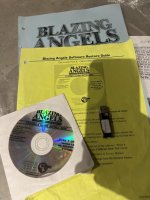
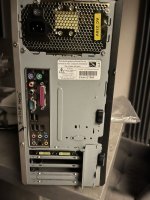
Ok so this is the disc and dongle I’ve gotwell then its an easy fix, show me a photo of the rear panel of the pc- the bit with the motherboard ports etc

You are using an out of date browser. It may not display this or other websites correctly.
You should upgrade or use an alternative browser.
You should upgrade or use an alternative browser.
Problem Blazing Angels Sit Down HELP PLEASE
- Thread starter athena
- Start date

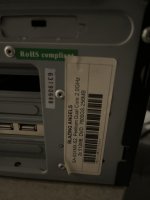
This is pic of back of the 2nd pc we tried to use which all worked but the machine wouldn’t start a game when pressing the fire button to start, I think looking my friend has used graphic card in this?looks like its using a g31 motherboard
(No 4 port usb on this one)
Attachments
But the 7600 cars missing in first one is I’m guessing in the second one? Why would they have removed it otherwise?if you don't have the right hardware then the game will not behave, i bet if you put a 7600 card in there it would work- you could use any card as long as you had the right xp drivers installed
I’m really still just trying to work out what the stuff on PCs are. Happy to admit I’m clueless with PCs I’ve said repeatedly this is a steep learning curve
So I need it simplified to really understand.
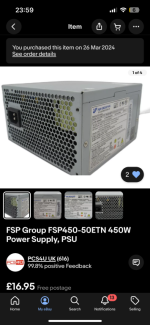
I’ve attached pic of the psu I was told should work in original pc. Though if it’s going to work I don’t know as it only arrived today and the original psu that died had loads of connectors, this new one only has 3 connectors so might not even be right,
I’ve no idea what else was wrong with original PC. But if it was a hard drive issue than it’ll still have that issue.
So can I use the hard drive in 2nd pc?
Attachments
i imagine the original graphic card failed and was removed, this game is not graphic hungry so maybe was working with onboard graphics with maximum shared ram. I never run onboard unless the setup was originally like this. You could pick up a used working compatible card on ebay for very little
The power supply pictured is fine as its can run at 115v or 230v, as for connections I would need to see some photos
The power supply pictured is fine as its can run at 115v or 230v, as for connections I would need to see some photos
Morning. I already asked my friend this morning after showing you pics. The graphics card was removed and put into this 2nd pc along with the RAM. (No idea just what I was told)
The original PC fault basically whilst in play it just froze mid game one day, turned machine off and back on and than it didn’t work at all. So gave it to my friend to look at, but they weren’t aware it was 115 (neither was I) and after plugging it in blew psu. Which is why we went to a different pc but took graphics card and ram from original pc. And it did all load and look like it was ok until it got to trying to start a game as buttons wouldn’t activate a game start. But if you accessed menu it would recognise controls and Calibrate just not start game. Which is possibly like you said, odd behaviour in the replacement.
So at moment I’ve got the new psu I was hoping I could put in original PC. Graphics card is possible to put back in and ideally use hard drive in 2nd pc put back in original pc?!
The original PC fault basically whilst in play it just froze mid game one day, turned machine off and back on and than it didn’t work at all. So gave it to my friend to look at, but they weren’t aware it was 115 (neither was I) and after plugging it in blew psu. Which is why we went to a different pc but took graphics card and ram from original pc. And it did all load and look like it was ok until it got to trying to start a game as buttons wouldn’t activate a game start. But if you accessed menu it would recognise controls and Calibrate just not start game. Which is possibly like you said, odd behaviour in the replacement.
So at moment I’ve got the new psu I was hoping I could put in original PC. Graphics card is possible to put back in and ideally use hard drive in 2nd pc put back in original pc?!
How can I find out motherboard to tell you what’s in second PC?what motherboard is in the 2nd pc?
you can bench test this pc, using a keyboard you can bypass the io board and start the game using the keyboard
so I don’t have to plug the PCs into machine to know if ok? That is just to plug into IO board for controls?
motherboards have the model number printed on them, also many show the model on the post screen
you can test certain global vr games on the bench with a keyboard, you can also check all drivers are correct by pressing windows key, click gvr shutdown and then goto device manager and check all hardware. Once you know all the drivers are correct then its highly likely the pc will function in the machine.
you can test certain global vr games on the bench with a keyboard, you can also check all drivers are correct by pressing windows key, click gvr shutdown and then goto device manager and check all hardware. Once you know all the drivers are correct then its highly likely the pc will function in the machine.
Ok this is all over my head a little but I’ll try my best and take it step by step. Unfortunately though I need to use Arcade set up as I don’t have a DVI cable to plug old PCs into tv in house so can’t rig it up without using screen in Arcade.motherboards have the model number printed on them, also many show the model on the post screen
you can test certain global vr games on the bench with a keyboard, you can also check all drivers are correct by pressing windows key, click gvr shutdown and then goto device manager and check all hardware. Once you know all the drivers are correct then its highly likely the pc will function in the machine.
It’ll mean I can’t do anything for prob week waiting for it over Easter.
I’ll send pic of new psu connectors i was directed to buy so you can let me know if it’ll work in original PC.
If it’s wrong I’ll need to get a suitable one ordered anyway to fix original PC.
I know you aren’t pro the emulator, from what you’re saying am I to assume that it’ll never work with the arcade controls ?! Am I literally wasting time pushing water up a hill?
I’ll send pic of new psu connectors i was directed to buy so you can let me know if it’ll work in original PC.
If it’s wrong I’ll need to get a suitable one ordered anyway to fix original PC.
I know you aren’t pro the emulator, from what you’re saying am I to assume that it’ll never work with the arcade controls ?! Am I literally wasting time pushing water up a hill?
Yes I’m just thinking, the 2nd pc worked until wanting to start a game. As you said, they behave weird with alien PCs being used so effectively this fancy powerful in comparison to originals gaming pc I’m using works upto control point is again odd behaviour maybe as it’s not original hardware etc. so could just be trying to make something work that won’t.
I was hoping the controllers etc would effectively just work via usb io board connection
If all I can do is revert back to original than I’ll stop wasting more money and time on this pipe dream lol and get original game back on. I love the game, my only gripe with BA is it’s so dark on screen in most missions. Why they didn’t make it brighter who knows.
I was hoping the controllers etc would effectively just work via usb io board connection
If all I can do is revert back to original than I’ll stop wasting more money and time on this pipe dream lol and get original game back on. I love the game, my only gripe with BA is it’s so dark on screen in most missions. Why they didn’t make it brighter who knows.
Ok great, if that makes it brighter. I’ll worry about it once I’ve managed to get it working again. Lolyou can adjust picture in test, digital vibrance and gamma
Sounds like if my newly acquired PSU isn’t right you’ll be able to point me to what I need. So maybe more money to spend but if I can get it finally working again at least that will soften the blow. As with everyone’s input, i really appreciate people’s advice and help. As stated in past my background is pinball, Arcade and PC is all new learning curve to me. Actually with computers I’ve used macs so just navigating windows has been a huge learning experience haha.
Perseverance will get me to the end. I hope. Lol