Problem Blazing Angels Sit Down HELP PLEASE

Vamino

Insert coin(s)
vacBacker
Feedback
22 (100%)
Credits
2,628CR
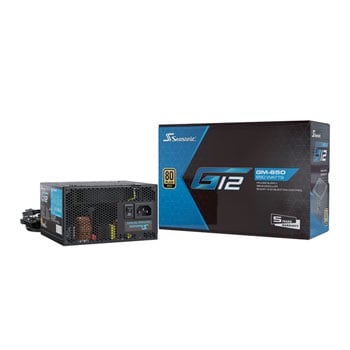
i was looking at this one for a new build.

not recommending it over any other, it just seems to be the cheapest.
The previous version of this PSU was made by Helly and then rebadged as a Seasonic. Not sure who the OEM is for it though, but I've never heard of Helly so don't know how good they are. It has a 5 year warranty which is not too bad though.

Old tier list:
https://forums.tomshardware.com/thr...er-list-rev-14-8-final-update-jul-21.3624094/

If price is a major factor I'd go FSP or Delta. Those PSU's are in a lot of industrial PC's and they tend to last for years.
But if you are pushing high end GPU's and CPU's then I'd go for top tier PSU every time.
 

Mc-Q

Active member
Credits
1,450CR
The previous version of this PSU was made by Helly and then rebadged as a Seasonic. Not sure who the OEM is for it though, but I've never heard of Helly so don't know how good they are. It has a 5 year warranty which is not too bad though.

Old tier list:
https://forums.tomshardware.com/thr...er-list-rev-14-8-final-update-jul-21.3624094/

If price is a major factor I'd go FSP or Delta. Those PSU's are in a lot of industrial PC's and they tend to last for years.
But if you are pushing high end GPU's and CPU's then I'd go for top tier PSU every time.
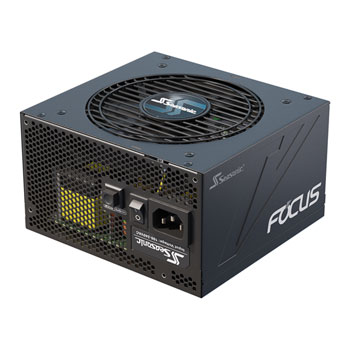
i'm looking at the other one in the thread now, the Focus GX series, that G12 doesnt come with enough cables for what i may be doing!
maybe even the 850 just for the extra cables
 

athena

User
vacBacker
Feedback
2 (100%)
Credits
125CR
Other end of the price spectrum to get the original PC back up and running.

https://www.ebay.co.uk/itm/364784770616

That's what I'd buy if I was on a budget.
Thanks @Vamino and @Mc-Q for these psu suggestions

The psu is only to make my original pc in blazing work again but if I can get the emulator to work in it I won’t technically be using the psu so the cheap £16/17 one would be perfect if it’s compatible as it might never be used lol

So the cheap psu has all necessary leads and the correct voltage etc for my original pc? (I’m assuming it is but wanted to check)

Regards the emulating, waiting on DVI adaptor as my new pc only has HDMI sockets, once I’ve got it I can throw it in machine to see what is and isn’t working correctly but afterburner definitely has lots of issues (top left screen box/start game the plane is invisible).

Star Wars I’ve changed everything you can think of suggested still stutters and has blue line down right side

Mach and Blazing on face of it work in attract perfectly fine.


Thanks
 

Vamino

Insert coin(s)
vacBacker
Feedback
22 (100%)
Credits
2,628CR
Thanks @Vamino and @Mc-Q for these psu suggestions

The psu is only to make my original pc in blazing work again but if I can get the emulator to work in it I won’t technically be using the psu so the cheap £16/17 one would be perfect if it’s compatible as it might never be used lol

So the cheap psu has all necessary leads and the correct voltage etc for my original pc? (I’m assuming it is but wanted to check)

Regards the emulating, waiting on DVI adaptor as my new pc only has HDMI sockets, once I’ve got it I can throw it in machine to see what is and isn’t working correctly but afterburner definitely has lots of issues (top left screen box/start game the plane is invisible).

Star Wars I’ve changed everything you can think of suggested still stutters and has blue line down right side

Mach and Blazing on face of it work in attract perfectly fine.


Thanks
Yeah, that cheap PSU will be perfect for your old Blazing Angels PC.
 

Bods

Senior Member
vacBacker
Feedback
3 (100%)
Credits
4,697CR
Thanks @Vamino and @Mc-Q for these psu suggestions

The psu is only to make my original pc in blazing work again but if I can get the emulator to work in it I won’t technically be using the psu so the cheap £16/17 one would be perfect if it’s compatible as it might never be used lol

So the cheap psu has all necessary leads and the correct voltage etc for my original pc? (I’m assuming it is but wanted to check)

Regards the emulating, waiting on DVI adaptor as my new pc only has HDMI sockets, once I’ve got it I can throw it in machine to see what is and isn’t working correctly but afterburner definitely has lots of issues (top left screen box/start game the plane is invisible).

Star Wars I’ve changed everything you can think of suggested still stutters and has blue line down right side

Mach and Blazing on face of it work in attract perfectly fine.


Thanks
That's what I would do, get it connected up and working in the cab and go from there with other games

Not sure what screen resolutions the Blazing Angels cab does so you may need to alter games to suit
I'm sure the USB for Controls is just picked up with Windows though and setting up controls in TP is easy enough
 

athena

User
vacBacker
Feedback
2 (100%)
Credits
125CR
So the massive fu**ing nightmare continues. I’ve rigged PC upto actual arcade cabinet. USB connected which is IO board I assume containing controls

Load game but no controls are recognised whatsoever. Played about with everything and can’t set them up or work out how. Nothing online helps as it’s all about using Xbox controllers etc, not dedicated cabinet controls.

SOMEONE FOR THE LOVE OF GOD HELP ME!! Before I literally revert back to just doing original PC and running BA once fixed. This has so far been an expensive waste of time.

I’m also more than happy to pay someone to visit and get it all running exactly how it should be if I can’t have help directed on here to fix it.

All I want is it to finally work. AAARRGGGHHHHHHH
 

TheDaddy

Senior Member
vacBacker
Feedback
14 (93%)
Credits
7,023CR
It was mentioned that the USB Controller may / may not work. It could be something as simple as drivers for that board but you would need to check the device manager and see if there is anything missing in there when plugged in.

If this is frustrating you then its no longer fun then may be time to get out why you can ?? Repairs / Converting is a whole new game and patients is key.

Dave.

I am too far away to come and help I am afraid.
 

athena

User
vacBacker
Feedback
2 (100%)
Credits
125CR
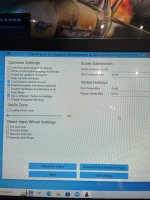
The joystick is being recognised when going to controller set up but regardless of what you press or do it says same thing on every bit in set up.

Ok so this is teknoparrot settings page

I’ve already tried selecting the direct input wheel settings but it made no difference
 

Attachments

  • image.jpg
    image.jpg
    113.7 KB · Views: 8

Bods

Senior Member
vacBacker
Feedback
3 (100%)
Credits
4,697CR
That's 2 of us pissed off now, A the flippin crap weather and B I just carried me ladders round to where my controllers are from these machines and caught my knee on a tube neck and broke it :(
 

athena

User
vacBacker
Feedback
2 (100%)
Credits
125CR
If its being recognised that a massive plus , See if someone with teknoparrot knows how to connect it !

Dave.
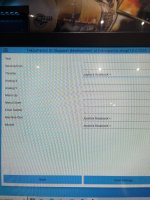
Well it is sort of recognised. If I go to controller set up on main launch screen and press mouse on for example
Fire missile and press missile button it says joystick rotation x
If I press different button on gun also says same thing but press different button etc
 

Attachments

  • image.jpg
    image.jpg
    103.7 KB · Views: 7

athena

User
vacBacker
Feedback
2 (100%)
Credits
125CR
That's 2 of us pissed off now, A the flippin crap weather and B I just carried me ladders round to where my controllers are from these machines and caught my knee on a tube neck and broke it :(
Mate sorry to hear your having a bloody steaming pile of turd day too.
Yes weather has been frickin awful and I’ve broken a tube neck in past so definitely feeling that pain. 🥹
 
Top